A Galaxy Ring won't charge without power to its matching case and clean, aligned contacts. Plug the case into USB-C power, align the ring with the holder's marker, and watch for an increase in its battery percentage.
A dead case and a ring that isn't seated correctly can look alike. A ring that charges but won't update its reading in Galaxy Wearable needs a phone connection check once you've checked the charging hardware.
In this guide
1. Power the original case before blaming the ring
Use the charging case supplied with your Galaxy Ring. The case fits its ring; another ring's case isn't a reliable substitute simply because the ring can be placed over its holder.
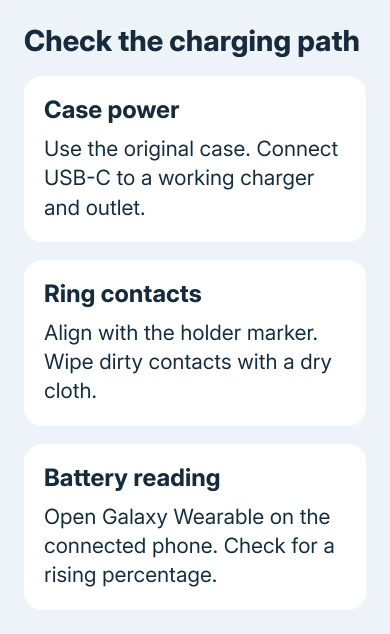
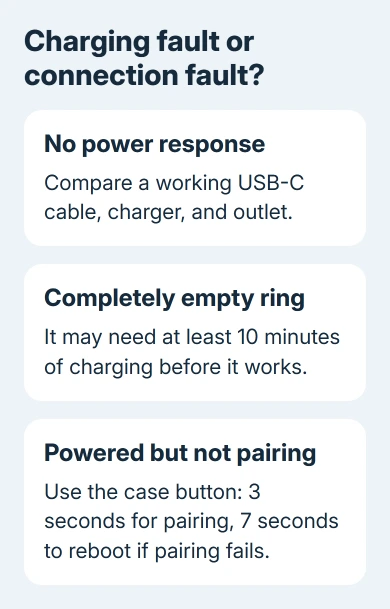
Connect the USB-C cable to the case and a suitable charger, then plug the charger into a working outlet. Open the case and check for a response. If it stays dark, try a known-working cable, charger, and outlet in turn.
The case contains its own battery, so it can charge the ring when unplugged only while it has enough stored power. A case that charged the ring yesterday may now need recharging itself.
Samsung recommends checking the original case, working power, and clean contacts in its charging-fault instructions. Start there before changing phone settings or resetting the wearable.
If the case responds with one cable but not another, continue with the working cable and watch the ring's percentage. If the case never responds to working power equipment, report a case-power failure when requesting service.
I'd use wired power for this first comparison. That lets you check charging without also having to get the wireless-pad position or the phone's power sharing right.
2. Align the ring and clean its charging contacts
Open the case and place the ring on its holder. Align it with the marker on the holder so the charging contacts meet. Close the case and allow it to charge, rather than leaving the ring loosely resting in the opening.
Remove the ring and look for visible debris on the contact surfaces. Wipe the ring's charging contacts and the case's contacts with a dry cloth, then reseat it and try again.
Don't scrape the contacts with metal or force the ring onto a holder that doesn't fit. Have bent or damaged contacts checked for repair instead of pressing harder.
Check the ring's battery in Galaxy Wearable on the connected phone. Look near the screen's top for the percentage. Note the reading, leave it charging, then check again.
If the percentage rises, the ring is receiving charge. The case lighting up doesn't confirm that the ring reached your expected charge.
If repositioning or wiping the contacts starts charging, keep using that arrangement and check the next charge as well. If the result changes whenever the ring shifts, tell support that charging stops or starts when the ring moves.
3. Give a completely drained ring time to respond
A completely drained ring may need at least 10 minutes on charge before it can be used. Leave it correctly seated in the powered case for that period rather than interrupting it to keep trying Bluetooth pairing.
The published charging time is about 90 minutes, but actual time varies with the ring's condition, use, and surroundings. Ten minutes is a starting wait for an empty ring, not a promise of a complete charge.
When the ring and case charge together, the ring charges first. The case starts charging after the ring is full. If the case battery doesn't start filling while the ring charges, that can be normal.
Check whether the ring's percentage is rising. If it rises but the case battery seems slow, let the ring finish before judging the case's ability to recharge itself.
If the ring still won't respond after a sustained charge with working equipment, try the alternate power path next. Keep it seated and powered for this check; repeated short connections won't tell you whether its empty battery can recover.
4. Check wireless charging through the case
Wireless charging still requires the Galaxy Ring case. Put the ring inside, align it with the holder marker, and close the lid. Place the closed case in the center of a compatible wireless charger.
The Galaxy Ring charging methods include USB-C, a wireless charger, and Wireless PowerShare. They all supply power through the case; the loose ring doesn't go directly onto a charging pad.
For Wireless PowerShare, put the ring in its case and place that case on the back of a compatible Galaxy device with power sharing enabled. Follow that phone's charging-position guidance if it doesn't detect the case.
If USB-C works but the wireless pad doesn't, keep using the working wired method while checking pad compatibility and placement. If wired charging works, focus on the wireless setup rather than treating the ring battery as completely dead.
If neither wired nor wireless power produces a response from the case, tell support you've tried both when requesting service. Buying another wireless pad won't address a case that also fails on a verified wired connection.
5. Reboot only when the powered ring won't reconnect
A ring with battery power can still fail to connect to your phone, even when its charging equipment works. Use the restart procedure after the physical charging checks when Galaxy Wearable can't reconnect or refresh its reading.
Place the ring in the case. Hold the case's Multipurpose button for three seconds to start pairing. If the ring doesn't enter pairing mode, hold the button for seven seconds to reboot it.
After the reboot, hold the button for three seconds again to re-enter pairing, then reconnect through Galaxy Wearable. Reopen the app and check whether it now shows a current battery reading.
A reboot is different from choosing Reset in the app. Don't erase the ring just to repeat the charging check. This step is for getting it connected again.
The Oura Ring battery checks apply to another brand's hardware and software. Don't borrow its reset sequence or charger for a Galaxy Ring, even when the symptoms sound similar.
When the case or ring needs service
Use the charging-fault page to request a Galaxy Ring and charging-case assessment from Samsung Support. Give the ring size, case response, charging method, starting percentage, and cable or charger comparisons.
Keep the ring and its matching case together for the assessment. That lets the service team check the connection between them rather than checking the ring or case on its own.
For a separate Galaxy tablet charging problem, use the Galaxy Tab charging checks. A tablet's battery-protection setting isn't a repair for the ring's charging contacts.
The Short Version
Power the matching case, align the ring, and wipe dirty contacts with a dry cloth. An empty ring may need at least 10 minutes to respond. Compare wired and wireless charging before requesting service for continued failure.
Checked November 12, 2026.
 If you have any business, I can build it online