An Outlook error 0x80070057 during an address-book download can need a change on the Exchange server rather than a repair to your inbox. The same code while sending from Gmail or Yahoo can belong to a separate sign-in problem.
Check the failed task before changing anything.
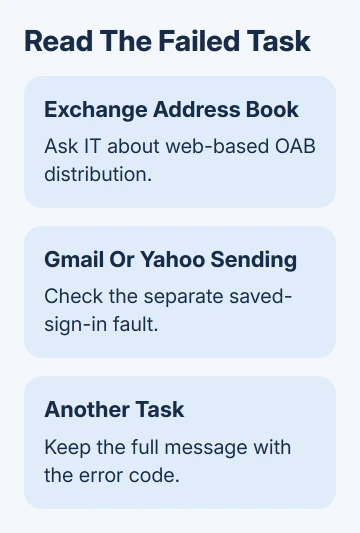
For an Exchange address book, the key question is whether Outlook can download it over the web. For Gmail or Yahoo, check whether sending stopped after a password change and Outlook never asked you to sign in again.
In this guide
1. Read the failed task in classic Outlook
Open the error details in Send/Receive Progress and note the account, task and complete message. Keep 0x80070057 with that information. Support needs the failed task as well as the code to tell what went wrong.
These address-book instructions apply to classic Outlook for Windows. That app has the File tab and Send/Receive ribbon. New Outlook doesn't offer classic Outlook's Cached Exchange Mode, so use its own account controls.
An Offline Address Book, often shortened to OAB, is a downloaded copy of your organization's directory. It helps classic Outlook look up work contacts when the server isn't available. It isn't the file containing all your email.
If the failed operation is an Exchange address-book download, use section 2. If it says Sending for Gmail or Yahoo, go to section 5. Other send/receive failures belong with the task and code checks.
I'd make this distinction before deleting a profile. Adding the account again won't change how the server sends out the address book.
2. Try the address-book download directly
Select your Exchange mailbox in classic Outlook. On the ribbon, open Send/Receive > Send/Receive Groups > Download Address Book, then select OK. Check whether the download finishes or shows the same error.
If the account is disconnected or Outlook shows Working Offline, restore the connection first. A download needs access to Exchange; an offline directory already on the PC can't fetch fresh entries by itself.
Open Address Book and check a contact change you actually expect to see. If the download finishes and the expected entry appears, leave the account settings alone.
Compare the same directory entry in Outlook on the web if your organization provides it. A missing entry there points to the organization's directory data. Downloading a fresh copy can't add an entry that hasn't reached the directory yet.
Microsoft says its Offline Address Book troubleshooting procedure covers directory entries, download access and account settings. If the online entry is correct but the download fails, take the exact result to IT.
3. Ask IT to check web-based address-book distribution
For the documented 0x80070057 address-book fault, Exchange is offering the OAB through Public Folder distribution only. Outlook 2013 and later don't support downloading it that way. They need web-based distribution.
This is a server setting. Ask the Exchange administrator to check that your mailbox's Offline Address Book is available through web-based distribution and that Autodiscover is configured correctly for the organization.
Autodiscover supplies Outlook with the server settings it needs, including the address-book location. Mail can reach your inbox even when Outlook doesn't have a working address for downloading the address book.
The specific 0x80070057 resolution also notes that Outlook 2013 and later support OAB version 4. Include that requirement when an older Exchange setup is involved.
The original fault description covers those older Outlook releases. Don't copy an old server command and assume it fits your current Exchange setup.
Let the administrator use the procedure for the Exchange version they manage.
After the administrator corrects distribution, run the manual address-book download again. Check that the download finishes and the directory entries are up to date.
Restarting Outlook without repeating that operation doesn't check the original failure.
4. Check whether the fault affects one PC or the organization
Ask whether colleagues using the same organization's directory can download their OAB. If several people have the same problem, IT should check shared distribution and Autodiscover before rebuilding individual profiles.
If colleagues succeed and only your PC fails, tell IT that too. They can compare the OAB address returned to your profile, network access and the mailbox's assigned address book without assuming the whole server is down.
For Microsoft 365 environments, the support procedure includes checking the directory online, account configuration, Autodiscover and access to the OAB.
An administrator should follow that environment's procedure rather than enabling legacy Public Folder distribution.
Keep your current profile and local mail while IT checks the server side. Removing a profile or deleting data files adds work and doesn't change the distribution method offered by Exchange.
If IT recommends a fresh profile, ask which account and data files it needs to include. POP mail or personal archives may exist only on the computer, so preserve those files before changing the setup.
5. Use the separate Gmail or Yahoo sign-in repair
A Sending failure with Gmail or Yahoo can show 0x80070057 alongside synchronization errors such as 0x800CCC0E or 0x800CCC0F. That combination is different from an Exchange address-book download failure.
The known sign-in problem can follow a password change while Outlook stops asking for a fresh login. Check whether the same mailbox opens in a browser. If browser sign-in also fails, restore account access with the provider first.
If webmail works and classic Outlook has that exact pattern, use the Gmail and Yahoo saved-sign-in repair. It covers the relevant Credential Manager entries and the later method when the first repair doesn't last.
The vendor's current notice says the original service fault was fixed on March 20, 2026, but symptoms can remain after a password change. The old sign-in token, which keeps Outlook signed in, usually expires an hour after the change.
If neither case matches, send your mail administrator or Microsoft Support the complete task message, Outlook version, account type and comparison results.
Ask them to check the task that failed. An Exchange address-book fix won't address a personal account's sign-in problem.
The Short Version
For an Exchange OAB download, retry the download and have IT check web-based distribution and Autodiscover. For Gmail or Yahoo sending failures, follow the separate sign-in repair.
Keep the task text with 0x80070057 so the two faults don't get mixed together.
Checked November 12, 2026.