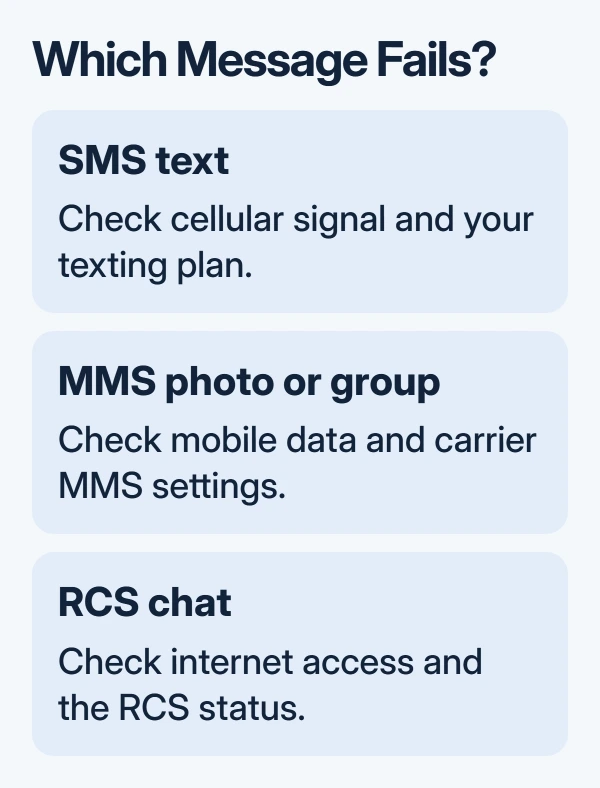
The fix for an Android message that won't send depends on whether it's a text, photo, or RCS chat. Check cellular signal and your plan for SMS, cellular data for MMS, and the RCS connection status for internet chats.
A message stuck in one conversation doesn't mean the whole phone has lost texting. Start with one short message to another person, then follow the section that matches the failure.
In this guide
1. Check which kind of message is stuck
Open Google Messages and look at the compose bar and Send control. The app identifies whether it will use SMS, MMS, or Wi-Fi/cellular data. RCS uses an internet connection for chat features.
Try a second recipient with a few words and no attachment. If that works, your phone can send at least that type of message. Keep the failed conversation open for the contact, picture, or RCS checks that follow.
Use the messaging app on the phone for this check. A computer that has disconnected from Messages for web is a separate problem. If the phone sends normally, don't change its carrier settings to repair the computer session.
Before retrying a stuck message, check whether it has now sent. Repeatedly tapping Send can leave the other person with several copies once the connection returns. A delivery receipt and a reply are different things, too.
2. Restore ordinary texting before changing RCS
Turn off Airplane mode, check that the phone has cellular signal, and restart it. Then send the same short SMS again. Wi-Fi working in Chrome doesn't tell you whether your mobile line can send an ordinary text.
Check your carrier account for an active line, available credit, and any texting restriction. Google includes signal and plan balance in its message troubleshooting steps.
For a physical SIM, check that it's seated correctly if the phone reports a missing SIM. A phone using an eSIM has no card to reseat. Leave the eSIM installed during these checks; getting that line back can require the carrier.
For Google Messages, check that it's your default texting app. On a Pixel, open Settings > Apps > Default apps > SMS app. On Galaxy phones, look under Settings > Apps > Choose default apps > SMS app.
Choose Messages, then try again from that app. Installing two messaging apps doesn't make both your default for texts. If every SMS still fails with a working line, keep the exact error for the carrier instead of resetting other apps.
3. Give picture and group messages a data connection
An SMS can work while a photo sent as MMS fails. Turn on cellular data and try one small photo to one person. A small photo to one person makes this easier to check than a large video sent to a group.
When MMS alone keeps failing, reset the access point settings to the carrier defaults. APNs contain the carrier's connection details for internet access and picture messages. Don't copy settings intended for a different network.
On Galaxy, look under Settings > Connections > Mobile networks > Access Point Names, then Reset to default in its menu. Other phones put APNs inside the SIM under Network & internet. Carrier restrictions can hide this control.
For scattered group replies, open Google Messages > profile picture > Messages settings > Advanced > Group messaging. Choose Send an MMS reply to all recipients (group MMS) to keep replies in the group thread.
That setting changes how group replies are sent; it doesn't repair a failed data connection. If a single photo still won't leave, ask your carrier to check MMS service and the APN for your exact line and phone model.
4. Check RCS status and choose a resend method
Open Google Messages > profile picture > Messages settings > RCS chats. Connected means RCS is available. Connecting shows that number verification is in progress. A carrier-disabled message needs the carrier's help.
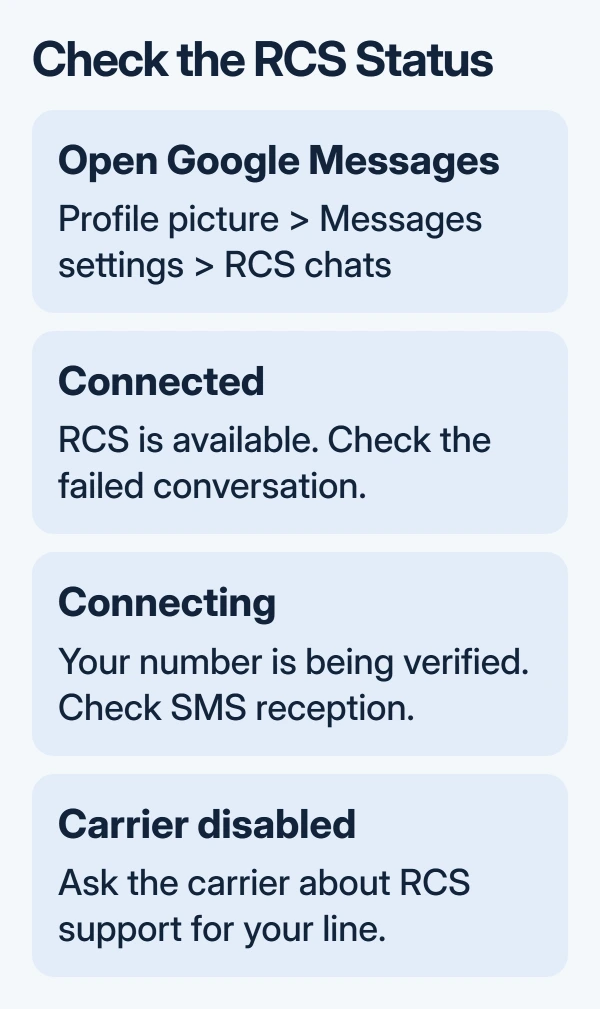
Check that the phone has internet access and can receive SMS, since RCS setup needs both. Update Google Messages through the Play Store. If available, update Google Play services too, as the RCS troubleshooting instructions recommend.
For a chat that won't send, check RCS chats > Resend messages and choose an available fallback that suits the message. Older versions call this area Chat features. An SMS or MMS fallback uses your carrier's messaging service.
I'd use that fallback for an urgent message before spending time on RCS setup. The message going through as SMS tells you ordinary texting works, while the internet chat still needs attention.
Don't repeatedly switch RCS off and on. That may drop your membership in existing groups. For Trouble connecting. Awaiting retry lasting over 30 minutes, use Details > Submit feedback from the status screen.
Read receipts aren't a sending repair. If a conversation sends but no longer shows whether it was read, check the separate Android read receipt setting rather than changing your SIM.
5. Repair a single contact or a business reply
Check the failed recipient's full number and add its international dialing prefix if required. Start a new message addressed to that number. If only the saved contact fails, correct or recreate that contact after saving its details.
Check that the person isn't blocked. When the failure involves a recent iPhone switch, the number's iMessage registration also matters, especially for incoming replies. An iPhone failing to text Android needs its own sender-side checks.
For Can't reply to this short code, check the business's contact instructions. Some short codes only send messages; sender names containing letters can't receive replies in Messages. Use the business's website or phone number instead.
For a paid short code, review Settings > Apps > Special app access > Premium SMS for the sending app. Allowing premium messages can add charges. It won't make an outbound-only sender accept replies.
6. Send the right details to the carrier or app team
If all SMS or MMS messages fail, ask your carrier to check outgoing messaging, line restrictions, and MMS setup on your line. Include your phone model, Android version, exact error, and whether calls, cellular data, and plain SMS work.
If ordinary texts work but RCS stays disconnected, use Messages > profile picture > Help & feedback > Send feedback, or the status screen's feedback route. Include the RCS status and how many conversations fail.
The Short Version
Match the failure to SMS, MMS, or RCS. Check cellular service for texts, cellular data and carrier settings for photos, and RCS status for internet chats. A single failed recipient needs a number or contact check before a phone-wide reset.
Checked November 13, 2026.