Google Account searches can be cleared in the Google app: tap your profile picture, open Search history, then use Delete to choose what to remove. Clearing Chrome's browsing history alone doesn't remove those account searches.
Check where the old search appears: Google account activity, Chrome's visited pages or signed-out searches saved on the phone. Start with the account shown in the Google app so you don't delete the wrong person's history.
In this guide
Open Search history for the intended account
Open the Google app on your Android phone. At the top right, tap your profile's picture or initial and check the email address. Switch accounts there if the searches belong to another account you use.
Tap Search history. Look for the searches and dates you want to remove before selecting a deletion period. This page shows saved search activity, rather than every file or web page on your phone.
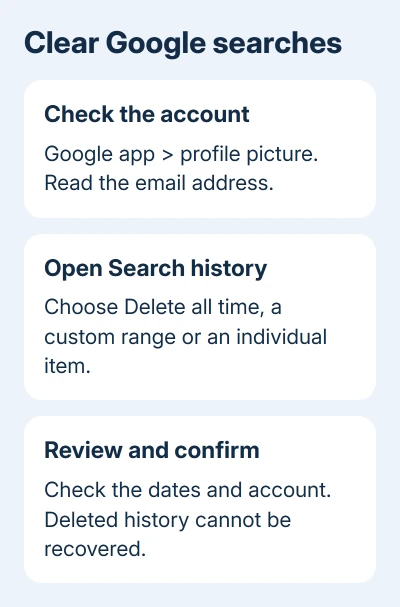
Google's search-history instructions currently warn that Search privacy settings are being updated. Some accounts may see different labels during that change.
If the screen looks different, stay with the Search history or activity controls for the account displayed. Don't use Android's Clear storage button for the Google app as a substitute for deleting activity from the account.
For a phone with several accounts, checking the address matters more than how many times you press Delete. A personal search won't disappear because you've emptied a work account's activity list.
Choose one search, a date range or all time
For the whole saved search history, open Delete on the Search history page and choose Delete all time. Read the confirmation and complete it. Deleted history can't be recovered, so choose a narrower range if needed.
For a period, choose Delete custom range and set the dates. For one day's activity, use the delete control beside that day. For a single search, use the delete control beside that activity item.
After confirming, look at the same date or search again. Items outside the selected dates can remain. If yesterday's searches are gone but last month's remain, check the range before assuming the deletion didn't work.
I'd remove a specific search or short date range when that's all you need. It keeps useful older activity available and makes the result easier to check than deleting everything without reviewing the selection.
For one recent search visible in the Google search bar, touch and hold that query, then tap Delete. When that query is saved to your account, removing it this way also removes it from My Activity.
Use that method for a few suggestions you recognize as past searches. It doesn't mean every phrase suggested by the search bar is a record of something you personally searched.
Stop new searches being saved, if that's the aim
Deleting existing searches doesn't automatically stop new activity from being saved. To change future saving, return to Google app > profile picture > Search history > Controls and review Web & App Activity.
Choose Turn off. The screen can offer Turn off or Turn off and delete activity. Choose Turn off and delete activity only if you also want to delete existing activity. Turning saving off alone leaves your past activity in place.
Read the account and setting named on that screen before confirming. These controls affect the selected account, so the change can also apply on its other signed-in devices.
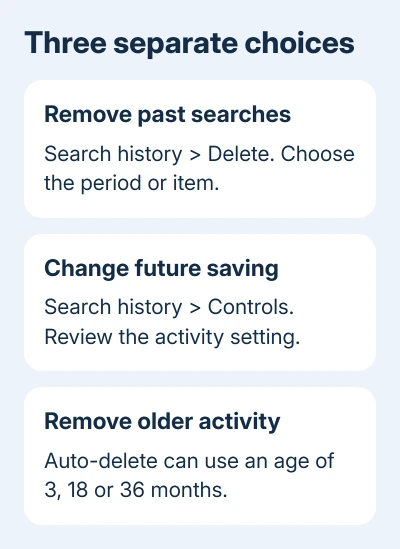
If you'd rather keep recent activity and have older entries removed, open the Auto-delete setting on the Web & App Activity card. Choose activity older than 3, 18 or 36 months, then follow Next and the confirmation.
Auto-delete removes activity once it's old enough. It won't make today's searches disappear immediately. Use manual deletion for a search you want removed now, even when automatic deletion is already enabled.
Because labels are changing for some accounts, read the current description of the history control. If the Google app is old and its menus look very different, update it through Google Play before looking for the setting again.
Clear visited pages separately when needed
An old Google results page can also be recorded as a browser visit. Removing its account search activity doesn't necessarily remove that page from Chrome's History list, so check where you're still seeing it.
In Chrome, use the three-dot menu and open Delete browsing data. Review the time range and use More options to select Browsing history while leaving categories you want to keep unselected.
The Android browser-history guide gives the full Chrome, Samsung Browser and Firefox steps. Each browser has its own history controls; deleting Google search activity handles a different history list.
Cookies and saved passwords are separate again. A visible past search doesn't require removing a password. If you also want website sessions cleared, the Android cookie controls show how to clear those sessions.
Google app visits can also be saved in Chrome's browsing history. That explains why an address may remain in the browser after the related account search has been deleted successfully.
Handle signed-out searches and suggestions that remain
The Google app can save search history on the phone while you're signed out. Open its search bar, touch and hold an unwanted recent query, and use Delete. Check whether the app is signed in before judging the account history page.
To change search customization while signed out, open Google app > profile picture or initial > Settings > Privacy & Safety. Look for Search customization and turn it off if you don't want that local customization.
The current help page also describes a Search personalization > Personalize Search control for lingering suggestions. Use the wording present in your app; these labels are also changing with the settings update.
A second device that's offline can still show activity deleted elsewhere. Connect it to the internet and check again. Repeating deletion on the first phone won't make an offline device receive the change sooner.
If account activity remains after the device reconnects, check the email address and deletion range again. Then use Help & feedback in the Google app and report the account-history screen, app version and dates that remain.
The Short Version
Use the Google app's Search history to delete account searches. Review Controls separately for future saving or automatic deletion. Browser visits and signed-out suggestions need their own controls, and offline devices need to reconnect.
Checked November 13, 2026.