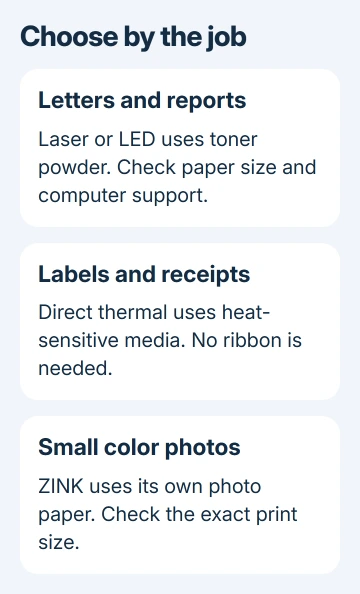
Yes, printers that don't use liquid ink exist. Choose a laser printer with toner powder for ordinary documents, or direct thermal for labels printed on heat-sensitive paper.
Small ZINK photo printers use their own color-forming paper. These machines do different jobs, so choose by what you need to print.
In this guide
For normal documents, start with laser or LED
A laser printer is a practical choice for letters, homework, or office pages when you don't want liquid-ink cartridges. Its cartridge contains toner powder, which the printer transfers and fixes onto the page.
LED printers use a different light source to form the image, but they also use toner. Seeing LED on a product page doesn't mean it needs liquid ink. Check the supplies list, since the word cartridge alone doesn't tell you what's inside.
A monochrome model prints in black and white. Choose a color model if colored charts or other color documents matter. That decision also changes the supplies you'll need to replace, so make it before comparing individual printers.
Brother's inkjet and laser comparison confirms the central difference: toner powder versus liquid ink. An ink tank changes how ink is supplied, not whether the printer uses ink.
Check the replacement supplies, not just the sales label
Find Print technology and Replacement supplies in the model's specifications. A laser or LED document printer lists toner. Ink bottles or cartridges identify an inkjet, even when the listing emphasizes cartridge-free printing.
A cartridge-free tank printer still needs ink refills. It isn't the answer when you specifically want to avoid liquid ink. It may suit someone who only wants to stop buying small cartridges, which is a different goal.
Many laser printers also have a drum, the part that carries the image before it reaches the paper. Some models combine it with the toner cartridge; others list a separate replacement. Read the model's supply guide before budgeting.
I'd check toner and drum part numbers before paying for the printer. A low purchase price is less useful if the replacement supplies are expensive or hard to find where you live.
If the current printer is simply reporting empty supplies, check its ink or toner level before replacing the whole machine. The computer's general printer list may not show that information.
For shipping labels, choose direct thermal
A direct thermal printer heats specially treated labels or paper to form the image. It doesn't need a separate ink cartridge, toner cartridge, or ribbon. The coating that forms the image is already on the labels or paper you buy.
That makes it useful for jobs such as shipping labels and receipts when the printer supports the required size. It doesn't mean a small label printer can accept Letter paper or print a full-color school report.
Match three things before buying: the label size, the printer's supported media, and the software that creates the label. A marketplace's downloadable label still needs to fit the printable area of the chosen machine.
Direct thermal images can fade, and the media is sensitive to heat, light, and abrasion. For records or labels you need to keep for a long time, choose a printing method that will stay readable for that storage period.
Zebra's thermal printing explanation separates direct thermal from thermal transfer. The shared word thermal doesn't make their supply requirements identical.
Don't confuse thermal transfer with supply-free printing
Thermal transfer printers use a heated head to move material from a ribbon onto the label. They don't use an inkjet cartridge, but you still need replacement ribbons that match the printer and label material.
This method can make labels that last longer. It can also print on a wider range of materials than direct thermal printing. The right choice depends on what the label must survive, rather than whether the printer is advertised as inkless.
Some printers support multiple print methods. Match the driver setting to the loaded supplies. A direct thermal roll with a thermal transfer setting can trigger a ribbon error instead of producing the label.
Ask the seller which method a listing uses and whether a ribbon is required. A clear answer should name the method and supported supplies. A no-ink claim doesn't tell you enough to choose until you have those details.
For small color photos, look at the paper system
ZINK printing forms color images on its own paper, without a separate ink cartridge. The color-forming materials are inside that paper. Putting photo paper in an ordinary printer won't turn it into a ZINK machine.
A small photo printer can be convenient for snapshots, but check the exact print size and supported paper pack. For large pages, scanning, or stacks of reports, look for a document printer with those features instead.
Not every compact photo printer uses the same method. Read the model's manual and its supplies list rather than assuming every pocket-sized photo printer is ZINK. The required paper should be named for that exact model.
Compare the cost of the supported pack with the number of prints it provides. The absence of a cartridge doesn't make printing free. With these printers, much of what you keep spending goes toward the required paper.
Confirm that the printer works with your laptop
Check the manufacturer's supported operating systems before ordering. A model made for phone photos may rely on its mobile app instead of letting you print from Windows or Mac the way you expect.
For document printing, decide whether USB, Wi-Fi, or Ethernet fits your setup. Then check that the exact model offers it. Wireless support on a product page doesn't automatically mean every laptop and app can print to it the same way.
After installation, print a simple first page before sending a large job. The Windows printer connection checks cover Windows discovery problems.
If the supplies description is unclear, ask the maker for the replacement-supplies page and supported paper sizes for the exact model. Those two lists tell you whether it avoids liquid ink and can print the pages you need.
The Short Version
Use toner for documents, direct thermal for labels or receipts, and ZINK for compatible small photos. Check supplies and paper sizes before buying. An ink tank still uses liquid ink; thermal transfer needs ribbon.
Checked November 16, 2026.