Excel 2010's Format Painter can fail when an old browser add-on interrupts the clipboard. Close your browsers and try again. In this fault, the copied selection vanishes and Paste Special offers only Text and Unicode Text.
A brush that stops after applying formatting once is normal. Canceling before you select the destination isn't. Disabling Skype's Click to Call add-ons fixed the older browser conflict.
In this guide
1. Close browsers before trying Format Painter again
Save your workbook and any work in browser tabs, then close the browsers. Return to Excel, select a cell with obvious formatting, and click Home > Format Painter. Click a destination cell and check whether its appearance changes.
Use two spare cells in a blank workbook for this check. Give the source a bright fill or bold text to make it obvious whether formatting reached the destination. Keep your real data out of the comparison.
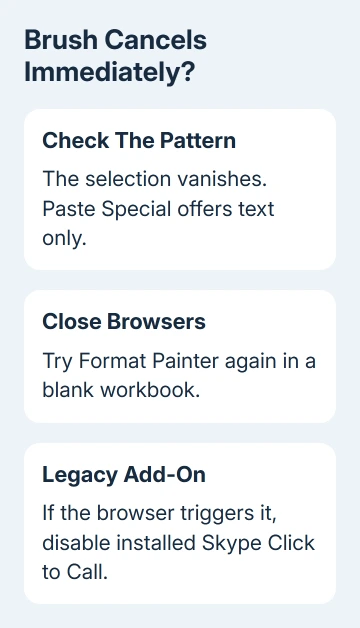
If the brush stays active and the formatting copies, reopen your browser and repeat the check. A failure that returns with the browser points toward its add-ons or another program affecting the clipboard, rather than a damaged sheet.
One owner in the original Format Painter discussion confirmed that exiting Skype and disabling its browser add-ins restored normal copying and formatting, even with Internet Explorer open.
It kept working after they restarted Skype and re-enabled the add-ins, though they hadn't tried a reboot or fresh browser session. Check the add-on again if the fault returns.
If closing browsers changes nothing, continue with the ordinary brush check and Excel Safe Mode. Repeated clicks on Format Painter won't repair a clipboard that another program keeps replacing.
2. Disable the legacy Click to Call add-on
Check for Skype Click to Call on the older Windows computer first. Don't install Skype or add an old extension to a modern browser to try this fix.
In Internet Explorer, open Tools > Manage add-ons. Look under Toolbars and Extensions for Skype or Click to Call entries. Select the matching add-on, choose Disable, and close and reopen the browser before checking Excel again.
Check which browser and version you're using. The 2012 discussion concerned browser add-ons installed alongside Skype, not Excel's own COM Add-ins list. Disabling an unrelated Excel extension doesn't remove that browser component.
Open Control Panel, then Programs > Programs and Features. If Skype Click to Call is listed, select it and choose Uninstall. Have IT remove a company-managed component.
The accepted reply said a newer Click to Call release addressed the fault. That was an update offered in April 2012. Don't use its old download address as a recommendation for software to install today.
After disabling the component, try Format Painter with the browser open, then after reopening Excel. Check that the brush stays active until you click the destination cell, rather than just watching the ribbon button light up briefly.
3. Tell normal brush behavior from a clipboard failure
Select the source cell first, then click Format Painter once and select the destination. A single click lets you apply the formatting once. The brush then switches off normally.
For several separate destinations, double-click Format Painter, apply it to each selection, and press Esc when finished. Don't press Esc between destinations; that ends the operation you wanted to keep using.
A Word brush that works once but will not stay active has a separate double-click timing fix, plus a toolbar workaround.
The Format Painter instructions describe the single-use and double-click behavior. Format Painter copies how a cell looks, so check its font or fill color. It won't replace the value in the destination cell.
Try Ctrl+C on a cell too. In this fault, its moving selection disappeared almost at once and Excel lost its normal paste choices. That points toward the conflict more than a brush stopping after one successful use.
Typing into a cell or pressing Esc after copying can end Excel's copy operation for a different reason. The Excel copied-cell selection guide covers that ordinary cancellation pattern.
Try the same check in a blank workbook if only one file fails. If the blank file works, check the affected workbook's restrictions and customizations before making changes to Office itself.
4. Check Excel's add-ins when the browser isn't responsible
Save and close Excel. Use Windows + R to open Run. Enter excel /safe and select OK. Look for Safe Mode in the title bar, then repeat the two-cell formatting check.
If the brush works there, close that session and start Excel normally. Open File > Options > Add-ins. Beside Manage, choose COM Add-ins and click Go. Note the checked entries before disabling them.
Restart Excel normally and try the brush again. Restore each add-in separately, restarting Excel between checks. If enabling a particular entry causes the failure, leave it disabled and ask that add-in's provider for a compatible update.
Use Excel Add-ins in the Manage list as a separate check if necessary. An Excel extension and a browser extension load in different programs, so keep a note of which one you changed.
Safe Mode doesn't close another program that uses the clipboard. If the problem remains there, return to the programs running alongside Excel rather than assuming an add-in is broken. A dedicated clipboard warning also has its own checks.
5. Repair the installation after the app checks
If the failure remains in a blank workbook with browsers closed, open Control Panel, open Programs, then Programs and Features. Select Microsoft Office 2010, choose Change, select Repair, and complete the prompts.
Save and close the other Office apps first. When the repair finishes, restart if asked, reopen Excel and repeat the same two-cell check. Keep that workbook for each comparison so changes in its contents don't confuse the result.
I'd check the browser component before repairing Office. What worked for the original owner points to a conflict with another program, and repairing Excel won't remove a browser add-on that starts interfering again.
Office 2010 support ended on October 13, 2020. If it remains unreliable, ask IT to move your workbooks and required add-ins to supported Office. Share the browser comparison and Safe Mode result.
An actual recalculation crash has a separate March 2017 update fix, rather than this clipboard repair.
The Short Version
Close browsers and try a blank workbook. Disable legacy Skype Click to Call if the browser triggers the fault. Double-click for repeated painting; check Excel add-ins and repair Office if the conflict checks don't help.
Checked November 16, 2026.
 If you have any business, I can build it online