NFL Fantasy keeps sending you back to its sign-in page in Edge because a privacy setting gets in the way. Tracking prevention or the third-party cookie block stops part of the login, so the league page starts to load, then signs you out.
Owners got in by dropping tracking prevention to Basic, and an exception for nfl.com does the same job on that one site while the rest of the web stays protected.
If the loop survives that, turn off the third-party cookie block. That's the fix the owner who first reported the loop settled on.
In this guide
Why the login loops
Signing in to fantasy.nfl.com takes more than one page. The login sets cookies (small files that keep you signed in), often with help from other addresses, and the league page reads them to know it's you.
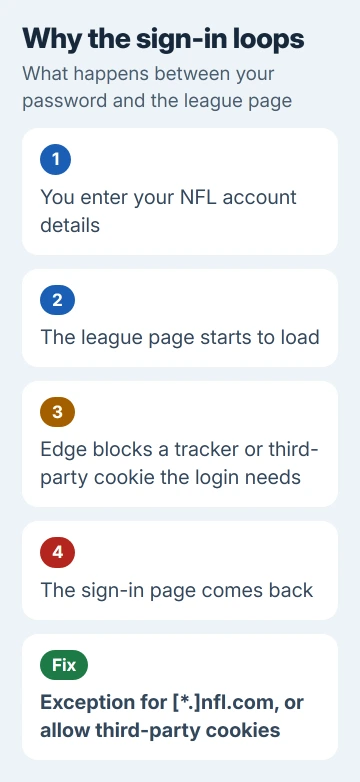
When Edge treats one of those pieces as a tracker, or refuses a cookie set from another address, the league page can't tell you've signed in, and back you go to the sign-in page.
Your password is fine, which is why the same account works on a phone or tablet.
1. Add nfl.com as a tracking prevention exception
- Open Settings and more (the three dots) > Settings > Privacy, search, and services.
- Make sure Tracking prevention is on, then select Exceptions.
- Select Add a site, type
[*.]nfl.comand select Add. The[*.]part covers fantasy.nfl.com and every other nfl.com address the sign-in passes through. - Close every Edge window, open Edge again and sign in. Edge on a Mac has the same page and the same steps.
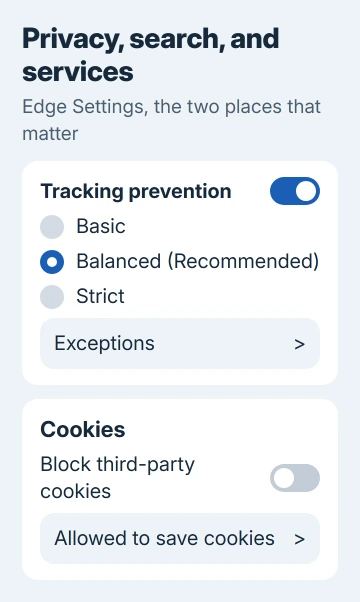
Microsoft's tracking prevention page warns that Strict can stop sites behaving as expected, including leaving you unable to sign in. Balanced is the recommended level, so if you'd moved up to Strict, that alone can explain the loop.
For a quick test, set the level to Basic and sign in. One owner could log in as soon as they switched from Balanced to Basic, and another said the same fix worked for them.
If Basic works, go back to Balanced and keep the exception instead, so other sites stay protected. One caution: an exception allows every tracker on that site, harmful ones included, so keep the list to sites you trust.
2. Let third-party cookies through
In November 2020 the loop came back for some owners after a Windows 10 update, and Basic no longer helped. The fix that worked then was turning off Edge's third-party cookie block.
- Go to Settings > Privacy, search, and services > Cookies.
- Turn off Block third-party cookies.
- Close Edge completely, reopen it and sign in to NFL Fantasy.
The owner who found this didn't like leaving the block off, and that's fair. While it's off, advertising cookies can follow you from site to site.
If you'd rather keep the block on all the time, add nfl.com under Allowed to save cookies on the same Cookies page, then test the sign-in. If the loop comes back with the block on, Fantasy needs the block off while you sign in.
3. Update Edge's tracker list
Edge decides what counts as a tracker from a list it downloads, and that list has caused this exact loop before. In September 2020 the Edge team pushed a Trust Protection Lists update to fix NFL sign-ins at Balanced.
Some owners still needed Basic after that update, so think of this as a quick check rather than the cure.
- Open edge://components.
- Find Trust Protection Lists and click Check for update.
- Then open Settings > About Microsoft Edge so Edge itself updates, and restart it.
The list normally updates by itself, so this often changes nothing. It takes a minute, though, and rules out an out-of-date list before you start deleting cookies.
4. Test an InPrivate window, then clear NFL cookies
Open an InPrivate window (Ctrl+Shift+N) and sign in there. It starts with none of your saved cookies, and extensions stay off there unless you've let them run in InPrivate.
A login that works there points at an extension or a leftover cookie in your normal window. I'd run this test before deleting anything, since one try shows whether cookies or an extension are behind it.
A half-finished login can leave a broken cookie behind that keeps the loop going even after the setting is fixed. To give the sign-in a clean start in your normal window:
- Go to Settings > Privacy, search, and services > Cookies.
- Open the full list of cookies and site data and search for nfl.com.
- Select the down arrow next to each NFL entry and choose Delete.
If an extension is behind it, start with ad blockers and script blockers. Switch them off at edge://extensions and sign in again after each one. Clearing everything instead? The guide to clearing cookies covers which sign-ins you'll lose.
5. Work PCs and school accounts
On a managed PC your IT team can set tracking prevention and cookie blocking for you. Those switches then appear grayed out with a note that your organization manages them, and only IT can add nfl.com as an exception.
Open edge://policy to see which policies are set. Anything mentioning tracking prevention or cookies is the setting to ask about.
When the loop won't stop
Sign in on your phone or tablet for now; one owner had no trouble on an iPad while Edge on Windows kept looping. Then press Alt+Shift+I on the sign-in page to send feedback from Edge, with a screenshot of the loop.
The same kind of loop shows up on other sites, and the WSJ sign-in loop in Chrome shows how it looks in Google's browser. If none of this helps, contact NFL Fantasy support with your browser version and the time it happened.
The Short Version
Add [*.]nfl.com under Tracking prevention > Exceptions in Edge's privacy settings, then restart Edge and sign in. Still looping? Turn off Block third-party cookies, delete nfl.com cookies and test InPrivate.
Checked November 19, 2026.
 If you have any business, I can build it online