Paint closing the instant you click the Text tool usually comes down to one font. Owners who fixed it found a nameless font heading the list in Settings > Personalization > Fonts, and uninstalling that font stopped the crash.
Reinstalling Paint doesn't help, because fonts belong to Windows rather than to Paint. Back up the font file before you remove it, in case another program needs it later.
In this guide
Is this the font crash?
The signs are very consistent, so compare them with what you're seeing:
- Paint closes as soon as you click the Text tool (the A button), before you can click the canvas to type anything.
- Every other tool works, on a new picture or an old one.
- Reinstalling Paint, running SFC (Windows' own file repair) or resetting the Store with WSReset made no difference.
If that's you, the font list is the place to look. The owners who solved it had tried the same reinstalls first, and only the font removal worked.
Reports began at the end of August 2023. One owner said the Text tool had worked three weeks earlier, and another found that an older PC, left without updates for a few months, still opened it fine.
That points to a change in Paint itself, which updates through the Microsoft Store rather than with Windows. It also explains why a font that had sat quietly on the PC for years suddenly mattered.
1. Find the font with no name
- Right-click the desktop and choose Personalize, or open Settings > Personalization, then select Fonts.
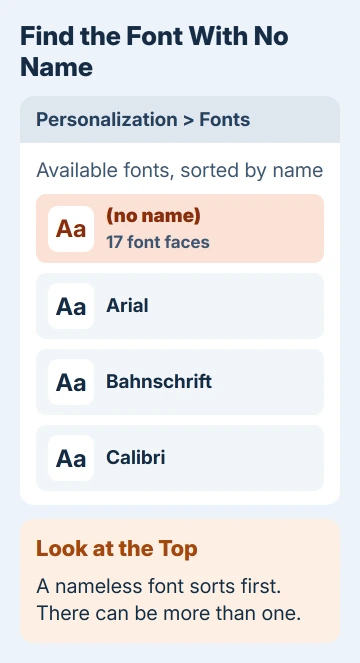
- Under Available fonts, the list is sorted by name, so a font without one sits first. It shows a preview and a count such as 17 font faces, and the line where the name belongs is blank.
- Check the first few entries, since there can be more than one.
Look in Settings rather than Control Panel. One owner went through all 191 fonts in Control Panel's Fonts folder and found a name on every one, yet the nameless font showed up straight away in Settings.
2. Back up the font file, then uninstall it
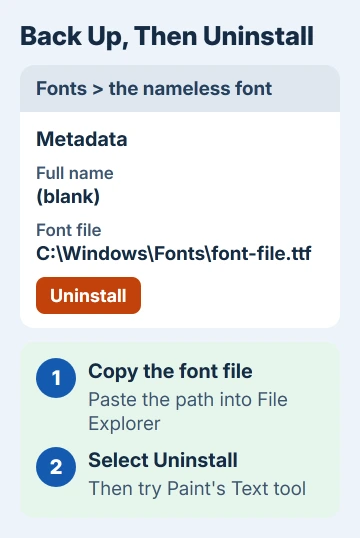
- Click the nameless font to open its page. Under Metadata you'll see its Full name and Font file, the path to the file on your drive.
- Open the folder from that path in File Explorer and copy the font file somewhere safe, such as Documents or a USB stick.
- Select Uninstall, just under the font file path (on older versions of Windows 11 it sits in the three-dot menu), and confirm.
- Open Paint again and click the Text tool.
For the owners who found a nameless font, that was the whole fix. "I backed up the suspect font files, uninstalled the font, and now MS Paint works!" was one owner's report, and several others posted the same result.
Microsoft's own page on managing fonts in Windows walks through the same Fonts settings, if you want the official version of these steps.
3. Work out which program brought the font
The nameless fonts in these reports were installed by other software. Two owners traced theirs to TurboTax, one of them to the 2017 edition, and another to an East Asian font pack that still worked in Office.
Removing the font costs less than it sounds. A document that used it opens with a stand-in font instead, and the app that added the font may ask for it again the next time it needs it.
That's when your backup helps. You can reinstall the file if the program complains, but Paint's Text tool will probably crash again while it's installed, so it's a trade-off.
One owner suggested converting an old font file to a newer format before putting it back, so the program keeps it and Paint stops crashing. No owner reported trying that, so treat it as an experiment.
If Windows refuses the backup when you reinstall it, our page on the not a valid font file message explains what's wrong with the file.
4. Still crashing? Update, repair or reset Paint
If you can't find a nameless font, or removing it didn't help, something else is crashing Paint. Update it first: open Microsoft Store > Library and select Get updates.
Then open Settings > Apps > Installed apps, find Paint, open its three-dot menu and choose Advanced options. Select Repair, test the Text tool, and use Reset if Repair didn't help.
Reset clears Paint's own settings but leaves your saved pictures alone. Owners who had no nameless font didn't post a fix, so if Reset fails too, your next step is a report to Microsoft.
When Paint still closes
Type reliability into Start and open View reliability history. Each Paint crash appears with the time and a faulting module, the file Windows blames, which is what support will want to see.
Send that to Microsoft through the Feedback Hub app or the Get Help app. Until it's sorted, you can still sketch and edit in Paint as long as you skip the Text tool, and our guide to drawing in Paint covers the rest of its tools.
The Short Version
Paint crashing on the Text tool is usually a font with no name. Open Settings > Personalization > Fonts, find the nameless entry at the top, copy its font file somewhere safe and select Uninstall.
If no nameless font shows up, update Paint, then Repair or Reset it under Advanced options.
Checked November 19, 2026.