
You double-click a font you downloaded and Windows says the file "is not a valid font file". Right-click and Install gives a second version, which says the file does not look like a valid font.
I would check two things first. Where does the file sit, and is the Windows Firewall service running? Both have stopped good fonts for owners.
Super User's accepted fix has drawn 171,021 views since August 2015. A Microsoft Q&A question that uses the installer's wording carries 90+ under Same question.
Two messages, one refusal
The first message comes from Windows Font Viewer, the window that opens on a double-click. The second comes from the Fonts folder installer.
Ours: this laptop's fontext.dll.mui holds the installer's lines. It accepts OTF, TTF, TTC, FON and PFM files, and nothing else. A web font such as WOFF or WOFF2 is not on that list.
The same file holds a rarer line. It reads "You do not have permission to install a font from this network". Then it adds "Copy the font file to your computer and install it from there".
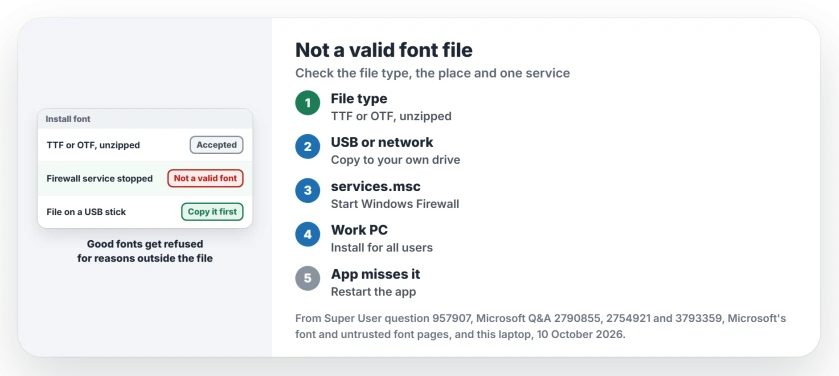
Status: Windows' own font messages on this laptop, Microsoft's font pages and owners on two forums, read side by side 10 October 2026. The firewall service fixed the most owners.
1. Make sure it is a font Windows can use
Microsoft says your file should be TrueType or OpenType, on its Manage fonts page. It also says "If the file is compressed into a .zip file, right-click it and select Extract to extract the files".
Install the file inside the folder you extracted, not the one still inside the zip. Our page on what a zip file is covers why a zipped file only looks open.
Fonts bought for phones can fail too. One Q&A asker bought a font from a phone theme store. The reply there was "The font may be coded for Android and can not be read by Windows".
An old Type 1 font comes as a PFB and a PFM file together. Windows says the PFB is "for a Type 1 font and cannot be installed directly" and wants the PFM instead.
2. Move a copy onto a local drive
A font on a USB stick or a substituted drive letter can fail without the permission message. One owner said removable media failed with no message at all, then "after copied the fonts to local disk, i can install it".
Another found a font kept in a Git folder failed, while a copy of the same file worked. Both files had matching hashes. Only the location differed. A third noted "you can't install a font that lives on a subst mapped drive".
So copy the font to your Desktop or Downloads folder, then right-click the copy and choose Install.
3. Start the Windows Firewall service
This is the accepted answer, and it surprised the people who tried it. It reads "The answer as weird as it sounds is to enable the windows firewall".
The asker came back with "I enabled Windows Firewall service and fonts are working perfectly again". Another owner wrote "Yep can confirm this works".
The service matters, not the switches. One owner on a locked work PC said "start the service of Windows Firewall solves the problem" without changing any firewall settings.
Press Windows and R, then type services.msc. Open Windows Defender Firewall, set Startup type to Automatic and press Start. If a third-party security app manages your firewall, check whether it stopped this service.
An error log one owner found names the link: "CreateAppContainerProfile failed with error 0x800706D9 because it was unable to register with the firewall".
Ours: certutil decodes that code on this laptop as "There are no more endpoints available from the endpoint mapper".
Ours: Windows Defender Firewall runs on this laptop with Startup type Automatic. If yours already does and the error stays, the fix lies elsewhere, as one owner with the firewall on found.
Our page on what a firewall does explains why I would leave that service running anyway.
4. On a work PC, ask for Install for all users
One Q&A owner managed a company rollout where standard users got the invalid message, while an admin account installed the same fonts fine.
In their words, "In our case it was caused by a Group Policy", the one called Untrusted Font Blocking.
Microsoft's untrusted fonts article says the setting helps stop any font being loaded that is "installed outside the %windir/Fonts% directory". A normal Install puts the font in your own profile, which is outside that folder.
Ours: the menu text on this laptop says Install "Installs selected fonts for the current user", and a second entry installs for all users.
Microsoft's page tells you the same: "To install for all users on a computer, select Install for all users". That copy lands in the Windows Fonts folder. It needs an admin password.
Ours: this laptop has no Untrusted Font Blocking policy set, and its per-user font folder is empty.
Installed, but your app does not show it
Microsoft warns you that "Not all apps support custom fonts". Close and reopen the app first. Many apps read the font list only when they start.
If your older program still misses it, install the font again with Install for all users. I would try that before converting the file with an online tool.
The Short Version
- Use a TTF or OTF file, unzipped.
- Copy the font to your own drive.
- Start the Windows Firewall service.
- Work PC? Ask for Install for all users.
- Installed but missing? Restart the app.
Where to Next
Was it the firewall service or where the file sat? Tell me in a comment, with the font's file type, and I will add any cause I have missed.

Isaac Smith is the founder and editor of PC Glance, a website that covers computers, laptops, and technology. He is a tech enthusiast and a computer geek who loves to share his insights and help his readers make smart choices when buying tech gadgets or laptops. He is always curious and updated about the latest tech trends.