Automatic page sorting can hide OneNote's subpage controls while ordinary pages still work. Set Sort pages to None, put the parent page first, and try Make Subpage. Changing the sort setting restored the feature for one owner.
A page also needs another page to sit under. If sorting is already off, check its position and the existing indentation before treating this as a sync problem.
In this guide
1. Change the affected section's sorting to None
Open the section where the option is missing, even if subpages work elsewhere in the notebook. In the original report, only some sections were affected, making it look as though the notebook was damaged.
Find Sort pages in the page list's top controls and select None instead of an alphabetical or date order. You can now put the pages in your own order.
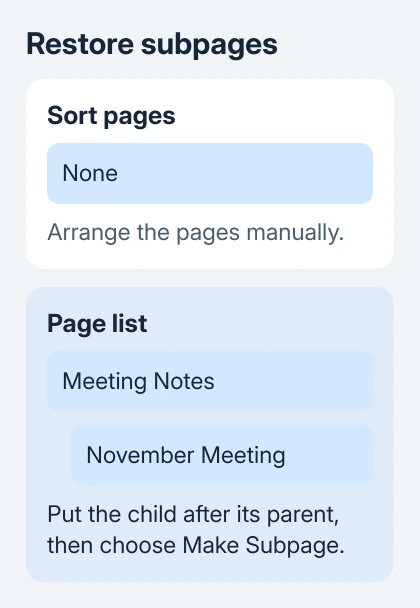
Click the page you want to turn into a subpage, then right-click its page tab. Check whether Make Subpage is available again. If it is, choose it; the title should shift inward under the preceding page.
One owner on Microsoft's forum restored subpages by changing Alphabetical to None. They arranged the pages, made the subpages, and then restored alphabetical sorting successfully.
I'd leave sorting at None while building the groups. It lets you see the parent and child pages together, instead of having an automatic order move the titles while you organize them.
If Make Subpage stays unavailable, keep sorting off for the next checks. A page still needs a parent to sit under, even with sorting off.
2. Put a parent page before the new subpage
A subpage is an existing page placed under a preceding page within that section. Start with two ordinary pages and decide which title should be the parent.
- Select the section where you want the group.
- Create or choose the main page, such as Meeting Notes.
- Create a second page, such as November Meeting.
- With sorting set to None, drag the second page immediately after the main page in the page list.
- Right-click the second page and choose Make Subpage.
The second title should sit farther inward than the first. Its notes stay on their own page. Make Subpage groups the page tabs; it doesn't combine their contents.
If you're trying to indent the first page in a section, make a main page before it. The page can't become a subpage until a parent page comes before it.
Try temporary pages with clear names before rearranging a large section. If they work, compare their order with the pages that won't indent. Check how those pages are arranged before looking for a problem with the whole account.
For the bigger structure of notebooks, sections, and pages, our OneNote organization guide explains how those levels fit together.
3. Drag the page tab instead of using the menu
The desktop app also supports making a subpage by dragging its page tab to the right until the title is indented. Move the tab in the page list, not the note container on the writing canvas.
Release it when the title sits inward under the intended parent. Then select the new subpage and check that the correct notes open. That way, you'll know you moved the right page, rather than a neighboring one.
Microsoft's subpage instructions describe this gesture for OneNote for Microsoft 365, OneNote 2024, OneNote 2021, and OneNote 2016.
The desktop app supports two levels of subpages. A page that's already at the deepest level can't move another level inward, so compare it with a new ordinary page before assuming the drag failed.
Use Promote Subpage in the page's context menu to bring it back toward the main-page level. Watch the indentation after each change so the page ends up under the right parent.
If both dragging and Make Subpage fail for fresh pages with sorting off, move to the version and scope checks. If neither method works, stop trying to drag that same title.
4. Expand the group before deciding pages disappeared
A successful subpage can be hidden when its parent is collapsed. Select the parent page and use its expand control to show the pages underneath it.
Look for the indented title to reappear in the page list. Don't create another copy of the note just because a collapsed group stopped showing its children.
After the group is arranged, automatic sorting is a choice. The owner who supplied the fix turned alphabetical sorting back on, but keep None if manual page order is how you want to navigate your notes.
Change one section first, then locate the grouped pages again. It's easier to check the result in one section than after rearranging the whole notebook.
Search failure has a different cause from a hidden group. If a known phrase won't appear in results even after the page is visible, use the OneNote search checks for that fault.
5. Compare a section that works
Repeat the two-page check in a different section of the same notebook. Keep the same sorting and page order so the comparison means something.
If one section works and another doesn't, record that difference. Note how many pages are involved and whether the section already contains groups, so support can compare the working and failing sections.
Don't split a large notebook just to test this. A working comparison section gives support useful information without moving your notes or changing the structure you rely on.
For OneNote for Microsoft 365 on Windows, check File > Account > Update Options > Update Now. Reopen the app after updating and repeat the small two-page check in the affected section.
For a copy labeled OneNote for Windows 10, install the supported Windows desktop OneNote app. The older app stopped supporting editing on October 14, 2025. Use its replacement to regain editing features.
Get help if fresh pages still won't indent
Report the problem through Microsoft's support service or your company's Microsoft 365 help desk with the OneNote version, the section affected, and a screenshot of the page list and sorting control.
Explain whether adding ordinary pages works and temporary pages indent in another section. Describe Make Subpage too: is it missing from the menu or grayed out? Support can tell whether grouping fails or all notebook editing is blocked.
The Short Version
Set Sort pages to None in the affected section, place the child page after its parent, and choose Make Subpage or drag the page tab right. Check existing indentation and collapsed groups if the result isn't visible.
Checked November 21, 2026.
 If you have any business, I can build it online