Error 0xC00CE556 naming machine.config points to unreadable .NET Framework settings. Repair the affected Framework first. If the app works as administrator but fails under your normal account, check file permissions too.
The full path in the message matters. An error naming Framework\v2.0.50727 doesn't mean you should install the first .NET download you find. Keep the app's name alongside that path during repair.
In this guide
1. Record the file path before changing anything
Copy the message or take a screenshot. Include the entire path, the parser error and the title of the failing application. Close the message, reopen that same app, and check whether it returns.
Machine.config holds settings shared by applications using that Framework version. An unreadable or damaged copy can affect several programs, even when the program showing the message wasn't the one that changed it.
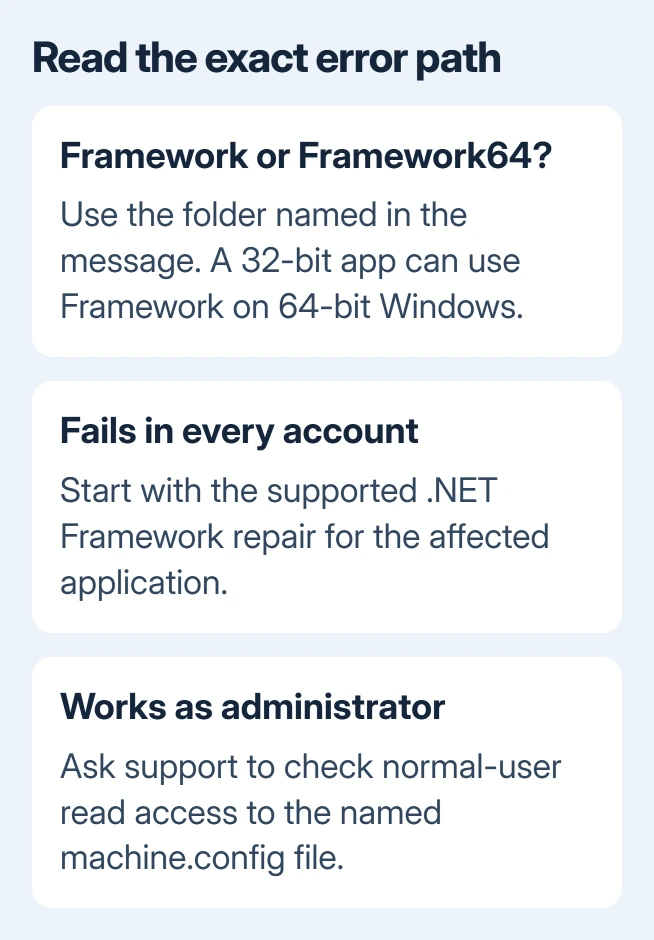
Look for Framework or Framework64 in the path. These are different locations. The Framework folder also serves 32-bit programs running on 64-bit Windows. Pick the folder from the error path, not whether Windows is 32-bit or 64-bit.
Also record the version folder. The original reports name v2.0.50727; other applications may name a different Framework version. Don't replace files in both folders just because both exist on your PC.
If just one program fails, keep its version and installer handy so its publisher can check any settings it added. If unrelated apps name the same file, the shared Framework needs attention.
2. Run the supported Framework repair
Microsoft's .NET Framework Repair Tool can repair setup and update problems in supported Framework versions. Use the download link on that page instead of a DLL download site.
Save your work and run NetFxRepairTool.exe. Accept the license terms, let it check the installation and review the changes it offers. Choose Next to apply the recommended actions.
When the tool asks you to retry the application, leave its window open and launch the program that produced the parser error. Check that the app opens; completing the wizard doesn't confirm that the launch error is gone.
Choose Finish if the app now works. If it still fails, continue with Next and keep the diagnostic output for support. Follow any requested restart and retry that program.
An owner restored ATI Catalyst Control Center by reinstalling .NET Framework, but Messenger still crashed afterward. That fixed their original error, but it didn't fix the other app.
The current tool's supported-version list matters. Its latest release lists support for Framework 4.6.2 through 4.8. An old v2.0 file path doesn't mean every repair option applies to your Windows version.
3. Match older Framework requirements to Windows
Press Windows + R, enter winver and note the version alongside its build number. Check the failing application's requirements for .NET Framework, including its version. Modern .NET and .NET Framework aren't interchangeable downloads.
Apps requiring Framework 2.0 or 3.0 generally need .NET Framework 3.5, which includes those versions. That tells you which Framework the app needs. If it's already installed, its settings can still be damaged.
Windows 10 and Windows 11 releases before 26H1 provide Framework 3.5 through the Turn Windows features on or off control. Press Windows + R, enter optionalfeatures, and check the state of the .NET Framework 3.5 entry.
If the component is missing and the app needs it, select it, click OK and allow Windows to obtain the files. Reopen the app after installation. For a separate missing-runtime error, the 0xc0000135 checks explain that distinction.
For Windows 11 26H1, build 28000, and later, follow the current Framework 3.5 installation instructions. Those releases use a separate installer instead of the old optional-component route.
Don't switch an installed Windows component off casually on a work PC. Other software may depend on it. If the right runtime is already installed and the parser error remains, check account access next instead of cycling Windows features.
4. Check whether the failure follows your account
If the affected app offers Run as administrator, try that once using an administrator account you control. Compare that with opening it normally under the account where the error appears. Close the elevated copy after the comparison.
If it opens only with administrator rights, check its file permissions next. Older owners reported that removing bundled HP software left ordinary users unable to read machine.config, while administrator launches still worked.
In Explorer, navigate to the precise file shown by the error. Right-click machine.config, choose Properties, then Security. Check the permissions without changing them. Note whether the normal Users group has read access.
Have IT or the app publisher compare those permissions with the expected settings for that installation. I'd ask before replacing it: repairing the file's contents and restoring account access are separate jobs.
Don't grant all users full control of this file, as one old reply suggested. That lets them change settings other apps use. Ask IT to restore read access, including permissions inherited from the parent folder.
When the error survives Framework repair
Send the application publisher the full parser message, Windows build, Framework version and repair-tool result. Include whether another account can open the app. Ask them to check configuration changes made by their installer.
Keep the original machine.config for support. A default replacement can remove settings other software needs. Copying a whole Framework folder from another PC changes far more than the named file.
If Windows itself also reports damaged files, follow the Windows repair checks for that error. The right repair depends on whether the trouble is with Framework settings, file permissions or Windows itself.
The Short Version
Preserve the error's file path and repair the matching Framework. Compare account permissions if administrator launches work. Send the app publisher any remaining error with your repair results.
Checked November 23, 2026.
 If you have any business, I can build it online