OneNote error 0xE0000024 in the old 2010/SkyDrive setup can mean a wrong or stuck Windows Live sign-in. Check the notebook's account first. Owners restored sync by correcting that identity or clearing saved Internet Explorer passwords.
Those fixes belong to that old Windows setup. Current OneNote needs its own account and sync checks for the same code, rather than an Internet Explorer reset. Preserve locally saved edits that haven't synced before changing either setup.
In this guide
1. Separate a password request from missing notes
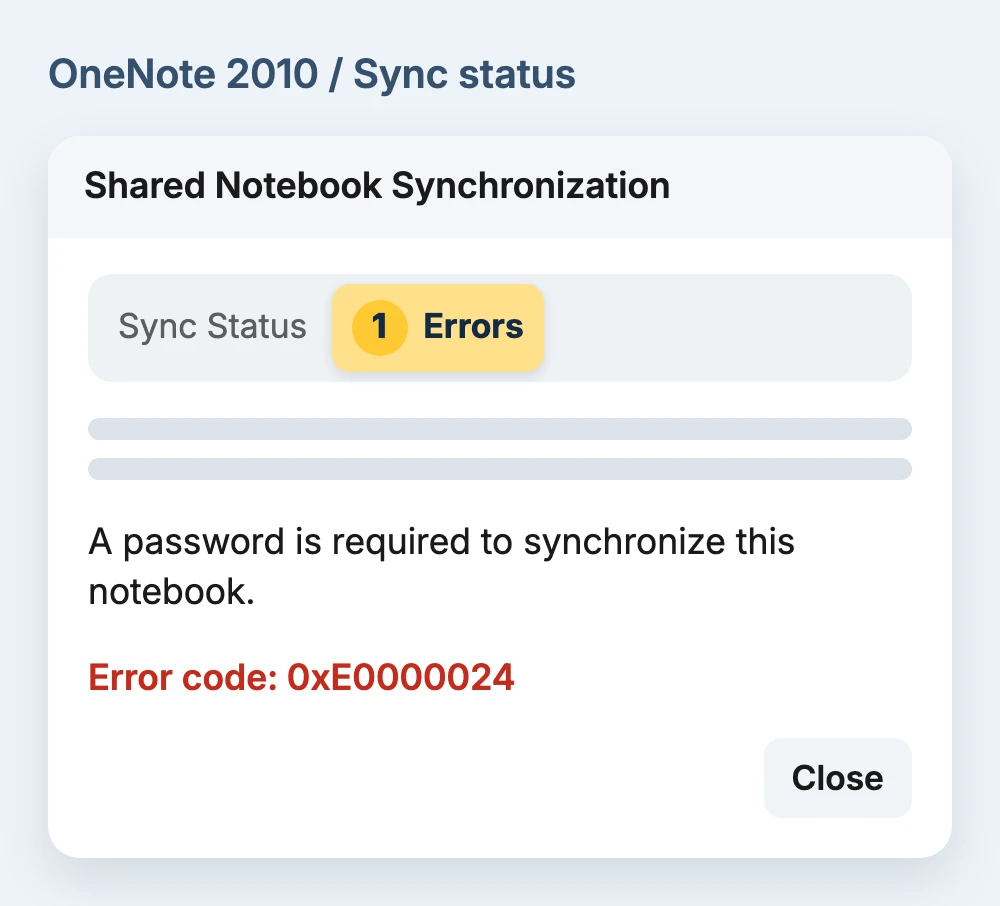
In OneNote 2010, the warning says the app needs a password to sync some notebooks. Clicking it opens Shared Notebook Synchronization, where the Errors tab can show 0xE0000024 beside a notebook.
The warning means OneNote can't sync with the online copy. It doesn't mean the visible local pages have disappeared. Keep the computer with your latest edits available while you check which changes have reached the online notebook.
Use the notebook owner's account to view it through OneNote's web app. Compare a recently changed page against the desktop version. A missing recent paragraph means the copies aren't yet the same.
Copy local-only text and save important attachments somewhere separate before you close that notebook or uninstall the old app. Check that the saved items open correctly. Don't treat an out-of-date online page as a backup of today's work.
Our OneNote sync-recovery steps explain the preservation route when changes exist on only one device. The error number differs, but the need to protect unsynced pages is the same.
For a notebook missing online, check the account before any reset. Personal and workplace Microsoft accounts can contain different notebook collections on the same PC.
2. Correct the account remembered by the old setup
The old Windows Live sign-in could be shared with other programs. Installing or signing into one of them could switch the active account away from the one holding your OneNote notebook.
One owner traced this to Visual Studio using a second Live account. They signed into a Live service with the account holding their notebooks, returned to OneNote and used Sync Now. OneNote requested the right credentials.
Read the email shown in the old app's sign-in prompt. Does it match the notebook owner's account? Use the notebook owner's sign-in, even if another program uses a different account.
In OneNote 2010, open File > Info > View Sync Status, select the affected notebook, and request a sync. If you're asked to sign in, check the account before entering its password again.
After a successful sync, the error clears and your latest page changes appear in the online notebook. Being able to type a password into a box isn't enough; check the actual page after the sync finishes.
If the same password prompt returns with the correct account, continue with the saved-password check for that historical Windows setup. Don't reset the account's password just because the old application repeats its prompt.
3. Clear saved passwords only on the legacy Windows setup
The earliest successful fix cleared Internet Explorer browsing data. A later owner narrowed it to saved passwords; clearing history and cookies wasn't needed. Start with that smaller change on the same old setup.
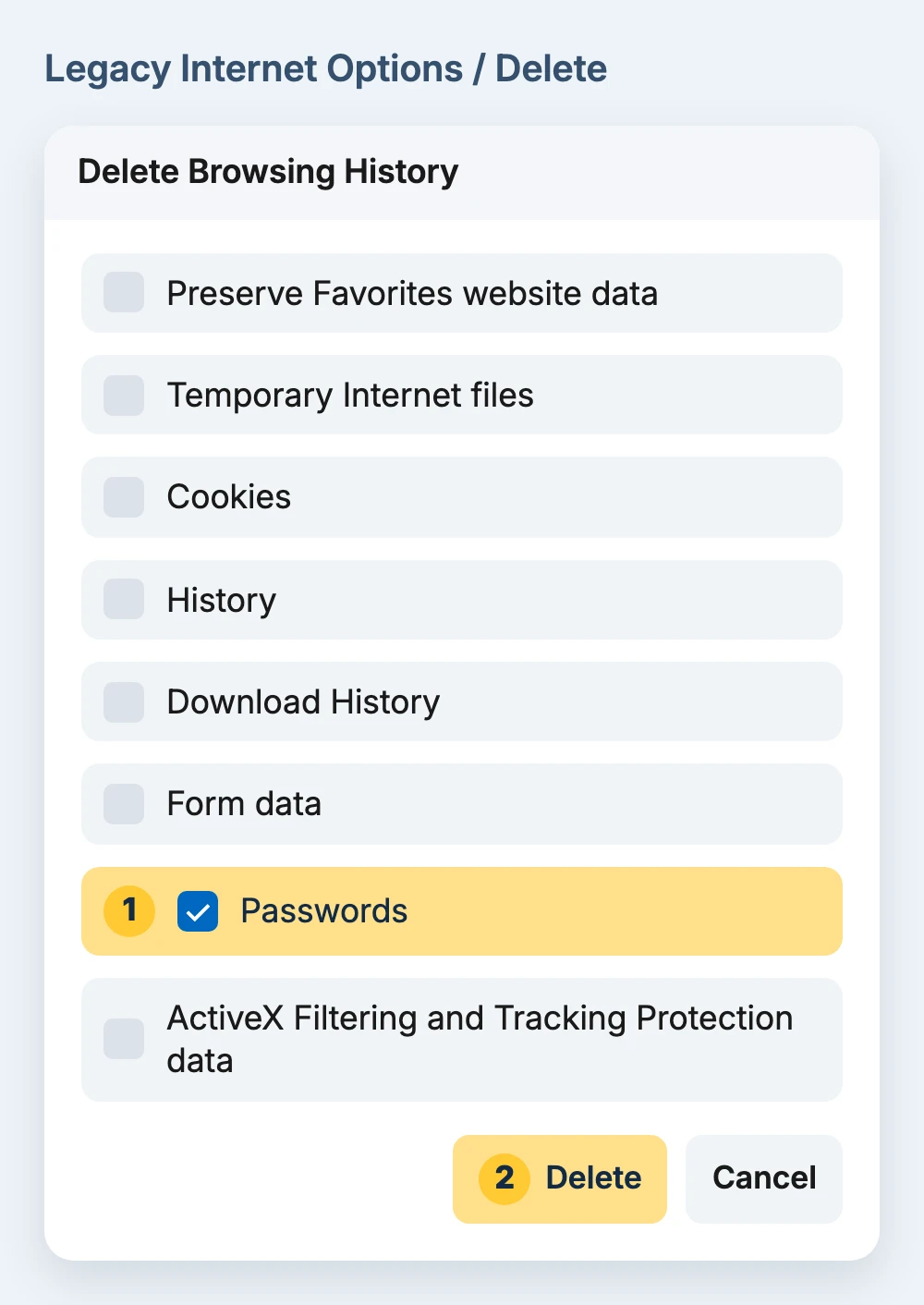
Open Internet Options from Windows Control Panel. On General, use Delete in the Browsing history section. Select Passwords and uncheck the other data categories if you're trying only the saved-password repair.
This removes saved Internet Explorer passwords, so have the account credentials available first. Complete the deletion, return to OneNote 2010, and request another sync. Enter the notebook owner's Windows Live credentials if prompted.
Check whether the password request stops repeating and the online page updates. If nothing changes, move on. Repeatedly deleting more browser data doesn't address every cause of this code.
This step belongs to OneNote 2010's old sign-in components. Clearing Chrome or Edge history on a Windows 11 PC running current apps isn't the same repair. Don't remove current browser passwords to imitate an Internet Explorer workaround.
4. Check the historical proxy case without reviving its workaround
The related 2012 discussion describes a Windows Live Sign-in Assistant fault behind certain proxies and firewalls. Two Office updates replaced its earlier registry workaround, which was then marked obsolete.
The updates were KB2553260 and KB2598289, and the release post said both were needed. It also instructed people who had added SkyDriveAuthenticationProvider for the previous workaround to remove that value afterward.
That information explains the historical Office 2010 repair; it isn't an instruction to add a registry value now. The old update links no longer lead to usable support pages. Office 2010 has reached end of support.
If an organization still maintains that installation, give IT those two update numbers and explain whether syncing fails only behind its proxy. Our OneNote proxy guide covers that network-specific pattern.
I'd move ongoing work to supported OneNote once the local notes are safe. Changing old sign-in settings in the registry won't replace a supported app, especially when the discussion itself says that workaround is obsolete.
5. Use current sync checks for a current OneNote app
In today's desktop OneNote for Windows, open File > Info > View Sync Status and read the complete error. Follow an offered sign-in action with the notebook owner's account, then compare its desktop and online pages.
Microsoft's OneNote synchronization guidance separates account access, notebook access and section-level problems. Choose the steps that match what isn't working instead of trying every old fix.
For an online notebook that won't sync in a supported app, send Microsoft 365 support the complete code, app version and account type. Say whether other notebooks sync. School IT handles the same details for school notebooks.
If it also fails online, have its owner or administrator verify the notebook location and your access. Include the date syncing stopped and list the pages whose latest edits are saved only on the old PC.
The Short Version
For OneNote 2010's 0xE0000024 loop, verify the remembered account and use the saved-IE-password fix only on that legacy setup. Protect unsynced pages first. Current OneNote needs current sign-in and notebook-access checks.
Checked November 27, 2026.
 If you have any business, I can build it online