OneNote 2010 signs in to OneDrive (SkyDrive at the time) through parts of Windows that don't always follow the proxy set in Internet Explorer. That's why your browser works at the office while OneNote can't connect.
Copying the proxy into Windows' second proxy setting with netsh winhttp got one owner syncing again, and ticking Automatically detect settings did it for others. Removing Windows Live Essentials is the third fix owners confirmed.
In this guide
Make sure the proxy is the problem
The pattern is easy to spot. Notebooks sync at home, then stop the moment the laptop joins the office network, while the browser still reaches OneDrive and the same notebooks open in OneNote for the web.
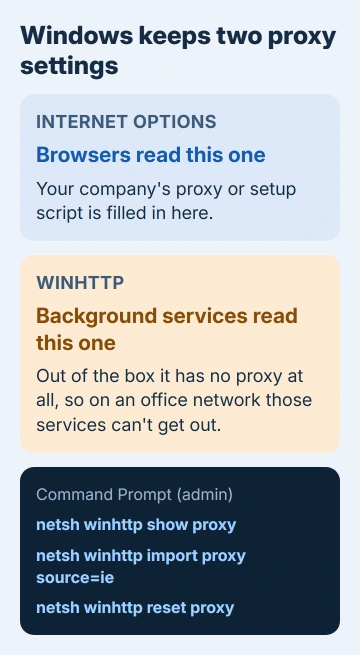
OneNote 2010 has no proxy box of its own, so you can't point it at your proxy from inside the app. It leans on Windows, and Windows keeps two separate proxy settings.
Your browser uses the one in Internet Options. The other belongs to WinHTTP, the part of Windows that background services use to get online, and out of the box it connects directly with no proxy at all.
1. Tick Automatically detect settings
Open Control Panel > Network and Internet > Internet Options, go to the Connections tab and choose LAN settings. Tick Automatically detect settings, and leave your script address or proxy server entries exactly as they are.
Choose OK twice, restart OneNote and press Shift+F9 to sync. That's how one owner got it working in 2016, with their company's proxy details kept alongside the tick, and another in 2012 after removing Windows Live Mesh.
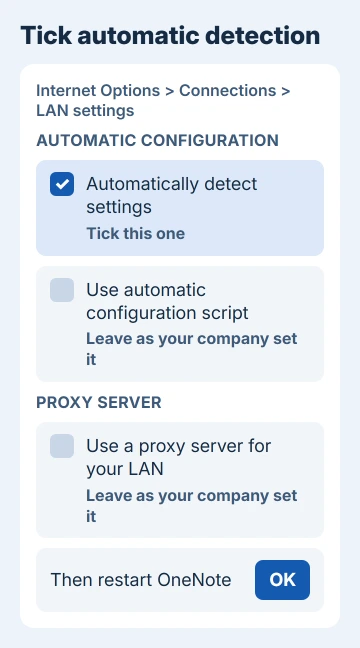
Some company networks aren't set up for automatic detection. One owner lost web access completely with the box ticked, so if browsing breaks, untick it and go on to fix 2.
2. Copy the proxy into WinHTTP with netsh
Search Start for cmd, and when Command Prompt comes up, choose Run as administrator. Then type netsh winhttp show proxy and press Enter to see what WinHTTP is using now.
If Internet Explorer has a fixed proxy server filled in, netsh winhttp import proxy source=ie copies it across in one go. If your company uses a setup script instead, ask IT for the proxy's address and port and set it directly:
netsh winhttp set proxy proxy.yourcompany.com:8080One owner ran exactly that with their company's proxy name and called it "a workaround that helped me out". Swap in your own address; the port is the number after the colon.
Internal sites that shouldn't go through the proxy can go in a bypass list, separated by semicolons:
netsh winhttp set proxy proxy-server="proxy.yourcompany.com:8080" bypass-list="*.yourcompany.com"Restart the PC so every service picks up the change, then open OneNote and sync. The netsh winhttp reference lists each option if your setup needs more.
To undo it later, run netsh winhttp reset proxy. On a work PC I'd check with IT before changing it at all, since Windows Update and other background services read this same setting.
3. Remove Windows Live Essentials or Live Mesh
In 2012 the OneNote team's development manager wrote that the way OneNote used the Windows Live sign-in assistant didn't work with some firewalls and proxies. Owners who took the Live programs off their PCs got OneNote syncing again.
Open Control Panel > Programs and Features, select Windows Essentials 2012 (Windows Live Essentials on older PCs) and choose Uninstall/Change. "Removing Windows Essential 2012 fixed it for me," one owner reported.
Another owner removed Windows Live Mesh and everything else with Windows Live in its name, then ticked Automatically detect settings as in fix 1. Restart the PC afterward and press Shift+F9 in OneNote.
Removing the whole package also takes Windows Live Mail, Photo Gallery and Movie Maker with it, so export anything you keep in Mail first.
4. Check whether IT has switched Office's web features off
On a managed work PC, the proxy may not be the whole story. Administrators can turn off Office's web integration with Group Policy, and then no proxy setting will get OneNote online.
One forum poster suggested a quick check: in OneNote 2010, open File > Share and look at step 3, Web Location. If there are no web places to pick there, IT can tell you whether the policy is set.
5. Newer OneNote behind a proxy
OneNote 2016 and Microsoft 365 sign in differently, but a proxy can still get in the way. In the newer OneNote apps, sync codes such as 0xE000006B can mean a firewall or proxy is blocking the connection to OneNote's service.
The blg57 sync failure also appeared during a service incident, so compare devices before asking IT to alter a proxy.
For OneNote B4 failures, check service trouble too, especially when several devices stop syncing together.
That fix is up to IT. The proxy has to let through the addresses on the Microsoft 365 URL and IP list, so send them the error code and mention that OneNote for the web works on the same network.
A different pattern, A8 affecting selected sections, has a page-copy repair that can preserve the original section.
Other Microsoft apps trip over the same thing: Outlook's 0xCAA70004 sign-in error can come down to a VPN-managed proxy, and so can OneDrive's 0x8004de40 connection error.
One workaround to skip
One reply on Microsoft's forum offers two registry files that switch your company's proxy policy off while OneNote runs, then back on when it closes.
That goes around your IT department's settings, so ask them for the proxy details and use fix 2 instead.
When none of this works
Office 2010 lost support on October 13, 2020, with no extended security updates, so OneNote 2010 won't get a fix for this. The way out is a current OneNote signed in with the same account, plus the address check in fix 5.
Before you move, open each notebook at onenote.com and make sure your latest pages are there. Copy anything that only exists in OneNote 2010 into a notebook that syncs.
The Short Version
Tick Automatically detect settings in Internet Options, or copy your proxy into WinHTTP with netsh. If OneNote still won't sync, remove Windows Live Essentials. On newer OneNote, ask IT to allow the Microsoft 365 addresses.
Checked November 20, 2026.
 If you have any business, I can build it online