Re-enabling IPv6 cleared Outlook error 0xCAA70004 for owners after Windows 10 version 1809. Check it before reinstalling Office. A VPN-managed proxy caused the same code for a later owner.
The message can say We Can't Connect You even when browser sign-in works. A working browser account doesn't rule out a connection problem affecting Outlook's sign-in window.
In this guide
1. Restore IPv6 on the connection Outlook uses
Press Windows+R, type ncpa.cpl, and press Enter. This opens the network adapter list on Windows 10 or 11 without going through their different Settings layouts.
Right-click the active Wi-Fi or Ethernet adapter and select Properties. In its networking components list, find Internet Protocol Version 6 (TCP/IPv6). Select its checkbox if it isn't selected, then choose OK.
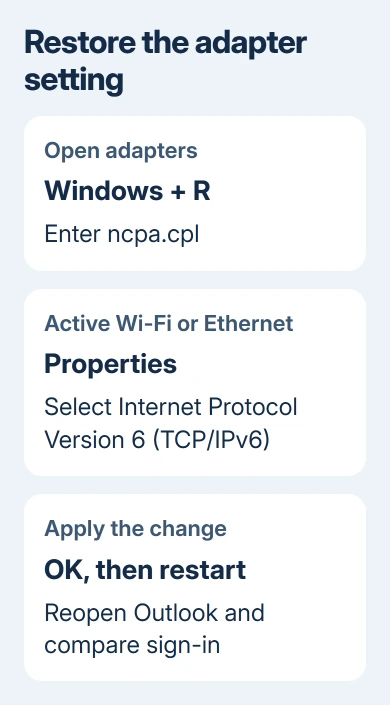
Restart the PC, reopen Outlook, and complete any sign-in request. Check that Outlook opens your mailbox and finishes connecting without showing the same error again.
On Microsoft's forum, an owner and a later participant restored sign-in by enabling IPv6. Another participant tried it and still got the error.
Leave an already-selected IPv6 checkbox enabled. Repeatedly toggling it adds nothing if sign-in keeps failing. Next, check the VPN and proxy in section 2.
On a managed work PC, ask IT before changing a network policy. If the setting won't stay enabled, tell them which adapter reverts and that Outlook sign-in is failing.
I'd check this setting before another Office reinstall. Neither reinstalling Office nor creating another mail profile had helped the asker.
2. Check whether a VPN controls the proxy
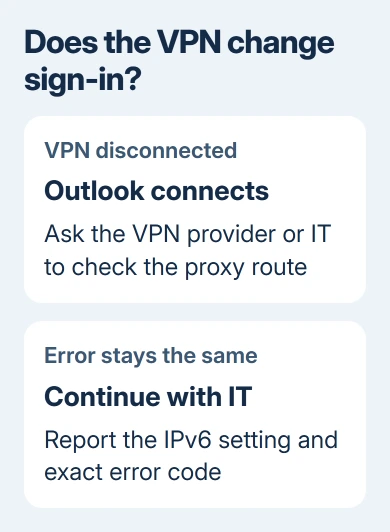
Try this when a VPN is running, or when a change to your work connection brought on the error. One later participant could sign in after stopping their VPN from managing the system proxy.
Record the current setup before changing it. In Windows 11, open Settings > Network & internet > Proxy. In Windows 10, use Settings > Network & Internet > Proxy. Look at the setup script and manual proxy entries.
If this is your own optional VPN, disconnect it briefly and try Outlook again. Where its settings offer system-proxy management, compare Outlook with that option disabled, using the VPN provider's instructions.
If Outlook signs in with that setting off, the VPN or proxy connection needs attention. Ask the VPN provider or your organization's network administrator to fix it before you try another Outlook profile.
OneNote 2010 trips over company proxies in a similar way, and the OneNote proxy page shows how to hand that proxy to WinHTTP with netsh.
Don't remove a required company proxy to get around access controls. Send IT the comparison result and ask them to check Outlook authentication through the configured VPN and proxy, including the account's multifactor sign-in.
The owner who reported this needed their VPN for connectivity. Disconnecting it was a way to identify what changed the outcome, rather than a complete long-term answer for that situation.
3. Check for an IPv6 policy beyond the checkbox
Even with the adapter's IPv6 box checked, some IPv6 components can still be disabled. Windows can control them through a registry policy, which you won't see in the adapter list.
Microsoft's IPv6 configuration guidance warns that disabling IPv6 components can stop parts of Windows from working. It recommends preferring IPv4 through policy when needed, rather than disabling IPv6.
If IPv6 was turned off by a tuning utility, deployment script, or earlier network troubleshooting, ask whoever manages the PC to check that configuration. Mention DisabledComponents under the Windows TCP/IP version 6 parameters.
Have the administrator check this, rather than paste a registry value from an old reply. Different values disable different components. Changing a managed setting without knowing its purpose can create another network problem.
After the administrator corrects the configuration, restart before comparing Outlook again. Report whether the error disappears completely or changes to another code.
If a different Windows sign-in error appears, record it separately. The Outlook 657rx guide covers that authentication fault; it shouldn't be substituted for this code just because both appear during sign-in.
4. Use earlier repair results to choose the next step
In the original report, Outlook's diagnostic check failed at validating user autodiscover authentication. Autodiscover is the service Outlook uses to locate the mailbox's connection settings.
Safe mode, a fresh Outlook profile, credential cleanup, and an Office reinstall didn't solve that asker's case. Another participant said moving between 32-bit and 64-bit Office helped for two days, then the error returned.
Since those repairs didn't work, check the network and sign-in settings before repeating them. Keep a note of each result so IT knows what you've already tried on your PC.
If Outlook opens normally but later reports a mail-transfer code, follow the matching Outlook send/receive error instead. Trouble transferring mail after Outlook connects needs different steps from trouble signing in.
The Windows 10 1809 reports date from 2018. Don't downgrade a current PC to 1803 or 1809 to recreate their setup. Keep the installed Windows and Office versions in your support report so the advice matches your actual system.
What to send the Microsoft 365 administrator
If enabling IPv6 and checking the VPN don't clear it, send those results to the administrator handling Microsoft 365. Have them check whether this PC's connection lets Outlook sign in and reach Autodiscover.
Include 0xCAA70004, the exact message, when it started, the Windows version, and the Outlook version from File > Office Account > About Outlook. Add whether other Office apps connect and whether the VPN changes the result.
Explain which repairs already failed. That gives the administrator a concrete starting point and helps avoid a second round of removing profiles while the same connection setting remains in place.
The Short Version
Enable IPv6 on the active adapter and restart. If the error continues, compare the VPN and proxy, then have IT check any deeper IPv6 policy. Those connection changes helped owners after Office repairs failed.
Checked November 16, 2026.
 If you have any business, I can build it online