
AirPods that keep beeping can be signaling a low battery, charging-case activity, or a microphone and speaker check. Identify whether the sound comes from the earbuds during listening or from their case before changing settings.
Ordinary charging-case sounds have an off switch on supported models. A quiet chime inside the case and an alert when a separated case moves have different purposes, so that switch is not a promise of complete silence.
Switch off the ordinary charging-case sounds
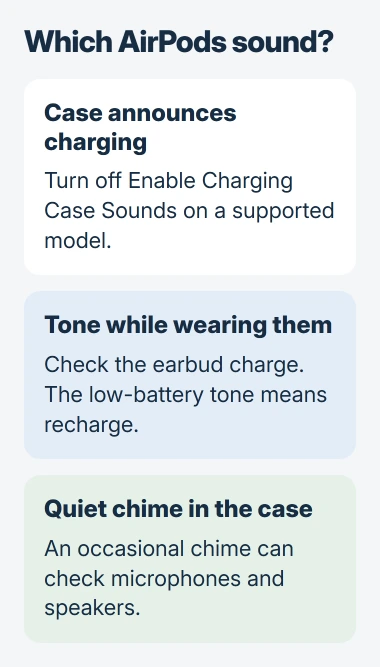
Wear the AirPods and connect them to an iPhone or iPad. Open Settings, select their name, and turn off Enable Charging Case Sounds. If that control is not on the first page, open Audio & Routing.
Apple documents this control for AirPods Pro 2, Pro 3, AirPods 4 with ANC, and AirPods 5 with Wireless Charging Case in its AirPods settings guide.
Status: AirPods sound controls and Apple's separate chime explanations checked November 2, 2026. Model support varies; no earbuds were tested.
On a Mac, open System Settings, select the connected AirPods, and find the same switch, opening Audio & Routing if needed. Older cases without these sound controls do not gain them through a reset.
Connect the case to power again and check whether its usual charging announcement stops. If a different sound continues, match it to the situations that follow instead of repeatedly toggling the same setting.
A tone during listening can mean the earbuds need power
Apple says the low-charge tone sounds at 10 percent, then again just before the earbuds switch off. This comes from one or both AirPods and is separate from the case speaker, as its charging instructions explain.
Return the earbuds to their case to recharge, and connect the case to power if its charge is low too. Check the battery reading before listening again. The case can need charging even when the earbuds still have power.
If music merely becomes quieter when you talk, inspect Conversation Awareness and the other volume controls. Changing playback volume and producing an alert tone are separate behaviors.
A quiet chime inside the case can be expected
Apple states that Pro 2 and Pro 3 earbuds can occasionally chime inside their case to check microphone and speaker operation. Its hearing-health guide describes this check.
That description supports an occasional quiet chime. Repeated beeps, loud squeals or crackling need their own explanation. The page gives no separate control for disabling this check.
When the actual hearing test refuses to run, use the hearing-test troubleshooting steps. Hearing a brief case chime alone does not mean a test failed or that hearing has changed.
A sound when the case moves can be a tracking alert
Apple's unwanted-tracking guidance says supported cases separated from their owner for a time can sound when moved. It specifically names Pro 2, Pro 3 and AirPods 5 with Wireless Charging Case.
Read any accompanying Find My notification. An alert about AirPods moving with someone is not the same event as connecting a charger. Follow that alert's identification instructions rather than assuming the battery is empty.
For unexplained sounds, give Apple Support the model, battery readings and trigger: charging, movement, wearing them, or closing the lid. Include any playback failures and a recording of the noise to help identify it.
The Short Version
Disable ordinary case announcements through the connected AirPods settings. Recharge for the in-ear low-battery tone. Occasional quiet case chimes have a separate documented purpose; movement-triggered tracking alerts need their own checks.

Isaac Smith is the founder and editor of PC Glance, a website that covers computers, laptops, and technology. He is a tech enthusiast and a computer geek who loves to share his insights and help his readers make smart choices when buying tech gadgets or laptops. He is always curious and updated about the latest tech trends.