
You rent a movie in the Apple TV app, start it on your Mac, then move to the big TV. The Apple TV refuses with: "This movie is playing on too many devices. To continue, stop watching on another device". You closed the Mac minutes ago.
I would stop playback properly before you switch, and if you already quit, give it half an hour. The owner who asked on Ask Different timed the lock, and it lifted after 15 to 30 minutes.
The question has had 1,907 views since June, and the owner's own timing is the top answer.
Why the rental is blocked
Apple's rental page allows a download on one device and a stream on another: "After you download your rental on one device, you can stream the rental on another device simultaneously". Two streams at once is what this message stops.
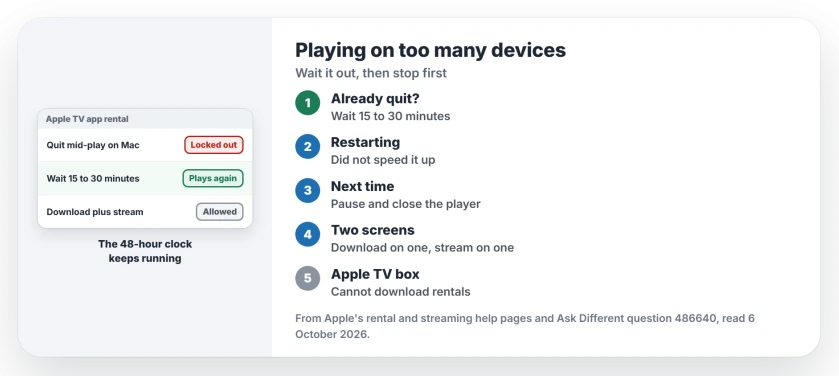
Status: checked 6 October 2026. A rental quit mid-play on a Mac stayed locked to it. The Apple TV refused to play it until 15 to 30 minutes had passed, as the owner timed.
The owner had quit the TV app with the movie still playing and closed the lid at once. Ours: I think the Mac never reported that the stream had ended, so the rental still counted as playing there.
1. Give it up to half an hour
The owner timed the lock with kitchen timers. In their words: "I can narrow down the sync delay to more than 15 minutes but less than 30 minutes". After that, the Apple TV let them watch.
Nothing they tried sped it up. They reopened the Mac and played a different show there. They restarted the Apple TV. The message stayed for the full wait.
2. Next time, stop it before you switch
Members asked whether they had tried "starting playback on the Mac again and stopping" it properly, rather than quitting. The owner never tested that, so this step is ours.
Ours: I would pause the movie, close the player, then wait a minute before you press play elsewhere. Quitting the app mid-play is what left this rental stuck.
3. Want two screens? Download on one
Apple's rule allows a download plus a stream. Download the rental on your Mac, iPhone or iPad, then stream it on the Apple TV box.
Apple adds a limit: "You can't download rentals on your Apple TV, smart TV, or streaming device". So the download has to live on the computer, phone or tablet.
The 48-hour clock keeps running
Apple says: "After you start watching, your rental is available for 48 hours". Ours: a half-hour wait costs little of that, but the clock does not pause while you wait.
If the same rental still refuses after an hour, Apple's streaming help starts with a simple step: "Update your Apple device to update the Apple TV app". Then try again.
Other Apple TV app sync problems
The owner's Apple TV showed the right progress in Continue Watching, so that part synced fine, and when it does not, Up Next not syncing across devices covers it.
Purchases have their own device limit, separate from rentals; Home Sharing not working on a Mac explains the five-computer rule.
The Short Version
- The message means the rental still counts as playing on another device.
- Quitting the app mid-play left one owner locked out for 15 to 30 minutes.
- Restarting the Apple TV or reopening the Mac did not speed it up.
- Pause and close the player before you switch devices.
- Apple allows a download on one device and a stream on another.
- Your 48-hour rental window keeps running while you wait.
Where to Next
Locked out right now? Set a timer for 30 minutes and try again. Before you switch screens next time, pause the movie and close the player first.
How long did your lock last? Post the wait in the comments.

Isaac Smith is the founder and editor of PC Glance, a website that covers computers, laptops, and technology. He is a tech enthusiast and a computer geek who loves to share his insights and help his readers make smart choices when buying tech gadgets or laptops. He is always curious and updated about the latest tech trends.