
You open your Backblaze backup, and the Desktop and Documents files you keep in iCloud are not there. That is worrying, because those are often the files you would miss most. I would update Backblaze before anything else.
One owner saw their iCloud Drive files come back into the backup on 21 September, right after an update. Backblaze's own help page sets the other condition.
Why the files went missing
In March, the opening poster on MacRumors wrote: "I just learned that Backblaze no longer backs up iCloud Desktop & Documents", and they quoted Backblaze's help page from that time.
That page then said: "iCloud's most recent update prevents Backblaze from backing up files that iCloud synced." Backblaze's release notes for Mac version 9.2.2.878 point the same way.
That version, Backblaze says, "excludes system and cloud-synced folders", and its list ends with Mobile Documents. That is where iCloud Drive keeps its files on a Mac.
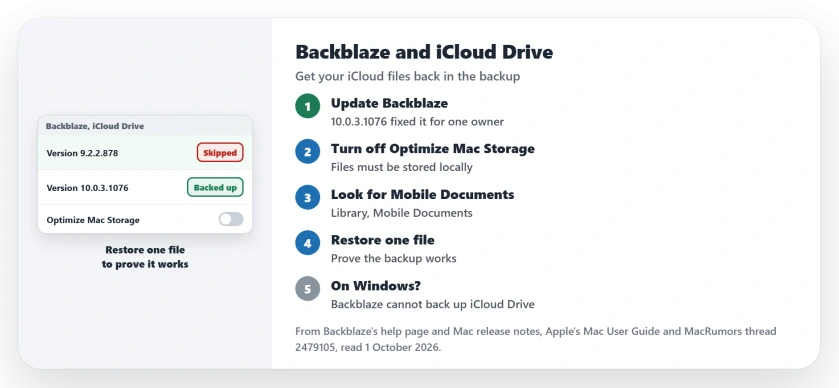
Status: checked 1 October 2026. Backblaze's help page says local iCloud Drive files back up on a Mac. One owner's files returned after updating to 10.0.3.1076, and a test restore worked.
1. Update Backblaze
This fix is user-reported. It brought the files back for one owner, who wrote: "Today I updated Backblaze to the latest version (10.0.3.1076), and it looks like all my iCloud Drive files are now being backed up."
They were exact about it. In their words, "the local files at ~/Library/Mobile Documents/com~apple~CloudDocs were not included in backups, but as of this afternoon they are".
Backblaze's own notes for 10.0.3.1076 only mention "temporary iCloud Drive and Google Drive folders that are not backed up". So the owner's result is the evidence, and your own backup is the proof.
2. Turn off Optimize Mac Storage
The rule is documented by the vendor. Backblaze's help page says you can back it up on a Mac "as long as the files are saved locally on your computer and are not stored solely on iCloud Drive remote servers."
Optimize Mac Storage breaks that rule on purpose. Apple says in its iCloud Drive guide: "Your Mac can automatically store documents in iCloud when more space is needed."
So turn it off. Backblaze's route is System Settings, your name, then "Click iCloud", then Drive under Saved to iCloud, and then "Turn off the Optimize Mac Storage option".
The owner whose backup came back had it off. Make sure your Mac has room for all of iCloud Drive before you switch, because every file then stays on the disk.
3. Look for Mobile Documents in your backup
Backblaze tells you where to look. Files that do not sync from your Desktop or Documents "can be found at /Users/[username]/Library/Mobile Documents/".
It adds that "they should exist in this same location in your backup". The Library folder is normally hidden on your Mac, but Backblaze says it "should show up normally in your backup".
4. Restore one file as a test
A backup you have never restored from is a hope, not a backup. The owner did this too: "I tested restoring a file just to be sure."
Pick one small file from iCloud Drive and restore it from Backblaze. If it opens, your setup works.
5. Know the limits and the other tools
Windows users are stuck for now, because on Windows, Backblaze says, "you can not currently back up iCloud Drive files to Backblaze Computer Backup".
Other backup apps treat cloud files differently. Arq told the opening poster that version 7.21 can ignore or download placeholder files. IDrive told them it backs up iCloud files "as long as the files are available locally on the Mac".
If Desktop files seem to vanish from your Mac itself, the Desktop files page explains where they go. And for sync that halts when the Mac wakes, see the iCloud Drive sync page.
And if iCloud Drive itself barely moves, clearing two fileproviderd cache files got it going for owners.
Does Backblaze back up iCloud Drive on a Mac?
Yes, when the files are stored locally, Backblaze says. One owner saw their iCloud Drive files return to the backup after updating to 10.0.3.1076 with Optimize Mac Storage off.
Why is Backblaze not backing up my Desktop and Documents?
If they live in iCloud Drive, Optimize Mac Storage can leave some only in iCloud, and an older Backblaze version excluded Mobile Documents. Update Backblaze, then switch Optimize Mac Storage off.
Can Backblaze back up iCloud Drive on Windows?
Not currently. Backblaze says Windows treats the iCloud folder as a reparse point, and its app cannot get past that.
The Short Version
- An older Backblaze version skipped iCloud Drive files.
- Update Backblaze to the latest version.
- Turn off Optimize Mac Storage.
- Check the backup for Library, Mobile Documents.
- Restore one file as a test.
- Windows cannot back up iCloud Drive to Backblaze.
- Other backup apps handle cloud files their own way.
Where to Next
Open Backblaze today and check its version, then look for Mobile Documents in your backup. Restore one file before you trust it again.
If your iCloud files are still missing after the update, tell me your macOS and Backblaze versions in a comment. Each report helps the next reader, and I fold them into this page.

Isaac Smith is the founder and editor of PC Glance, a website that covers computers, laptops, and technology. He is a tech enthusiast and a computer geek who loves to share his insights and help his readers make smart choices when buying tech gadgets or laptops. He is always curious and updated about the latest tech trends.