
An iPad's name is the label used to identify the tablet in services such as AirDrop and on a connected computer. Change it in the Name field under Settings > General > About; renaming the tablet does not require a new Apple Account.
A distinctive label helps when several iPads appear together. Choose something recognizable without including an email address, phone number or other details that nearby people do not need.
Replace the name stored on the iPad
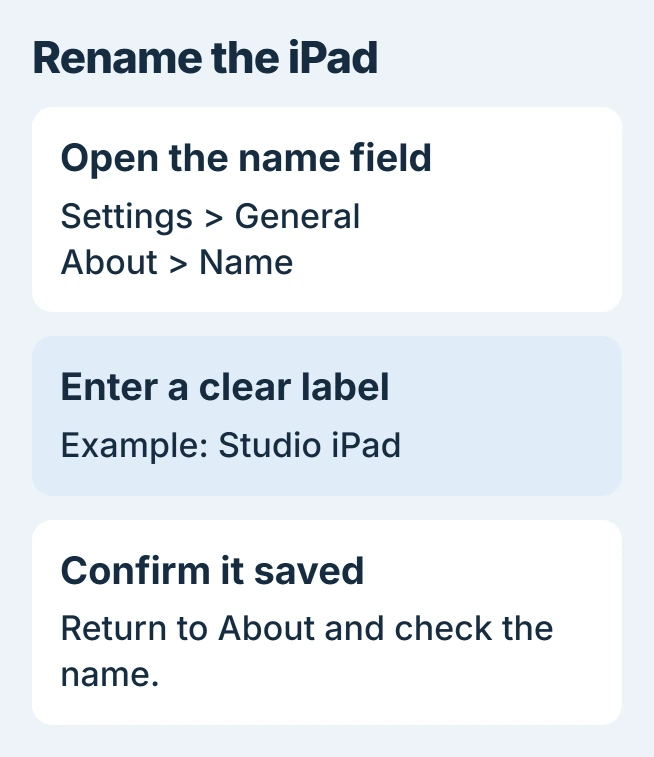
Open Settings on the tablet and select General. Enter About, then tap Name. Apple says this is the device-name control in its iPad naming guide.
Tap the clear-text button in that field, then type the replacement. For example, Studio iPad distinguishes a shared work tablet without identifying its owner personally.
Status: Apple iPad naming instructions and management restrictions checked November 1, 2026. No tablet settings were altered.
Return to the About page and read the name shown there. Check its spelling before looking for the tablet from another device. The value in Settings is the first place to confirm that the edit stayed saved.
Check the device list that matters
Apple states that iCloud, AirDrop, Bluetooth, Personal Hotspot and a connected computer use this name. Personal Hotspot still requires a supported cellular iPad and plan; a new label does not add that capability.
On the computer or other device, reopen the relevant device list and identify this iPad. If a familiar old entry remains, check which device it represents before selecting it for a transfer or backup.
An iPhone has its own separate device-name setting. Renaming the tablet does not rename the phone, even when both belong to the same Apple Account.
A new name does not stop sharing
The device label is separate from the account that connects the iPad to iCloud. Calls, messages and photos can continue arriving after the label changes.
To stop those connections, use the iPad sharing controls for the particular service. Changing Name is not a sign-out, an erase or a transfer of ownership.
When the name cannot be changed
An organization can lock the name of an iPad it supervises. Apple documents a Modify device name restriction in its managed-device reference.
Ask that organization's administrator to approve the new label when its restriction applies. Removing management or erasing a work tablet is unnecessary for a naming request.
For a personal iPad whose edit will not stay saved, give Apple Support the iPadOS version and explain whether Name is unavailable or reverts after leaving the field. Those symptoms need different checks.
The Short Version
Edit Name inside the iPad's About settings and confirm the saved label. Keep account changes and sharing controls separate, and ask the administrator when a managed tablet blocks renaming.

Isaac Smith is the founder and editor of PC Glance, a website that covers computers, laptops, and technology. He is a tech enthusiast and a computer geek who loves to share his insights and help his readers make smart choices when buying tech gadgets or laptops. He is always curious and updated about the latest tech trends.