To change a PIN on Windows 11, open Settings > Accounts > Sign-in options > PIN (Windows Hello) > Change PIN. Enter the old PIN and its replacement. For a forgotten code, choose I forgot my PIN and verify the account.
The PIN unlocks this Windows device. It isn't the Microsoft account password, so changing it here leaves your password unchanged for Outlook or other Microsoft services.
In this guide
Change a PIN you still know
Sign in to Windows with the account that needs a different PIN. On a shared PC, check the signed-in name on the Settings page. Each account has its own sign-in settings, so changing yours won't replace someone else's PIN.
Press Windows+I to open Settings. Select Accounts, then Sign-in options. Expand PIN (Windows Hello) and select Change PIN. This is the ordinary route when the current PIN still works.
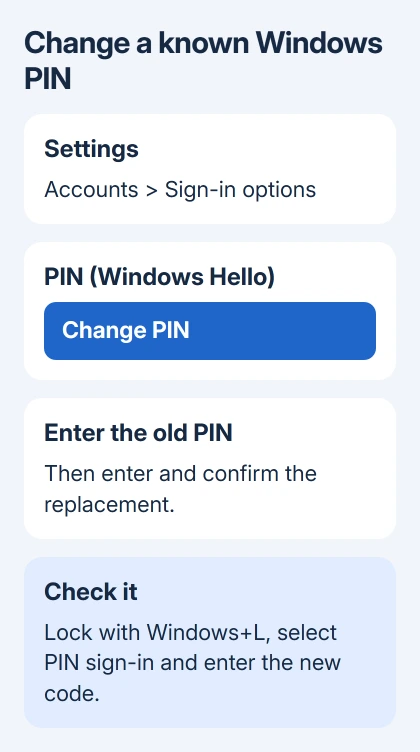
Enter the existing PIN in the current-PIN field. Type the replacement into the new-PIN field and repeat it in the confirmation field. Select OK when the entries match and Windows accepts the new code.
Microsoft says a PIN change through Settings requires the existing code. Guessing at that field isn't necessary when Windows offers a separate forgotten-PIN route.
Use a code you can remember without reusing an obvious date or a simple sequence. If you choose the option to include letters and symbols, you'll need to enter those characters when signing in, rather than treating the PIN as digits only.
Windows can reject an entry that doesn't meet the rules shown in the dialog. Read the message and adjust the replacement to match it. An organization can require a different PIN format from the one a personal PC accepts.
Confirm the new PIN before leaving the PC
After saving, press Windows+L to lock the computer. Return to the sign-in screen and select the PIN option if Windows offers another sign-in method first. Type the new code and confirm that the expected desktop opens.
Face or fingerprint recognition may sign you in without asking for a PIN. That only checks your face or fingerprint sign-in, so choose the PIN option to check that you remember the new code correctly.
If the sign-in fails, check the account name and the selected input method before trying again. A Microsoft account password typed into a PIN field will be rejected even when that password is correct.
For a PIN containing letters or symbols, also check the keyboard layout shown on the sign-in screen. An unexpected layout can change the character a key produces. Compare the entry with the type of PIN you just created.
I'd check the replacement right after saving it. It's easier to catch a mistyped or misremembered code now than to discover the problem after restarting during a busy morning.
Reset a forgotten PIN while you're signed in
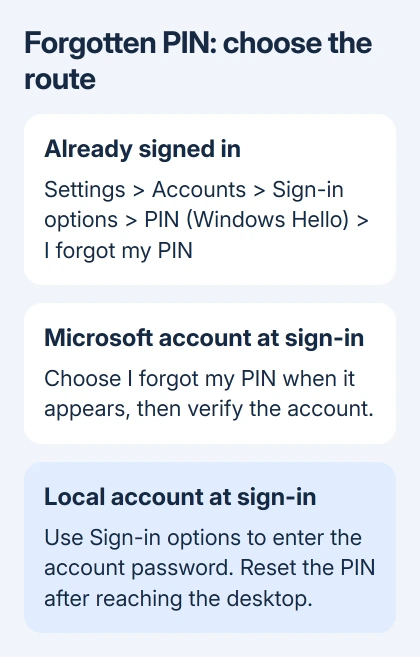
A fingerprint or face scan may still let you reach the desktop after you've forgotten the PIN. Open Settings > Accounts > Sign-in options, expand PIN (Windows Hello), and select I forgot my PIN.
Follow the directions to verify your account and create a replacement. Unlike Change PIN, this checks your identity without asking for the old PIN first. Complete any confirmation prompts Windows shows.
Keep access to the method you use to verify your account. If the reset asks for a code or approval, complete that step to reach the new-PIN form. That prompt isn't asking for the forgotten Windows PIN.
Set the replacement after verification succeeds. If an account-access error stops the reset, deal with that error first; entering your new code again in an earlier field won't help. The PIN won't change until the reset finishes.
Removing PIN sign-in uses a separate control. Our grayed-out PIN Remove guide explains the Windows Hello switch that can affect removal. Changing a PIN keeps PIN sign-in enabled.
When you're already at the sign-in screen
Select the correct Windows account first. If I forgot my PIN appears near the PIN entry box, select it and follow the reset instructions. This sign-in-screen option is available for Microsoft accounts, not local accounts.
For a local account, choose Sign-in options and enter its password to reach Windows. Open the desktop PIN settings afterward. A missing forgotten-PIN option doesn't mean a local account needs a Microsoft password.
If the local password is also lost, use local password recovery. It can offer Reset password and the security questions set when you created the account. A password reset disk also works if you made one earlier.
For a Microsoft account with a lost password or verification access, use the recovery options at sign-in or its password-reset process. Recover that account before setting a replacement device PIN.
When the screen says the PIN is unavailable rather than simply rejecting a forgotten code, use our Windows 11 PIN recovery guide. It covers the blocked-sign-in case in more detail than the routine change procedure.
Handle account rules and missing controls
Windows 11 keeps the PIN controls under Accounts > Sign-in options. Windows 10 uses the same general route, though its expanded control may be labeled Windows Hello PIN. Follow the labels for the installed version.
A PIN is tied to its device. If you use the same Microsoft account on a second laptop, check that laptop's own sign-in settings to replace its own PIN. Don't expect this PC's replacement to update every device automatically.
Ask your IT help desk if a setting is managed or the new PIN fails a policy requirement. Share the error wording, then say whether you're replacing a known code or recovering a forgotten PIN.
Leave Windows security folders and registry settings alone for this task. Use the Settings controls for a normal PIN change so you don't create a sign-in problem while trying to replace a code.
If a personal PC's reset still fails after account verification, open Contact Microsoft Support, enter the PIN problem, and select Get Help. Use Contact Support if that option appears after the suggested help.
Describe the failed stage: opening the PIN panel, verifying the account, accepting the replacement, or signing in. Support can't change private account details, but the failed stage helps them select suitable recovery instructions.
The Short Version
Use Change PIN for a known code and I forgot my PIN for a forgotten one. Save the replacement, then lock Windows and check it. Local accounts need their password when the sign-in-screen reset option isn't available.
Checked November 13, 2026.