
You copy a line on your own computer, click into Chrome Remote Desktop, press Ctrl and V, and nothing arrives. Copying back from the remote PC fails as well.
I check two switches, because the clipboard needs both and either one can turn off without a word. Its Super User page sits at 73,126 views, and a Google Chrome forum thread about the web app has 605 upvotes.
Two switches have to agree
Chrome Remote Desktop runs in a Chrome tab at remotedesktop.google.com. So it needs Chrome's permission to read your clipboard, and inside the session it has a clipboard sync option of its own.
Google's own Chrome Remote Desktop help page does not mention the clipboard at all. Every fix in this article comes from owners, plus Google's permission and policy pages.
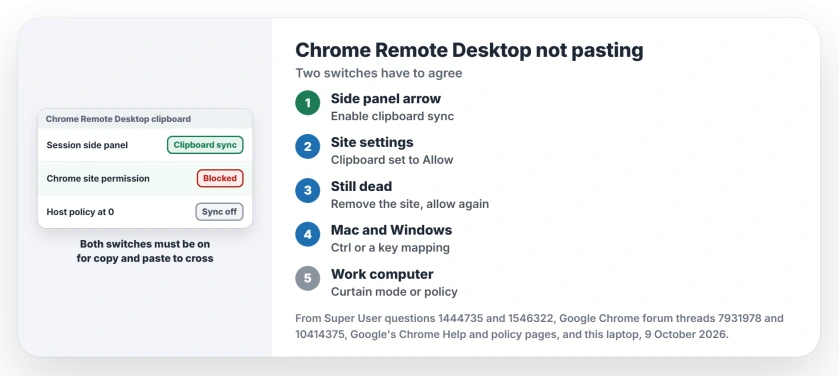
Status: Google documents Chrome's clipboard permission and the policy that can switch sync off. The panel option and the permission reset are owner fixes. Host inspected here 9 October 2026.
Ours: this laptop runs the Chrome Remote Desktop host, version 154.0.8037.40, as the chromoting service. No Chrome policy is set on it, and none of its Chrome profiles holds a clipboard exception for any site.
1. Turn on clipboard sync in the side panel
Start your session, then look at the edge of the window for a small arrow. It opens the session options.
A Google forum reader described it: "There is a hidden panel on the right side with a blue arrow. click it and you will see an option for clipboard sync".
On Super User, that panel held "Keyboard controls and its submenu has the option to enable the clipboard."
Select Enable clipboard synchronization. When Chrome asks whether the site may see your clipboard, choose Allow.
One reader found the arrow on the left, not the right. Check both sides.
2. Allow the clipboard for remotedesktop.google.com
Has the option gone from the panel? Owners fixed that from Chrome's side. Paste this into Chrome's address bar:
chrome://settings/content/siteDetails?site=https%3A%2F%2Fremotedesktop.google.comSet Clipboard to Allow, then reload the session. A Super User owner whose panel had lost the option thanked the reader who posted it, adding "Do this using the Chrome browser."
Google lists Clipboard among the site permissions in Chrome: "Sites usually read your clipboard for features like save the format of your copied texts."
3. Remove the permission so Chrome asks again
Sync can stop even with both switches on. On a 194 upvote thread, one owner had it set and "it just stopped working a week ago."
Their fix: open Chrome's settings and search for Clipboard. Open Site settings, then Clipboard, and remove remotedesktop.google.com from the Allow list.
Sign in to Chrome Remote Desktop again. Turn sync back on and choose Allow at the prompt.
Owners answered "Works well! Thanks" and "Copy/past has worked for me." One warned that the reset has to be done again for every computer you connect to.
A Mac on one end
The remote computer keeps its own shortcuts. A Windows host wants Ctrl and V even when you sit at a Mac, and a reader on the forum reminded Mac owners of exactly that.
Are you going the other way, from Windows into a remote Mac? One owner opened the session options, chose Configure key mappings and mapped ControlLeft to MetaLeft. Your Ctrl key then acts as Command on the Mac.
One way only, or big copies fail
Does yours work in one direction only? Some owners report that. A 2024 asker could paste into the host but not copy back, and had already removed and re-added the permission. That thread has no fix yet.
Big copies failing? That is a separate case. One owner wrote "If I am attempting to copy paste large amounts of data it still disconnects the session."
Google's policy text for the host adds that "the actual upper bound for the clipboard size is based on the maximum WebRTC data channel message size". For files, use the session's upload and download option instead.
Another browser can help as well. A Firefox user whose sync stopped mid-day opened the session in a different browser, and the clipboard came back.
Curtain mode or a work policy
Curtain mode blanks the remote screen while you work, and it can take the clipboard with it. A Super User owner lost copy and paste after turning it on through the registry.
They set RemoteAccessHostRequireCurtain back to 0 in the registry, then restarted the host from an administrator Command Prompt:
net stop chromoting && net start chromotingOn a work computer, check policy. Google's description of RemoteAccessHostClipboardSizeBytes says "If a value of 0 is set, then clipboard sync is disabled." Type chrome://policy on the host to see whether IT set it.
Ours: the host's remoting_core.dll on this laptop carries both policy names.
Copy and paste broken on Windows itself, outside the session? See copy and paste not working. Using Microsoft's Remote Desktop and it stalls? Try Remote Desktop freezing.
The Short Version
- Open the side panel arrow and turn on Enable clipboard synchronization.
- Allow Clipboard for remotedesktop.google.com in Chrome's site settings.
- Still dead: remove the site from Clipboard, sign in again, allow at the prompt.
- Windows host from a Mac: paste with Ctrl and V.
- Curtain mode or a zero policy turns sync off.
Where to Next
Does yours work in one direction only? Tell me which way in a comment, along with both systems, and I'll add what I find.

Isaac Smith is the founder and editor of PC Glance, a website that covers computers, laptops, and technology. He is a tech enthusiast and a computer geek who loves to share his insights and help his readers make smart choices when buying tech gadgets or laptops. He is always curious and updated about the latest tech trends.