Chrome can clear one site's cookies while keeping you signed in to other sites. On a computer, open Settings, then Privacy and security > Third-party cookies > See all site data and permissions. Search for the site and delete its entry.
Expect a fresh sign-in request from that site. This can fix a stuck session or remove its saved preferences. Android and iPhone have different controls, so use the section for your device.
In this guide
Find the site in desktop Chrome's data list
Open the Chrome profile you use for the affected website. Click the profile picture near the window's top corner if you have several profiles, then switch to the one containing the session you want to clear.
Use the three-dot menu and choose Settings > Privacy and security > Third-party cookies. Open See all site data and permissions. This lists each website's saved data. It's separate from the window for clearing browsing data across sites.
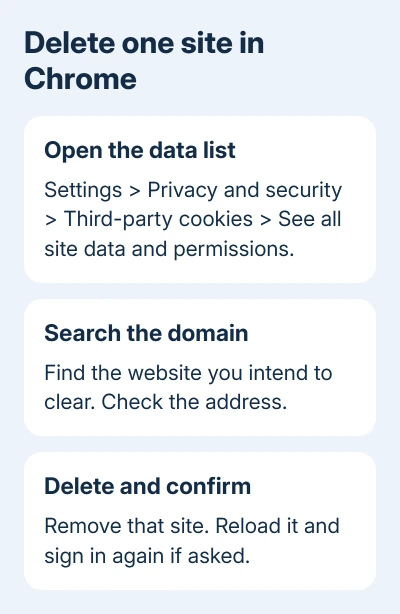
Google says specific cookies can be deleted through this site-data list. The Third-party cookies heading can be confusing: this list also holds data saved by sites you've visited.
In that list's upper-right search field, enter the website's name. Use its domain, such as example.com, rather than a whole page address containing a long path, search query or tracking code.
Review the matching entries before clicking anything. A company can use several related domains, and unrelated websites can have similar names. Match the address in the affected tab to the entry you're about to remove.
Delete that entry and open the website again
Click Delete beside the site you want to clear, then confirm Delete. Reload the affected tab after deletion. You may need to sign back in, choose your preferences again or answer a new cookie-consent prompt.
Have your password and usual verification method ready before confirming. Cookie deletion can end the website's saved login even when Chrome still holds its password in the password manager.
Repeat the previously broken action, such as signing in or opening your account page. Stop clearing data if it now works; the other websites don't need a reset.
If the entry reappears after you reload the site, that alone isn't a failure. Websites can save new cookies when you visit again. Check whether the page works now, rather than expecting the site-data list to stay empty.
I'd start with this small deletion when only one website has trouble. Signing out of dozens of unrelated accounts adds work without helping you tell whether that website's saved session caused the fault.
If you're deciding which data to remove, the cookie cleanup explanation separates a saved session from cached files and visited-page history. Those categories serve different purposes.
Keep the deletion separate from cookie permissions
Deleting stored cookies removes existing data. It doesn't tell Chrome to block every new cookie from that site. If you want the site to stop saving data, you'll need to change its cookie permissions separately.
Likewise, an exception under Sites allowed to use third-party cookies changes what the website can use. Removing or adding an exception isn't the same action as clearing its saved site-data entry.
A site can need third-party cookies for an embedded sign-in or another service. If the page still fails and reports blocked cookies, review the Chrome cookie permission settings instead of deleting the same data repeatedly.
A cookie-consent banner belongs to the website. Clicking Reject tells the site your choice; it doesn't use Chrome's control for deleting stored data. To remove the current browser data, return to Chrome Settings.
Private browsing has its own behavior too. Third-party cookies are blocked by default in Incognito, so a page that fails only there may have a permission issue rather than an old session that needs clearing.
On Android, delete data from the open site
Open the website in Chrome for Android. Open the three-dot More menu, then choose Site controls > Cookies. Use Delete beside the stored data and follow the confirmation.
Reload the website after deletion. Sign in again if asked, then repeat the action you were trying to fix. Check that you're still using Chrome; a link opened inside another app can use a different browser window.
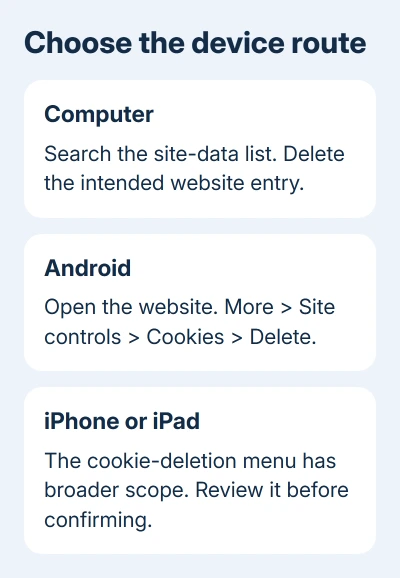
Android's Site controls route starts from the page itself, which helps when its brand differs from the web address. Check the address before removing data, especially if a sign-in redirects to another domain.
This won't clear the same website's cookies in Samsung Browser or Firefox. If the problem is in one of those apps, use that browser's own controls rather than deleting more data from Chrome.
Chrome's computer settings and Android's Site controls panel use different routes. If a menu from the computer section isn't on your phone, use the Android route rather than searching the phone for desktop controls.
Know the limit on iPhone and iPad
On iPhone and iPad, open More > Settings > Privacy and Security > Delete Browsing Data. This menu uses data categories. The cookie steps for iPhone and iPad don't offer the single-site deletion route available on a computer.
Don't confirm that broad deletion if your aim is to preserve every other site's session. Review the selected categories and scope first. Switching to Safari's settings won't clear Chrome's cookies for you.
If you decide a wider cleanup is acceptable, select Cookies, Site Data, review the time range, and deselect data you want to keep before confirming Delete Browsing Data. This has a wider effect than deleting one desktop entry.
When the website still won't work
Try signing in normally after clearing the site's data. A rejected password, account suspension or service outage needs the website's support team. Clearing browser storage can't correct those account or server problems.
Give the site's support team its address, the exact error and your Chrome version. Explain whether deletion changed the failure. For a managed browser with locked controls, ask the administrator about the restriction.
The Short Version
On desktop Chrome, search See all site data and permissions and delete the intended site. Android has a Site controls route. Check the scope before using iPhone's broader browsing-data deletion. New cookies after a fresh visit are normal.
Checked November 13, 2026.