
Deleting messages on a Mac starts with selecting the right thing in Messages. Select a bubble and press Delete to remove that message, or Control-click a conversation in the sidebar and choose Delete for the whole thread.
Check Messages in iCloud before confirming. With that feature enabled, deletion reaches the other devices using the same message library. The recipient keeps their copy.
Choose a message or an entire conversation
Open Messages and the conversation containing the unwanted content. Select the message in the conversation itself when the rest of that history should remain. Select the sidebar conversation when the entire exchange can go.
Apple documents these separate actions in its Mac message-deletion instructions. Save any text or attachment that needs to survive outside Messages before deleting it.
Enable Messages in iCloud is on the iMessage tab in Messages > Settings. Check its state before removing history; turning it off is unnecessary for an ordinary deletion.
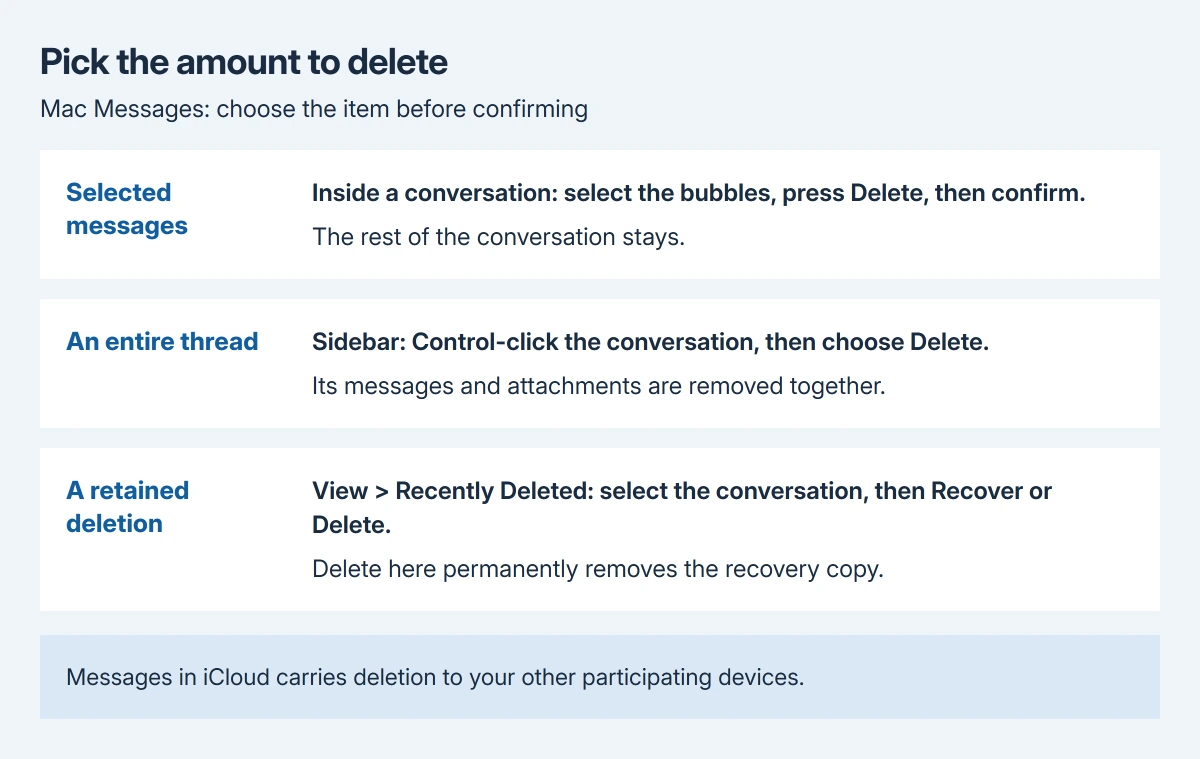
Status: Mac Messages deletion and recovery checked October 29, 2026 against Apple's current guide. The controls apply inside Messages. No private conversation was opened or removed.
The selection check is ours: read the selected bubble or sidebar name before confirming. Removing a thread with a familiar name still removes its attachments and history, rather than just hiding its sidebar entry.
Remove selected bubbles and attachments
- Click the intended conversation in the sidebar.
- Select the unwanted message or attachment in the conversation. Select additional messages only when they should also be removed.
- Press the Delete key.
- Click Delete in the confirmation dialog.
The selected content should leave the conversation while the remaining messages stay. If the unwanted words disappear from the typing field instead, that field had the keyboard focus. Click the existing message before trying again.
For several attachments of one kind, click the conversation header's contact or group picture. Find a category such as Photos, then click Show more. Shift-click the items, Control-click the selection and choose Delete.
Review those attachments as a group before confirming. This is useful when the conversation should remain but its shared pictures are no longer needed.
Delete whole conversations from the sidebar
Control-click the unwanted sidebar conversation and choose Delete, then follow the confirmation. Apple also supports selecting several conversations together, Control-clicking the selection and choosing Delete.
Do not select several threads merely to remove one message from each. Conversation deletion acts on their histories. Use bubble selection inside each conversation for that smaller change.
If identifying the right person is difficult because every sidebar picture shows initials, the Mac contact-photo checks address that display problem before a group cleanup.
Recover a mistake or permanently remove it
Choose View > Recently Deleted in Messages. Select the relevant conversation in that view, then choose Recover to return its retained messages to the conversation list.
Apple says recovery is available for up to 30 days. If Recently Deleted is absent, its guide notes that there may have been no conversation deleted within that period.
For immediate permanent removal, select the intended conversation in Recently Deleted, click Delete and follow the prompts. This removes the recovery option. Inspect the selection again before completing it.
Recovering a synced conversation also affects the other devices using Messages in iCloud. Keeping a second signed-in device is therefore different from keeping a separate saved copy.
The iPhone message-deletion procedure uses touch controls instead of the Mac's sidebar and keyboard. Use the controls for the device being operated.
Decide whether automatic deletion fits the task
For an ongoing retention limit, open Messages > Settings > General and inspect Keep messages. Choosing a period other than Forever automatically removes conversations and attachments after that period.
Leave Forever selected when the intention is only to clear specific threads today. A shorter retention period applies broadly, including to older history that may still matter.
Deletion does not recall a sent message from another person's device. Undo Send is a separate iMessage action with a two-minute window and compatibility conditions; deleting your history does not extend that window.
If Messages refuses a documented deletion or its controls are missing, contact Apple Support with the macOS version and the failed action. Say whether the failure concerns bubbles, sidebar conversations or Recently Deleted.
The Short Version
Select bubbles for a small deletion or Control-click a sidebar thread for its history. Recently Deleted provides recovery or permanent removal. Keep messages changes ongoing retention. Check synced devices before confirming.

Isaac Smith is the founder and editor of PC Glance, a website that covers computers, laptops, and technology. He is a tech enthusiast and a computer geek who loves to share his insights and help his readers make smart choices when buying tech gadgets or laptops. He is always curious and updated about the latest tech trends.