
Deleting Safari history on a Mac uses History > Clear History, followed by a time period and confirmation. Check Safari's iCloud connection first: Apple says the deletion also reaches other Apple devices using iCloud for Safari.
Save any page addresses that still matter before confirming. A cleanup intended for the last hour should not remove the entire available record by accident.
Decide which devices and dates the deletion should affect
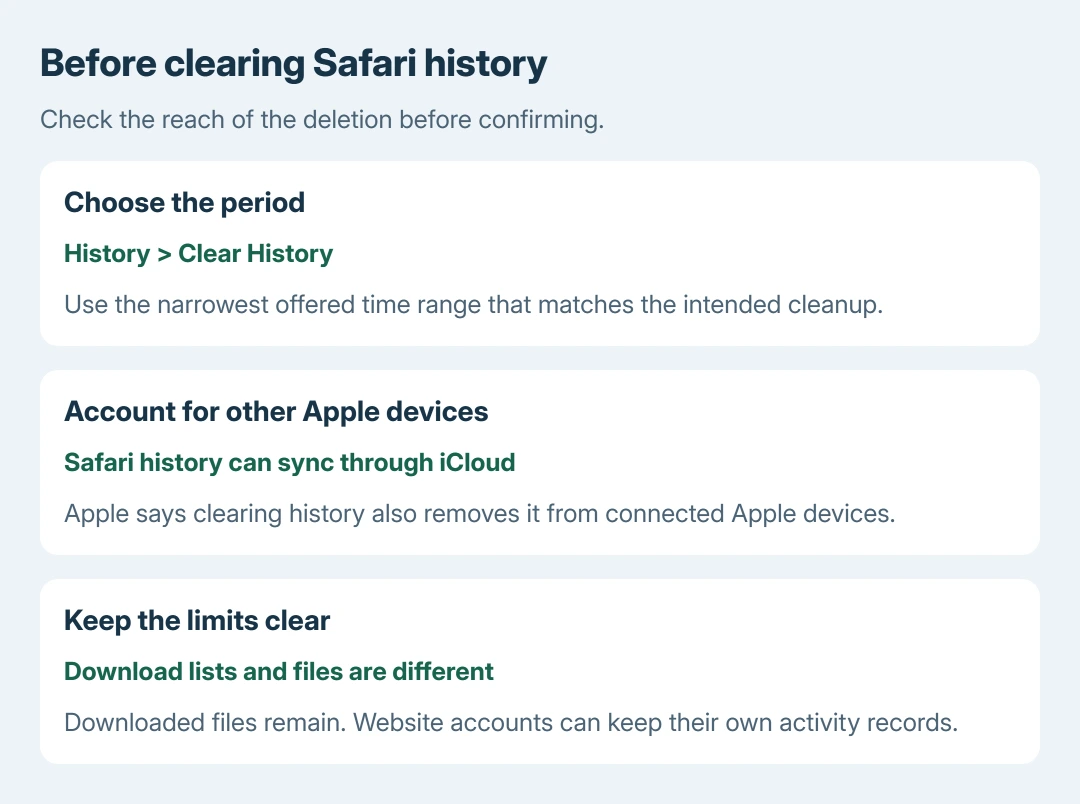
If this Mac shares Safari through iCloud, treat clearing history as a change across those connected devices. Apple's Mac history-deletion guidance states that scope explicitly.
Check the Apple Account and Safari sync setting if the Mac is shared or recently changed owners. On current macOS, open System Settings, select your name, then iCloud > See All to inspect Safari.
Status: Safari's Mac history-removal and iCloud scope reviewed October 28, 2026. This procedure was researched without deleting any browser data.
Choose the narrowest offered period that accomplishes the task. If the goal is simply to stop using a shared account on a website, sign out there; removing a history entry does not close its account.
The Mac procedure differs from the iPad Safari cleanup controls. Use the desktop menu while Safari is the active Mac application.
Clear the chosen period and verify the result
- In Safari, choose History > Clear History.
- Select a time range and, if offered, one profile or all profiles.
- Check the warning and click Clear History.
Return to the History menu and inspect its list for the chosen period. Entries outside a limited range can remain; their presence does not mean the selected deletion failed.
Apple says this command removes recent searches and other browsing records as well as visited-page history. It also clears items such as the list of downloads and records of sites that requested location or notification access.
Downloaded files remain on the Mac. Removing the download list does not delete the documents, pictures or installers stored in Downloads or another chosen folder.
The time-period check is ours: it controls how much recorded browsing is discarded. Do it before approving the confirmation, while cancellation is still available.
Keep website account records separate
Safari cannot use this command to erase a search history saved independently by a website. Apple states that limitation in the same help page.
For example, a signed-in service can still display its own searches or activity after Safari's local list is cleared. Manage those records through that service's account controls if their removal is also intended.
Clearing the browser's record likewise does not delete an account, retract a purchase or remove downloaded documents. Match the cleanup to the thing that actually needs changing.
Is one broken website the reason for clearing everything?
A website login or loading problem calls for a different decision. Safari offers Settings > Privacy > Manage Website Data for selecting a particular site's stored data instead of erasing a whole browsing period.
Apple warns that removing website data can sign users out or alter site behavior. Make sure the relevant account can be accessed again before removing that data.
Our cookie-removal explanation covers that consequence. A broad cleanup is not evidence that the site's own service or Safari's rendering fault has been repaired.
If the selected history period remains after confirmation and Safari has been reopened, report the Safari version, macOS release and sync details to Apple Support. A managed Mac should also be checked with its administrator.
The Short Version
Choose the intended history period, consider iCloud's reach, then confirm the removal. Downloaded files and records kept inside website accounts remain separate. Use a site's data controls when the real problem is that particular website.

Isaac Smith is the founder and editor of PC Glance, a website that covers computers, laptops, and technology. He is a tech enthusiast and a computer geek who loves to share his insights and help his readers make smart choices when buying tech gadgets or laptops. He is always curious and updated about the latest tech trends.