
Delta installs from the App Store where its listing is available, without jailbreaking or a signing service. For AltStore PAL, install the official marketplace first and get Delta inside it rather than using a random direct-install button.
The phrase Delta iOS direct install covers several different routes. The App Store, AltStore PAL and AltStore Classic install the app in different ways, so choose the route your iPhone can actually use before downloading anything.
Check the app, iOS version and region first
Open Settings > General > About and check your iOS version. The current Delta App Store listing requires iOS 17.4 or later. The iPad version requires iPadOS 17.4 or later.
Those requirements can change with a new app release. Read the Compatibility section on the listing you open, especially if you're using an older iPhone that can't install the latest iOS.
If a compatible iPhone needs more room for its system update, use the iPhone update storage checks before deleting game data to make space.
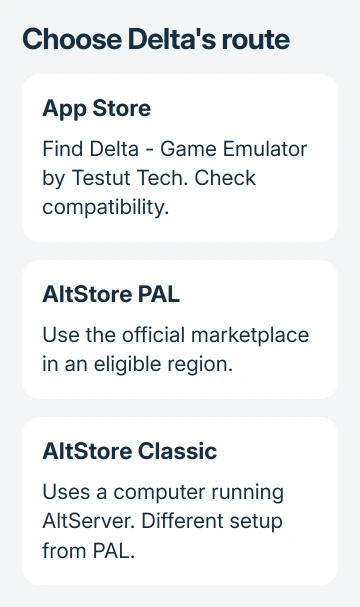
The official app is Delta - Game Emulator from Testut Tech. Check both parts. A similar name or a video demonstrating an installation isn't enough to identify the package offered by a different website.
PAL's supported regions have expanded from the EU-only description in Delta's older FAQ. The current downloads page lists the European Union, Japan and Brazil. Check the marketplace eligibility on your device.
For computer installation, the Delta Mac and Windows guide covers the separate hardware requirements. Downloading an iPhone app package onto Windows doesn't make it a Windows program.
Install Delta from the App Store when available
This is the simplest route when the official listing offers the download for your account and device. It doesn't require AltServer, Developer Mode or an enterprise profile.
- Launch App Store from your iPhone's home screen.
- Search for Delta - Game Emulator.
- Open the Testut Tech listing and check compatibility.
- Tap Get or the cloud download button.
- Approve the download with the authentication your iPhone requests.
- Open Delta when installation finishes.
The official App Store listing can also open the correct app from Safari. The US web address doesn't promise availability for every Apple Account region; you'll need to check the listing in the store on your device.
Reaching Delta's library means the emulator is installed. An empty library isn't a failed installation. Games are imported separately, so don't reinstall the app just because no game appears the first time it opens.
If Get never starts downloading, check whether other App Store apps download normally. A general store problem needs its own fix. Switching to an unknown certificate service leaves you relying on that service to keep the app working.
Install AltStore PAL in an eligible region
AltStore PAL is the marketplace route that starts on a website and then installs apps on the phone. It is different from AltStore Classic, whose setup uses a computer running AltServer.
Your Apple Account must use an eligible region, and you must physically be there. Changing a region label alone doesn't meet those conditions. Update your iPhone before following the installation prompts.
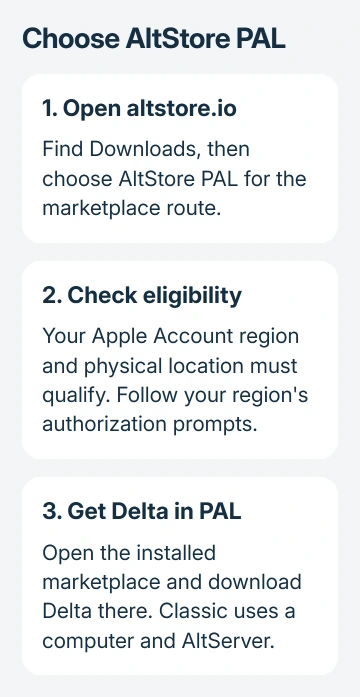
- Open altstore.io in your iPhone's browser.
- Find Downloads, then AltStore PAL.
- Choose the PAL download, rather than an AltServer download for a computer.
- Complete the marketplace authorization prompts for your region.
- Open the installed AltStore PAL and choose Delta's download action there.
For the European Union, Apple says in its alternative installation instructions to read the marketplace information after tapping its install link, tap Allow, then finish the onscreen installation steps.
In Japan or Brazil, the prompt instead takes you through Settings > Manage App Installation. Tap Allow beside the marketplace, read the information and confirm Allow, then complete installation.
Follow the region-specific screen rather than an older instruction that expects exactly the same Settings banner everywhere. If authorization isn't offered, check eligibility and software updates before retrying the marketplace link.
Keep PAL separate from Classic and signed downloads
AltStore Classic's official setup requires AltServer. The downloads page provides a macOS version and a Windows version because a computer takes part in that installation method. It isn't the same computer-free route as PAL.
I'd use the App Store or PAL when either is available for this job. Choose Classic only when you intend to follow its full official setup, rather than expecting a one-tap download like the App Store offers.
An IPA is an iPhone app package. The file alone doesn't meet your iPhone's permission and app-signing checks. Treat a web button promising otherwise as a separate service, not as another name for the official store.
Don't install an unknown device-management profile for a gaming download. These official routes don't need a stranger managing your iPhone. Stop if a site asks you to enroll the phone with an unfamiliar organization.
If a previously signed copy stops opening, check which store or service supplied it before deleting it. Save data can matter more than the app download, and removing the app can remove local progress.
Import a game and keep the installation updated
Delta's library has an add control for importing a game from Files. Choose a supported game file you have the right to use in Files. Check that it appears in Delta's library before importing another game.
Game files are often called ROMs, meaning copies of game data. Installing the emulator doesn't provide a library of commercial games. A request for a game file isn't an instruction to install another app profile.
Keep using your original store for Delta updates. App Store copies update through the App Store. For alternatively distributed apps, current iOS lists automatic app updates under Settings > Apps > App Installation.
If automatic downloads are off, open Settings > Apps, choose the app and check its available update controls. Deleting the marketplace removes its ability to supply updates for apps installed through it.
When installation still fails, use the marketplace's support with your iPhone model, iOS version, region and exact prompt. For a failed App Store download on a compatible phone, give that same information to Apple Support.
The Short Version
Use Testut Tech's Delta in the App Store when available. For PAL, start at altstore.io and complete the authorization for your eligible region. Classic needs AltServer, while an empty Delta library simply needs a supported game imported.
Checked November 9, 2026.

Isaac Smith is the founder and editor of PC Glance, a website that covers computers, laptops, and technology. He is a tech enthusiast and a computer geek who loves to share his insights and help his readers make smart choices when buying tech gadgets or laptops. He is always curious and updated about the latest tech trends.