ERR_CONNECTION_RESET means the connection ended before Edge could load the page. If several sites fail in Edge and Chrome on your Dell, check Windows and the network. One owner fixed it by reinstalling Windows with fresh Microsoft media.
That was the final fix after their network resets and driver updates failed. Start with the quicker checks: a fault confined to Edge, one affecting every device on the router, and one confined to the Dell need different repairs.
In this guide
1. Check whether the failure follows Edge or the Dell
Open the same failing address in another installed browser. Compare a second device on that connection as well. Use identical addresses for the comparison. A working mobile app can't tell you whether its website loads.
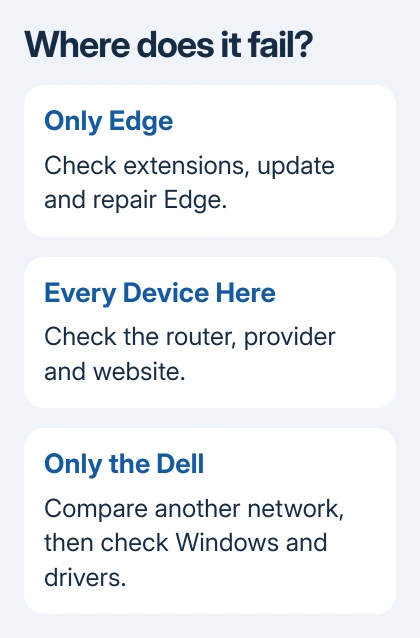
If only Edge fails, go to section 2. If every device on that connection fails, restart the modem and router and try again. A site that still fails everywhere may need its operator or your internet provider to check the connection.
If the Dell is the only failing device, connect it to your phone's hotspot. If that works, check filters on the usual network. If neither connection works, look at software installed on the Dell.
In the original case, the owner couldn't reliably reach Slack, Facebook and YouTube. Edge and Chrome were affected, and both Ethernet and Wi-Fi showed trouble. Clearing only Edge's cache wasn't helping with that wider problem.
A reset error on a local IIS website after a particular Windows update is a different case. The KB5066835 website issue concerns the server-side Windows component, rather than this Dell factory-setup problem.
2. Repair Edge when the other browser works
Open edge://settings/help, apply an available update and relaunch Edge. Try the failing page again. If it still fails, enter edge://extensions, temporarily turn extensions off and retry that same page.
If disabling extensions works, restore them individually until the fault returns. Remove the responsible add-on. This helps you find a fault that affects only Edge. If another browser fails too, keep going with the Windows checks.
For a continuing Edge-only problem on Windows 11, close Edge and open Settings > Apps > Installed apps. Find Microsoft Edge, open its menu, select Modify, approve the system prompt and choose Repair.
Windows 10 places the app list under Settings > Apps > Apps & features. Select Edge and use Modify > Repair. The repair needs an internet connection, and your browser data and settings should be kept.
If your organization's settings hide Modify, ask IT to repair Edge. If Chrome also fails after the repair, move to the Windows connection checks.
3. Check the network driver and Windows connection setup
Open Device Manager > Network adapters. For the active adapter, right-click to open Properties, then choose Driver. Compare its version and date with the driver for your exact Dell model. Skip packages intended for a different model.
Use the laptop's Service Tag on Dell Support if the model name is ambiguous. Save a working network-driver installer before removing an adapter driver, so you can reconnect after restarting.
The Windows connection repairs include reinstalling an adapter driver when simpler checks fail. The thread's asker had tried updating both adapters, but the same sites still failed.
If the problem continues, try Network reset once. On Windows 11, open Settings > Network & internet > Advanced network settings > Network reset. On Windows 10, use Settings > Network & Internet > Status > Network reset.
Choose Reset now, confirm and let Windows restart. This reinstalls network adapters and resets their settings. VPN clients or virtual-network software may need setup afterward. Check the same sites before changing anything else.
One other Dell owner reported immediate success after disabling IPv6, the newer internet addressing system. I'd give that result to your network administrator rather than leave IPv6 disabled: some Windows components depend on it.
The main asker's DNS changes, network resets, firewall test and even a separate USB Wi-Fi adapter had failed. If you've tried those too with the same results, repeating them is unlikely to help.
4. Use fresh installation media only for a persistent PC fault
The owner eventually replaced the Dell factory setup using Microsoft's Windows media. They said the sites then worked and kept working. They blamed the original drivers, but didn't identify which driver was faulty.
A clean installation removes files, apps and settings. Back up your files and any BitLocker recovery key, and check Windows activation and edition first. Have Dell or a technician handle the installation if you're unsure.
For compatible x64 PCs, find Create Windows 11 Installation Media on Microsoft's download page. It's separate from Installation Assistant, which upgrades the current Windows installation.
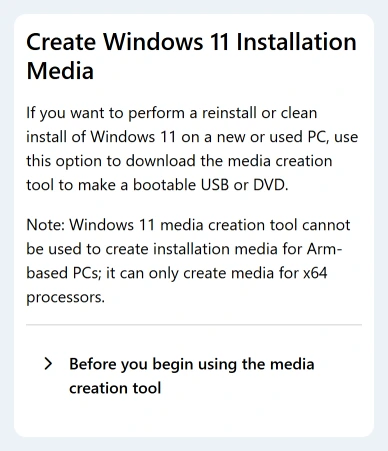
Use the tool with an empty USB stick holding 8 GB or more. Creating the installer erases the USB's existing contents. Arm-based PCs need Arm installation media; this x64 tool isn't the right choice for them.
Follow the installation-media instructions for the supported system you're installing. Booting the installer for a clean installation differs from running setup inside Windows and keeping your existing apps.
The original report was a Windows 10 installation in 2021. For a current repair, check whether the Dell supports Windows 11 or needs a supported Windows 10 servicing arrangement. The unsupported-PC checks cover that decision.
When the Dell still resets connections
Give Dell Support your Service Tag, system and browser versions, affected addresses and hotspot comparison. Ask about network drivers and factory-installed networking software before agreeing to a reinstall.
Also say whether the sites failed on fresh Windows before you restored your apps. That gives support a better idea of what to check next. Record each change and whether the same failing pages started working afterward.
The Short Version
Compare browsers, devices and networks first. Repair Edge for an Edge-only fault; check Windows for a Dell-wide failure. Fresh Microsoft media fixed the historical owner's case, after simpler repairs failed.
Checked November 22, 2026.
 If you have any business, I can build it online