KB5066835 broke USB keyboards and mice in Windows recovery and caused some local websites to refuse connections. Install the latest cumulative update for your Windows release; later updates fixed both faults.
The symptom matters more than the KB number alone. A missing preview, invisible password button and smart-card failure need different actions. Match your symptom before removing an update that newer updates have already replaced.
In this guide
1. Confirm the Windows release and installed build
Press Windows+R, enter winver, and press Enter. Record the release name and full OS Build. KB5066835 was released on October 14, 2025, for the 24H2 and 25H2 releases of Windows 11.
Its original builds were 26100.6899 for 24H2 and 26200.6899 for 25H2. Seeing that KB in Update history doesn't mean it's still the newest cumulative update installed on your computer.
Open Settings > Windows Update > Update history to see later quality updates. Then return to Windows Update, choose Check for updates, install the newest update available for that Windows release, and finish any requested restart.
Microsoft lists follow-up repairs in its KB5066835 notes. Once you've installed the newer update that fixes your problem, you may no longer need the old workaround.
If Windows can't install those updates, keep the error code. A failed installation with 0x800f0983 has a separate Windows update repair route. That differs from a device fault after a successful installation.
2. Restore USB controls in Windows recovery
The USB fault affects Windows Recovery Environment, often shortened to WinRE. That's the repair environment containing options such as Troubleshoot, rather than the normal Windows desktop.
In this case, a USB keyboard or mouse works in Windows but stops responding after you enter recovery. If your keyboard also fails on the desktop, this recovery-only fault doesn't explain it.
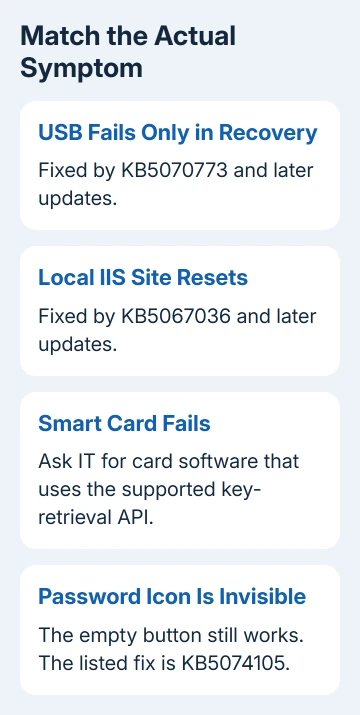
The repair arrived in KB5070773, released October 20, 2025, and updates released afterward. If Windows still starts, install its current cumulative update from the desktop before returning to recovery.
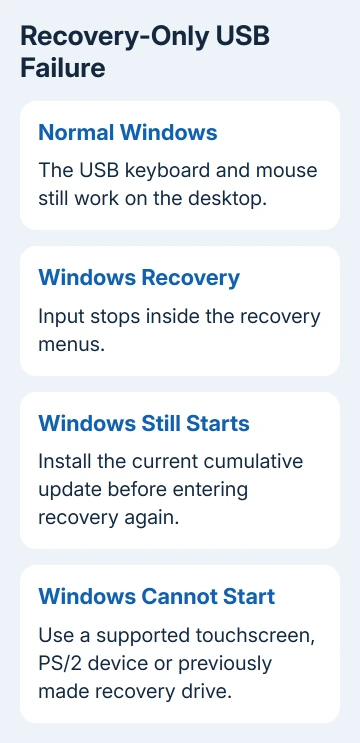
If Windows won't start, the alternatives include a touchscreen and touch keyboard, a PS/2 keyboard or mouse where the PC has that port, or a previously created USB recovery drive.
Booting that recovery drive can provide a recovery environment with working USB input. A USB-to-PS/2 plug alone isn't the same as having compatible PS/2 hardware, so check the PC and keyboard support before buying an adapter.
If none of those routes is available, ask the computer maker or IT to help start a working recovery environment. Say that USB input fails specifically inside WinRE after KB5066835, rather than reporting only a broken keyboard.
3. Repair local IIS websites that reset connections
A second confirmed problem affects server applications using HTTP.sys, a Windows component that handles incoming web connections. Some IIS websites can fail with ERR_CONNECTION_RESET, including sites hosted at localhost.
Check this case if you're a developer or administrator and your own Windows-hosted website stopped loading. It isn't a general explanation for every public website that fails in a browser.
Open Settings > Windows Update, check for updates, install what's offered, and restart. The release notes say to restart even if that check doesn't install an update. Test the same local site afterward.
The listed repair is KB5067036, released October 28, 2025, or a later update. The issue didn't occur in every environment, so seeing the KB number in your history doesn't by itself explain a website failure.
If the site still fails on an updated build, give its administrator the URL, error, Windows build and restart result. Ask them to check the IIS application and its logs instead of repeatedly removing browser data.
4. Have IT check smart-card certificate compatibility
The update changed how smart cards sign you in or sign documents. Some older certificate operations use CSP, a system for handling cryptographic keys. Its stricter RSA checks require KSP, a newer key-provider system.
Symptoms can include cards not being recognized in some 32-bit applications, document signing failing, or certificate-based sign-in errors. Ordinary password sign-in problems don't automatically belong to this category.
Give IT the card software version, affected app and exact message. Ask about provider compatibility and any Smart Card Service Event ID 624 recorded before the update; that event points to older operations affected by the change.
For a lasting repair, the app's developers need to change how it retrieves keys to use the supported Key Storage API. Ask IT or the app maker for that compatible version. An older registry workaround was scheduled for removal in April 2026.
Updating Windows alone won't change how an older app retrieves those keys. This case needs the team that maintains the card software and affected app, especially when the same card works in one application but fails in another.
5. Use the password button even when its icon is invisible
An invisible password icon in the lock-screen sign-in choices is another listed issue. It originated with KB5064081 or later updates and can appear on a PC that also installed KB5066835.
Hover over the empty position where the password choice should be. Select that position to open the password entry field, then sign in normally. The button remains available even though its picture isn't visible.
This mainly affects computers managed by a business or organization. The release notes describe it as very unlikely on personal Home or Pro devices. A rejected password or missing account is a different problem.
The listed repair is KB5074105. Once signed in, install the newest cumulative package available for that Windows release rather than changing account credentials just to repair the missing picture.
6. Recognize the File Explorer preview security change
KB5066835 also changed preview behavior for files downloaded from the internet. File Explorer disables their preview as a security measure. That can look like another failure after the update, even though the change is intentional.
Check whether local files still preview and only downloaded files are affected. Don't remove an update just to restore every attachment's preview. Give IT a trusted-file example if your work depends on that preview.
For a wider problem on a current release, use the latest Windows update issue checks to match the present build. A fault appearing today may belong to a newer update rather than this 2025 package.
When the matching repair doesn't help
Open Get Help on a personal PC and include the symptom, winver result, original KB and newest installed update. For recovery input or smart cards on a work device, send those details to IT with the matching case from this page.
Ask for help with the action that fails on your current Windows build. I'd avoid uninstalling a year-old update as the first experiment when its confirmed defects already have replacement fixes.
The Short Version
Update the affected Windows release, then follow the symptom: recovery-only USB, local IIS, smart cards or the invisible password button. Downloaded-file preview blocking is an intentional security change, not the USB fault.
Checked November 12, 2026.
 If you have any business, I can build it online