An Event ID 16386 entry saying the ATI EEU client failed to start points to an AMD display-driver service. For an unused ATI installation, stopping and removing its leftover External Events service fixed this error for affected owners.
Check the event's source and message before changing anything. The number alone doesn't identify the fault, and a PC that still uses AMD graphics needs its driver installation checked first.
In this guide
1. Match the event to the ATI EEU message
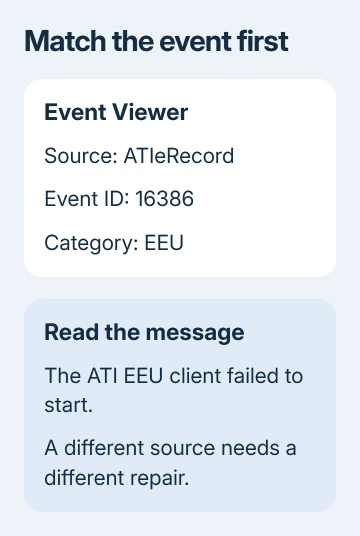
Open Start, search for Event Viewer, and open it. Expand Windows Logs and check Application for the reported event. Select an entry and read the General tab rather than relying only on its event number.
Look for ATIeRecord, the EEU category, and a message about the ATI EEU client failing to start. Record the time and event details. If the source is different, use that source's support information instead of applying an ATI repair.
The older reports mention related ATIeRecord event numbers too. Look for the same ATI component and failure message. A long list of errors alone doesn't mean they share this cause.
Don't clear the log yet. Keeping the time of the last matching entry makes it easier to check whether new failures appear after a change. Old entries remain visible even when their cause has been corrected.
If the computer is also crashing, note the crash time separately. An error just before a restart can help with troubleshooting, but it isn't necessarily what caused the crash. A Windows crash check should follow the actual crash message.
2. Check whether the PC still uses AMD graphics
Open Device Manager through Start's right-click menu on Windows 10 or 11. Expand Display adapters and note every adapter listed. On Windows 7, search Start for Device Manager and open the same category.
A laptop can list more than one graphics adapter because it uses integrated and dedicated graphics together. With an AMD adapter present, check the supported driver package before deciding its service is left over from an old installation.
In the original Windows 7 report, the owner used an Nvidia card while the motherboard's ATI graphics were disabled. ATI background processes were still present. The fix is for unused ATI software, not active AMD graphics.
Press Ctrl + Shift + Esc for Task Manager. Check its processes for atieclxx.exe and atiesrxx.exe. These processes belong to the ATI software and help you check what's still installed. Seeing them doesn't mean your PC has malware.
If AMD graphics are active or you're unsure which GPU drives the screen, get the model's display-driver package from the PC maker first. Ask the maker about the External Events error if reinstalling that package doesn't resolve it.
For accompanying display stalls, the AMD driver timeout checks cover that symptom separately. Keep the complete timeout message alongside the event details so support can compare them.
3. Stop the leftover service and compare new events
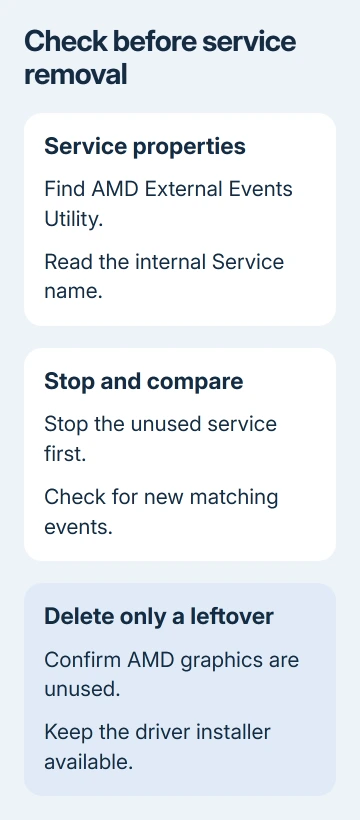
For a confirmed unused ATI installation, press Windows + R, type services.msc, and press Enter. Find AMD External Events Utility in the Services list and open its properties.
Write down its Service name and current startup setting before changing anything. The name listed for a service can differ from its internal name. Commands need the internal name shown in its properties.
Select Stop if the service is running. Then use the computer normally and watch for fresh matching events. A stopped service won't erase earlier entries, so compare event timestamps with the time you stopped it.
If the control is unavailable or stopping it reports an error, save that message. Don't substitute a similarly named Windows service just to complete the step. Support can use the exact failure to check the installed driver package.
I'd stop and check the service before deleting it. If the event source doesn't match, or the PC needs the AMD installation, that smaller change gives you a chance to reconsider the repair.
4. Remove only the unused service that matches
One owner confirmed the suggested service removal worked, and a separate Windows 7 owner reported the same success. Use this fix only for the leftover service, not for every AMD system.
Search Start for Command Prompt and use the result's Run as administrator option. Approve the administrator prompt. Use Command Prompt here; PowerShell can interpret a short command name differently.
Microsoft's service deletion command removes a service entry. Use the exact internal service name from Properties, enclosed in quotes if it contains spaces.
The historical command is sc.exe delete "AMD External Events Utility". Use it only when Properties shows that exact Service name. If it shows a different name, don't copy the old command or guess which entry to remove.
Deleting a service isn't a temporary toggle: restoring it can require reinstalling its driver software. Keep this step for an unused ATI installation whose role you've confirmed, with the appropriate driver package available if needed.
A successful response means the entry was deleted or marked for deletion. Removal can wait until the service stops or a program releases its connection. Close Services, restart Windows, and check for fresh matching events.
If the response says the specified service doesn't exist, stop there. Leave driver files and registry keys alone. Recheck the actual service name and ask the PC maker to identify the installed component.
5. Escalate a continuing event with the driver details
If new ATI EEU errors continue, give the PC maker or AMD support the full event text, adapter names, Windows version, and service name. Include whether the error returned after driver repair or leftover-service removal.
If no fresh errors appear but the PC still crashes, continue with the crash itself. Give support its stop code and crash time rather than reporting the cleaned-up ATI event as the continuing fault.
The Short Version
Match ATIeRecord and the ATI EEU message first. Repair an active AMD installation; remove the matching External Events service only when it's an unused leftover, then check for new events after restarting.
Checked November 16, 2026.