Excel 2010 can turn a cut into a copy when old Skype Click to Call software disrupts the clipboard. Remove Skype Click to Call if it's installed, then restart Excel.
A different case is normal: cells stay visible after Ctrl+X until you paste them. If the original empties after Ctrl+V, the move worked. If Ctrl+X fails on its own, check whether another app uses that shortcut.
In this guide
1. Check whether the cut actually fails after pasting
Start a blank workbook so the test doesn't move your real data. Type sample in A1, click A1 once, and choose Home > Cut. Click C1 and choose Home > Paste.
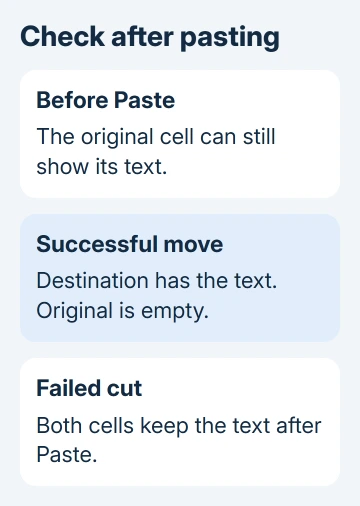
After a successful move, C1 contains the word and A1 is empty. The original cell doesn't need to disappear at the moment you press Cut. Excel completes that part when you paste.
Repeat with Ctrl+X and Ctrl+V using another temporary word. If the ribbon moves the cell but Ctrl+X doesn't, check for a conflicting keyboard shortcut in step 3. If both methods leave the original after pasting, check Click to Call first.
An animated selection usually surrounds a cut or copied range. In this fault, it appeared briefly or didn't stay visible. Check what's in both cells to see whether the move worked, even if you didn't notice an animation.
Microsoft's move and copy instructions describe both the commands and that moving selection. Check the destination and original cells together to see the actual result.
Make sure you're selecting the whole cell rather than editing text inside it. Press Enter to finish a cell edit, then click the cell once before testing. Cutting selected characters from the formula bar is a different operation.
2. Remove the separate Skype Click to Call component
Close Excel and the web browsers. Open Control Panel > Programs > Programs and Features. On Windows 7, Control Panel is available from Start; on Windows 10 or 11, search Start for Control Panel.
Look through the installed programs for Skype Click to Call. Select that entry, choose Uninstall, and follow its prompts. Reopen Excel and repeat the blank-workbook move.
This fixed the problem for several owners on Microsoft's forum, including an Excel 2010 owner who said both Cut and Format Painter started working again. The reports also included Excel 2007, so it wasn't limited to one release.
Click to Call was a separate component. Don't remove unrelated Microsoft applications just because their names include Skype, and don't install an old Skype package to look for it.
Check that the move now works: the new cell gets the content and the old cell empties after pasting. If formulas had been arriving as values, check a disposable formula too before returning to the real workbook.
If the program isn't listed, move on. This fix applies to that old component. Other software can cause clipboard failures on a current computer.
I'd remove an installed Click to Call component before changing Excel's files. Several owners fixed this exact fault by removing it.
3. Free Ctrl+X from another app's hotkey
If Home > Cut works but Ctrl+X doesn't, close programs that assign their own keyboard shortcuts and try again. Start with any app where you personally configured Ctrl+X for another action.
One owner traced this to Skype's microphone-mute hotkey. Their shortcut affected Word as well as Excel; removing that shortcut restored normal cutting without uninstalling Click to Call.
For that old Skype 5.10 interface, the path was Tools > Options > Advanced > Hotkeys. Deactivate or change the entry using Ctrl+X. That route belongs to the old desktop client, not current Teams settings.
With another utility, open its hotkey settings and remove only the conflicting combination. Record your choice first if the shortcut is something you use regularly. Then restart the utility or Excel as needed and repeat the test.
Try cutting a few disposable characters in Word too. A failure across applications points away from one workbook. A failure only inside Excel keeps the next checks focused on Excel's startup components.
For a Word-only keyboard failure, the guide to shortcuts not working in Word covers its own language and command settings. Those aren't reasons to reset Excel.
4. Compare a clean Excel launch with a normal one
Finish saving, then quit every Excel window. Press Windows+R, type excel /safe, and press Enter. Use a fresh workbook in that safe-mode session for another temporary cell move.
If it works there, compare the add-ins loaded by your normal Excel launch. Safe mode leaves out added components, so start checking those if the move works there.
Close safe mode and start Excel normally. Open File > Options > Add-Ins. At Manage, select COM Add-ins, choose Go, and record the enabled entries. Turn off one suspect item, restart, and test again.
Repeat with Excel Add-ins if necessary. Re-enable items that don't affect the result. If one component triggers the fault again, ask its publisher or IT to check compatibility. Leave it off while they check.
Safe mode won't bypass every program outside Excel. A participant in the original discussion still had the problem there, so the problem could still come from a clipboard tool or shortcut utility running outside Excel.
Avoid deleting everything from Excel's startup folders. They can hold workbooks and customizations you need. The separate guide to an extra blank Excel window explains how startup files can affect a launch.
5. Repair Office only after checking the smaller causes
If ribbon Cut and Ctrl+X both fail in a blank workbook after those checks, open Control Panel > Programs and Features. Select the installed Office suite and choose Change.
For Office 2010, select Repair when offered and finish the process. The choices depend on how Office was installed. Complete any requested restart. Try another disposable move before using your main workbook.
For a work computer, give IT the Office version, Windows version, and the blank-workbook result. Tell them whether Home > Cut works, whether safe mode changes anything, and whether the problem affects other applications.
Ask them to check clipboard and hotkey software before replacing your workbook. Office 2010 is an old release; plan migration with IT if the installation can't be repaired reliably.
The Short Version
Judge the cut after pasting. If it leaves two copies, remove old Skype Click to Call when present. If only Ctrl+X fails, remove conflicting hotkeys. Use safe mode to check added components next, followed by Office repair when needed.
Checked November 17, 2026.
 If you have any business, I can build it online