FaceTime can find someone through an enabled phone number, email address or a name saved in Contacts. It has no public people directory, so ask for their FaceTime number or email if all you have is a name.
If a saved contact doesn't appear, enter their number or email directly. If that works, correct the card. If the address isn't available for FaceTime, ask which address is enabled on their device.
In this guide
Search with the number or email they actually use
On your iPhone or iPad, open FaceTime and select New Call. Earlier releases can say New FaceTime. Type the recipient's phone number or email in the address field and select the matching result.
When the person is already in Contacts, start typing their saved name instead. Select the correct contact if several names appear. The add-contact control can also let you choose someone from your saved contacts.
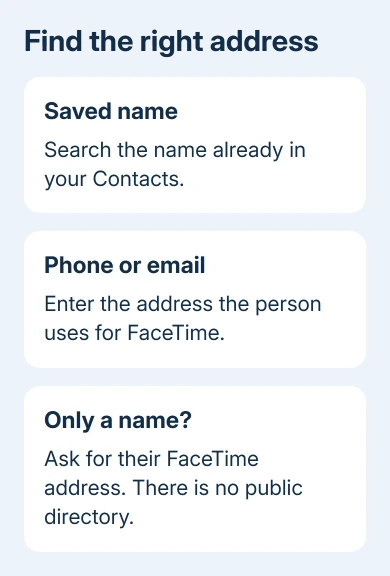
Apple explains that you can enter a name, number or email in its FaceTime calling instructions. A name refers to a saved contact, rather than a public search across Apple Accounts.
Choose FaceTime for video, or the audio-call control for audio. Check the selected contact and address before calling, especially when their card includes work and personal numbers or several emails.
If the call rings, FaceTime has found an address it can call. A missed call won't tell you why they didn't answer. It isn't a reason to rewrite a correctly saved contact.
Save the address in a contact card
Open Contacts, tap the add button, and enter the person's name. Add the phone number under the phone field or their email under email, then save the contact. Use the address they gave you for FaceTime.
For an existing contact, open the card and tap Edit. Correct an old number or add the enabled email address. Save the change, return to FaceTime, and try the saved name again.
If the same person has several cards, check which card contains the number you're calling. Two identical names can hide different details. The duplicate contacts guide helps when those cards need to be combined.
Keep the country code with an international number, and confirm it with the person rather than guessing from an old conversation. An enabled email is useful for someone calling from their iPad or Mac.
Saving a contact doesn't register that address for FaceTime on the other person's behalf. It just lets your device show their name alongside those details. The person still needs that number or email enabled in their own FaceTime settings.
Ask them to check which FaceTime address is enabled
On their iPhone or iPad, ask them to open Settings > Apps > FaceTime. Earlier versions put FaceTime directly in Settings. The service needs to be switched on and set up before they can receive calls.
Have them check the selected numbers and emails under You can be reached by FaceTime at. They can send you a selected address through a messaging channel you already use.
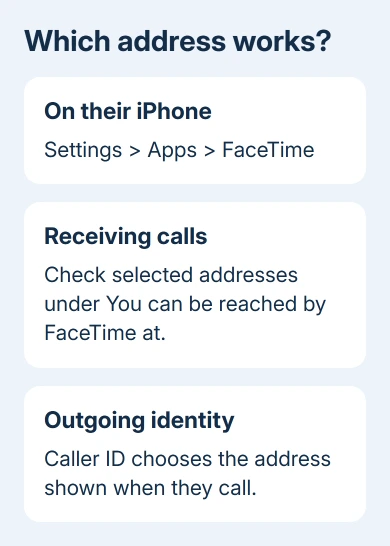
The Caller ID choice sets the number or email someone sees when they call. The list of reachable addresses controls which numbers and emails they can receive FaceTime calls on.
An iPad or Mac user can be reachable through an email without giving you an iPhone number. Use the enabled email exactly as written. You don't need their account password or verification code to call them.
If their screen says Waiting for activation, that device hasn't finished setting up the relevant service. The FaceTime connection guide separates activation and connection trouble from a wrong recipient address.
I'd confirm the enabled address before deleting and recreating contact cards. A perfectly saved old number still won't reach someone who now receives FaceTime only through a different number or email.
Find and call the same person on a Mac
Open FaceTime on the Mac and sign in if prompted. Click New Call (or New on older versions), enter a phone number, email or saved name, then press Return. Choose video or FaceTime Audio.
Check the selected result before calling. As on an iPhone, a name depends on the contacts available on that Mac. Entering a known enabled number or email avoids relying on whether a contact card has synced there yet.
If a saved name appears only on the phone, compare the person's contact cards on both devices. Try their enabled address directly on the Mac. If the call works, check the Mac's contacts list rather than their FaceTime account.
The other person can check their own reachable addresses in FaceTime > Settings > General on the Mac. They should give you a selected address, rather than assuming every email they use is automatically registered there.
Use a link for someone on Android or Windows
An Android or Windows user joins through a FaceTime link created by someone using an Apple device. Searching their Android phone number in FaceTime isn't a substitute for creating and sharing that invitation.
On your iPhone or iPad, open FaceTime and choose Create Link where offered. Send the link through a message or email to the person. They open it in a supported Chrome or Edge browser, enter their name and request to join.
The Apple participant admits them to the call. They don't need an Apple Account to join through the link. They can use the browser to join the invitation, but it doesn't offer a FaceTime directory or account sign-up.
The invitation page belongs to each call and isn't a public contact search page. Keep the link within the intended group, especially if you're inviting several people to the same call.
Ask the person to call you if none of their enabled addresses works. If the call works, check the number or email they called from. If calls fail in both directions, ask Apple support to help with FaceTime calling or activation.
The Short Version
Ask for the person's enabled FaceTime number or email, enter it through New Call, and save it in Contacts for name searches. Android and Windows participants need an invitation link. FaceTime doesn't provide a public search by name.
Checked November 12, 2026.