
Helldivers 2 crashing on PC after the Easy Anti-Cheat change has a game-specific repair from Arrowhead. Start with leftover mods, then follow the developer's cleanup and verification sequence before considering broader Windows repairs.
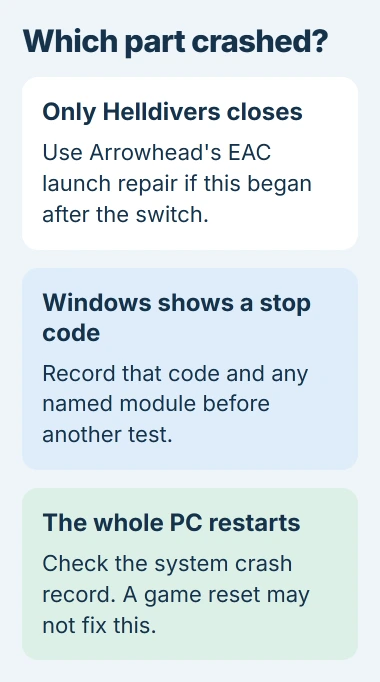
This applies to a game that fails to launch or closes. If the whole PC restarts, loses power or displays a Windows stop code, record that symptom first. A game-file repair does not establish why the computer itself crashed.
Separate a game exit from a Windows crash
Check what remains usable after the failure. A return to the Windows desktop with other apps running is different from the computer restarting or becoming completely unresponsive.
Microsoft says unexpected restarts can involve hardware, drivers or software in its stop-code troubleshooting guide. Record the displayed code and any named module.
Status: Arrowhead's EAC launch-crash instructions checked November 2, 2026. Its page says a fuller fix is still being worked on. No game installation or crash was tested.
For a restart without a readable error, use the unexpected PC restart guide. Keep that system failure separate from a launch error that leaves Windows working.
The EAC cleanup is documented by the vendor. Save screenshots of custom game settings first; the AppData reset removes them. Close the game before changing files.
Remove the leftovers named in Arrowhead's EAC fix
Open the game's folder through Steam > Library > HELLDIVERS 2 > Manage > Browse local files. This identifies the actual installation, including games stored outside the default Steam drive.
Apply Arrowhead's cleanup to that installation:
- Use the mod manager's Purge Mods option when applicable. Removing a mod from its list can leave files behind.
- In the game's bin folder, remove remaining ReShade or OptiScaler files named dxgi.dll, d3d9.dll, d3d11.dll, reshade32.dll or reshade64.dll.
- Open %appdata%\Arrowhead and remove its Helldivers2 folder. Preserve needed settings first; do not delete the whole AppData directory.
- In the game installation's EasyAntiCheat folder, run GGuninst.exe. Remove a leftover bin\GameGuard folder if present.
Keep these file operations inside the exact folders named. A matching DLL filename elsewhere in Windows is not part of this cleanup. Do not download substitute DLLs or uninstallers from another site.
Restart, verify the installation and try launching
Install applicable Windows and manufacturer driver updates, then choose Restart. Arrowhead specifically distinguishes a restart from shutting down for this procedure.
In Steam, right-click HELLDIVERS 2, open Properties > Installed Files, and run Verify integrity of game files. Wait until verification and any replacement download finish before starting the game.
The same verification route appears in Arrowhead's general PC troubleshooting. Reaching the menu is the first check; retry the activity that previously failed before calling the issue resolved.
Crashes beginning after Windows updates can have a separate driver cause. The Windows game-crash guide covers Microsoft's documented RGB-driver case; it is not proof of an EAC fault.
Understand files that repeatedly fail verification
Arrowhead's verification explanation says a small number of authentication files can fail validation normally because they are generated when the game launches.
Its troubleshooting threshold is 10 or more files repeatedly needing validation. The page recommends driver checks, reinstalling and resetting the game's AppData, and explicitly warns that the latter resets in-game settings.
The recommendation to log both the count and launch result is ours. A validation message by itself is weaker evidence than the game continuing to crash after its replacement downloads complete.
Escalate a remaining launch failure with its crash report
If the game still closes, check Arrowhead's linked EAC page for its current reinstall instructions before removing more files. The developer may revise the workaround as its fuller fix progresses.
If a crash-report prompt offers a memory dump, Arrowhead asks for that file in a Player Support request. Share it through that support channel, along with the error and completed steps.
A PC that still resets needs its system-crash evidence assessed as well. Do not keep repeating a destructive game cleanup when the recorded failure is a Windows stop error or power loss.
The Short Version
For an EAC-era launch crash, follow Arrowhead's mod, settings and old anti-cheat cleanup, restart, then verify the game. Whole-PC restarts require a separate Windows diagnosis. Send persistent launch-crash reports to Arrowhead.

Isaac Smith is the founder and editor of PC Glance, a website that covers computers, laptops, and technology. He is a tech enthusiast and a computer geek who loves to share his insights and help his readers make smart choices when buying tech gadgets or laptops. He is always curious and updated about the latest tech trends.