
Your Wallet is stacked with old Amazon return codes, dead boarding passes and last year's tickets. The Remove Pass option is nowhere. You tap the three dots and it is simply not offered.
I get how annoying a dead end that small is, and I can tell you what usually goes wrong.
You have to open the pass first.
Tap the three dots while you are still looking at the stack of cards and you get a different menu, one with no Remove Pass in it. That single distinction accounts for most of these.
1. Open the pass, then tap the three dots
Start here. It is the whole answer more often than not, and it takes one extra tap.
An owner on a community thread spelled out the difference precisely:
"The ellipsis (…) should show the Remove Pass option if you have already tapped on a pass to select it first… It won't have a Remove Pass option if you are just tapping it when seeing all cards."
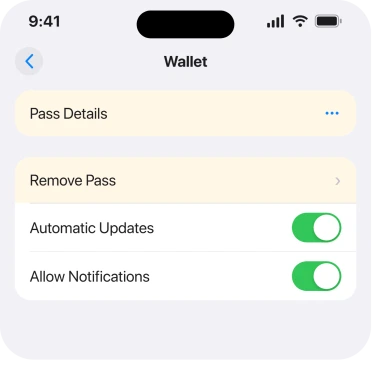
So the order matters. Tap the pass so it fills the screen. Then the three dots at the top right. Then Remove Pass. Three taps, in that order.
Apple's own instruction matches, on its remove passes page: "Tap the pass that you want to remove. Tap the More button, then tap Remove Pass and confirm."
Same steps, and Apple never explains that doing it in the wrong order silently gives you a menu without the option.
No three dots at all? Your text settings may be pushing them off the screen. A Level 10 adviser on Apple's forum explained that with larger text, "the 3 dots icon will be pushed off screen".
Owners confirmed it in a thread about old Amazon return passes. One turned off Bold Text: "when I turned that off the three dots were visible". Another shrank the text: "Changing the font size worked".
On iOS 27 both settings live under Appearance.
Apple's steps are "Tap Appearance, then tap Text Size", and Bold Text is on the same screen. Put them back once the pass is gone.
One more owner found the three dots only in the full app: "You have to open the actual Wallet app rather than the shortcut double tap side button."
2. Scroll up, because passes sit below your cards
Second, and it explains the readers who cannot find the pass at all.
In the Wallet app, payment cards sit at the top and passes sit under them. Several cards and the passes are off screen entirely, so it looks like Wallet holds nothing else.
An owner hit exactly this and was told plainly: "Open the Wallet app and scroll up."
The double-click shortcut is not the same view.
One owner reported: "When i double click the side button i can see the passes but when i go into the wallet app, i can only view/edit my credit cards but not the passes." A second owner said the same thing in April.
Use the Wallet app itself, not the side-button shortcut, because the shortcut shows a payment view with no editing.
3. Look in the Expired list, which Apple hides on purpose
Narrower, and it explains passes that seem to have gone while still cluttering things up.
Apple: "Some limited or single-use passes, such as boarding passes or event tickets, are automatically hidden after they expire. These passes are moved to a separate list, where you can view, unhide, or delete them permanently."
So they are not gone. They are filed somewhere you would never look.
Apple's route: in Wallet, tap the More button, then Expired. Tap a pass to see it. Then Delete to remove it for good, or Unhide to bring it back.
If a card rather than a pass is what refuses to behave, that is a different corner of Wallet, and our page on a card Wallet will not add covers it.
Tap Edit there to clear several at once. That is the fastest way through a pile of old Amazon codes.
4. If it is a Home Key, Wallet cannot delete it
Small and specific. Apple states this one outright.
Apple: "You can't remove a Home Key pass directly in the Wallet app, you must use the Home app."
A documented exception, then, rather than a fault. Open the Home app and remove it from the home or accessory it belongs to. It leaves Wallet with it.
Check that before you spend twenty minutes deciding Wallet is broken.
5. Expect it to leave your Apple Watch too
Quick. This one is a consequence rather than a fix.
Apple: "When you remove a pass from the Wallet app on your iPhone, you might also remove that pass from your paired Apple Watch."
So if you use a Watch for boarding or entry, clear your passes in advance. Not on the morning you need one.
Apple's word is "might", not "will". Unhelpfully vague, so check the Watch afterwards rather than assuming either way.
6. When the pass comes straight back
Last, because a pass that reappears is a different problem from one that will not go.
Some passes are pushed by the app that created them. Remove the pass and the app puts it back on its next update, which reads exactly like a failed deletion.
Amazon return codes, airline boarding passes and ticketing apps all do this.
So delete the pass and deal with the source: turn off the app's Wallet integration in its own settings, or remove the app if you are done with it.
Apple documents no per-app Wallet switch, so that reasoning is ours rather than vendor-documented.
On the thread I read, not one reply came back to confirm any of these steps worked. The instructions are Apple's own, and the ordering point came from an experienced member, but that thread closed without a single reported success.
If your problem is the Wallet Orders list rather than passes, that is a separate feature with separate switches, covered on our page about Wallet order tracking.
What does not help
- Tapping the three dots from the all-cards view. That menu has no Remove Pass in it.
- Using the double-click side button shortcut. It shows a payment view, not an editing one.
- Restarting the phone. Nothing in the reports ties a restart to the option appearing.
- Looking in Settings. Passes are removed inside the Wallet app, not from Settings.
- Deleting the same pass twice. If an app pushes it back, deletion was never the problem.
Status: iOS 26.6.1, checked 18 August 2026. The routes, the Expired list, the Home Key exception and the Watch note are all Apple's own wording. No owner on the thread confirmed a fix.
Why is there no Remove Pass option in Apple Wallet?
Because you tapped the three dots while still looking at all your cards. Open the individual pass first so it fills the screen, then tap the three dots, and Remove Pass appears.
Where do expired boarding passes and tickets go?
Apple hides them automatically in a separate Expired list. In Wallet, tap the More button, then Expired, then a pass, then Delete to remove it permanently or Unhide to bring it back.
Why can I see passes with the side button but not in Wallet?
The double-click shortcut opens a payment view rather than the full app. Two owners reported exactly this. Open the Wallet app itself and scroll up past your payment cards to reach the passes.
Why does a deleted pass keep coming back?
Because the app that created it re-adds it. Amazon, airline and ticketing apps push passes on update, so remove the pass and then turn off that app's Wallet integration or delete the app.
The Short Version
- Open the pass first, then tap the three dots, or Remove Pass will not be offered.
- Passes sit below your payment cards in Wallet, so scroll up to find them.
- The side-button shortcut shows a payment view and cannot edit passes.
- Expired boarding passes and tickets are hidden in a separate Expired list.
- A Home Key pass can only be removed from the Home app, which Apple states.
- A pass that returns is being pushed back by the app that created it.
Where to Next
What makes this feel broken is that Wallet gives you the same three dots in two places and quietly changes what is behind them. No greying out, no explanation, just a shorter menu.
So the fix is almost never a setting. It is an order of operations, and once you know it the whole thing takes five seconds a pass.
And if a transit card stops opening barriers, Express Transit fails for reasons of its own.
Where Wallet refuses to add a digital ID at all, the conditions for that are strict and specific.
Where a calendar entry keeps coming back after you delete it, that has six causes.
Clear a stack and watch something creep back within a day? Name the app for me. Not one reply on the thread I read worked out which apps do this, and a short list of culprits would save the next person a lot of tapping.

Isaac Smith is the founder and editor of PC Glance, a website that covers computers, laptops, and technology. He is a tech enthusiast and a computer geek who loves to share his insights and help his readers make smart choices when buying tech gadgets or laptops. He is always curious and updated about the latest tech trends.