
Mail on your Mac says "Moving Message 1 of 1" and never finishes. New mail still arrives, but deletes and folder moves on your Exchange account stop reaching the server.
That is annoying on a work Mac, where your iPhone shows one inbox and your Mac another. I read the owners' MacRumors thread, which tracked this bug through the whole macOS 27 beta, plus Apple's notes for the first update.
What owners traced it to
Its opening post, in a thread with about 2,000 views, describes the block well: "nothing else will sync behind the stuck message the needs to finish moving."
Owners report the trigger is a reply to a calendar invite on an Exchange account. The stuck line usually appears on the next thing you do, such as a delete, not at the moment you accept.
One owner hit it by moving a message into an Exchange subfolder instead. Mail on iPhone with iOS 27 was not affected for the owners who compared.
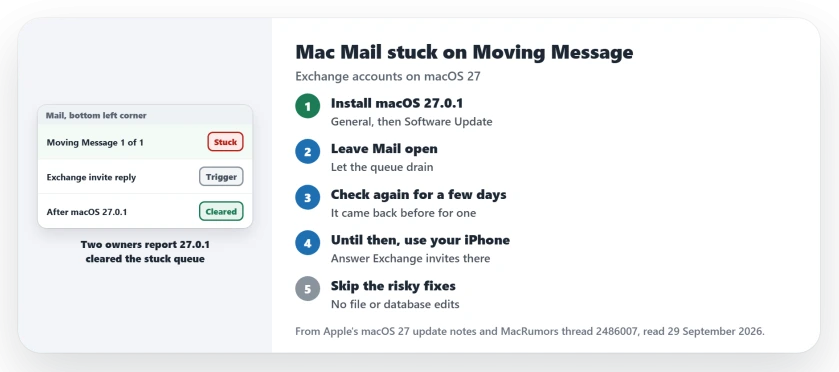
Status: checked 29 September 2026. Apple's note for macOS 27.0.1 lists only bug fixes, and two owners report it cleared the stuck queue within a day.
1. Install macOS 27.0.1
Apple released it on 28 September. Its notes for macOS 27 give 27.0.1 a single line about bug fixes and name nothing.
The owners in the thread saw more than that. In their words: "Looks like macOS 27.0.1 fixed this for me as the Mail app is working perfectly for me again."
That was confirmed by an owner later the same day, whose stuck messages moved after the update.
To install it on your Mac, open Software Update under General in System Settings.
2. Leave Mail open and check it for a few days
After the update, leave Mail open so the queue can drain. Owners saw the stuck line in the bottom left corner of the Mail window. For one, all 20 stuck messages went through and the line disappeared.
Check it again over the next few days. The second owner added a warning: "Every time I have "fixed" this it seems to return after a few days."
3. Until you update, answer invites on your iPhone
If you cannot update yet, keep calendar replies off the Mac. Owners who answered Exchange invites on their iPhone instead kept Mail on the Mac working normally.
One owner with a large Exchange mailbox said a full download would take them 3 to 4 days to finish. That is a good reason to avoid the trigger rather than repair the damage.
4. The 27.2 beta is not your first step
The thread's starter moved to the macOS 27.2 public beta. They report it fixed the bug for a week of invites.
Another owner gave sound advice: "At the very least test the regular update before installing the beta." I agree. A beta on a work Mac brings its own risks.
5. Skip the file and database fixes
Owners tried deleting Mail's message files, and one shared a script that edits Mail's own database. Some of those tricks worked.
But they also went wrong. One owner's file deletion made Mail download the whole account again, 6,880 messages. Others rebuilt mailboxes, removed the account or reinstalled macOS, and it did not hold.
With 27.0.1 out, the update is the safer fix. Keep a backup of your Mac before you touch anything inside the Mail folder.
Mail trouble of a different kind
If your messages vanished after an update, the missing emails page covers re-adding the account. If a Yahoo account says it is offline, the Yahoo page has that fix.
Why is Mac Mail stuck on Moving Message 1 of 1?
Owners traced it to replies to Exchange calendar invites on macOS 27. One action got stuck in Mail's queue and held up every change you made after it.
Does macOS 27.0.1 fix Mail stuck on moving messages?
Apple's note only says bug fixes. Two owners report the stuck queue cleared after they installed it.
Should I rebuild the mailbox to fix it?
Owners who rebuilt the mailbox, removed the account or reinstalled macOS saw it return. Install 27.0.1 first.
The Short Version
- Install macOS 27.0.1 from Software Update.
- Two owners report it cleared the stuck queue.
- Leave Mail open so the queue can drain.
- Check it again over the next few days.
- Until then, answer invites on your iPhone.
- Try the regular update before any beta.
- Skip file deletions and database scripts.
Where to Next
Install macOS 27.0.1 from Software Update today. Then leave Mail open and watch the bottom left corner.
If the stuck line comes back after the update, describe in a comment what you did just before. That helps pin down a second trigger.

Isaac Smith is the founder and editor of PC Glance, a website that covers computers, laptops, and technology. He is a tech enthusiast and a computer geek who loves to share his insights and help his readers make smart choices when buying tech gadgets or laptops. He is always curious and updated about the latest tech trends.