

Your Mac will not go to sleep, or its battery drains with the lid shut. You run pmset -g in Terminal, and the sleep line ends with sleep prevented by powerd.
powerd is the Mac's own power manager, and I would not read that line as the fault. powerd keeps a block of its own while the screen is on, so the cause is usually a leftover setting or another app.
That exact line sits in an Ask Different question from June 2021 with 20,484 views, and an older one about processes blocking sleep has 21,258.
What the powerd line tells you
Apple's pmset manual says processes can hold power assertions, and "Assertions may prevent system sleep or display sleep". The sleep line names whoever holds one.
Owners' listings show powerd holding its own, named Powerd - Prevent sleep while display is on.
In one 2025 owner's listings, Python came and went from that line while powerd stayed, so with the screen on, the powerd line alone tells you little.
Ours: none. Without a Mac of my own, I worked from Apple's power pages, Apple's pmset source code and owners who got their Macs sleeping again.
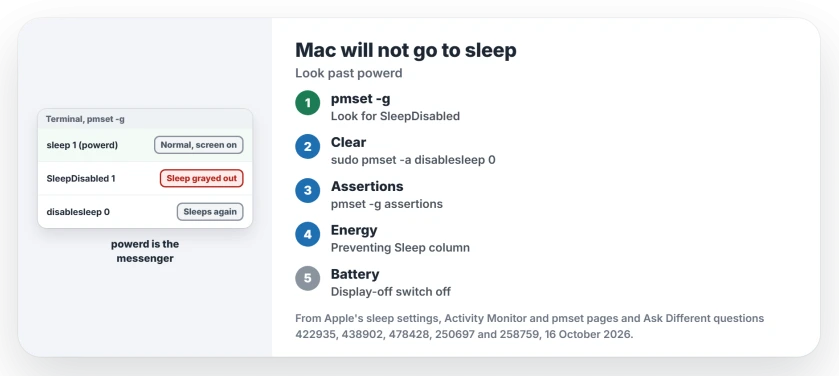
Status: two owners confirm the disablesleep fix; Apple's sleep settings, Activity Monitor and pmset pages checked 16 October 2026.
Sleep grayed out in the Apple menu? Clear disablesleep
If Sleep is dimmed in your Apple menu and closing the lid does nothing, look for a leftover setting. In 2022 an owner had exactly that on a MacBook Air, and a restart, safe mode and an NVRAM reset did not help.
The accepted answer was one command.
sudo pmset -a disablesleep 0The owner replied, "Wow, that did it". The same command fixed a MacBook Pro M2 on macOS 14.1 for another owner. Two owners had set it themselves with pmset, one to keep music playing with the lid closed.
Want to check first? Run pmset -g. Look for a SleepDisabled line in your output. Apple's pmset source prints it only when that setting exists, and a 2025 owner saw SleepDisabled 1 there after turning it on.
After the fix it may read SleepDisabled 0. One answer found no difference between that and no line at all.
Find what else keeps it awake
Next, ask macOS for the full list.
pmset -g assertionsOne answer sums it up: "That will list the reasons your Mac is not currently asleep". Under Listed by owning process, look past powerd for PreventUserIdleSystemSleep or PreventSystemSleep held by something else.
Activity Monitor shows it per app: click Energy and read the Preventing Sleep column, which Apple describes as "Whether this app is preventing your Mac from going to sleep". Missing the column? Add it from View, Columns.
The usual culprits owners found
Internet Sharing was one. In their words, disabling it "solved the issue", even with no other computer attached. If you rely on it, our Internet Sharing page shows where it sits in System Settings.
Xcode's iPhone simulator was another; closing it cleared the block. One owner's Bluetooth keyboard with low batteries kept a Mac mini awake until they charged it.
Check the display-off switch
Apple has a setting that keeps a Mac awake on purpose. On a laptop it sits in System Settings, Battery, Options: "Prevent automatic sleeping on power adapter when the display is off". A desktop Mac has one under Energy.
If it is on, your Mac stays awake on power with the screen dark, and Apple adds that preventing sleep "may increase power consumption".
For an intentional overnight job, choose a timed keep-awake setup and check what changes when you close the lid.
Is an SMC reset needed?
Not on Apple silicon. Apple says "SMC resets automatically on Mac with Apple silicon" when you restart, and its page has the steps for an Intel Mac.
One owner did an SMC reset and then the disablesleep command, and that pair put things right.
Lid shut and the battery still drains?
Then it may be waking up, not staying awake. Our page on MacBooks draining overnight on macOS 27 reads the sleep log and finds the apps that wake it.
If you shut down fully and opening the lid starts it again, Apple's lid-startup setting covers supported Apple-silicon laptops.
The Short Version
- sleep prevented by powerd alone is normal while the screen is on.
- Sleep grayed out? Run sudo pmset -a disablesleep 0.
- pmset -g assertions lists the real blockers by process.
- Activity Monitor's Energy tab shows Preventing Sleep per app.
- Turn off the display-off switch in Battery, Options, or in Energy.
Where to Next
Which process was holding your Mac awake once you looked past powerd? Name it in a comment for me. I add new ones to the culprits section.

Isaac Smith is the founder and editor of PC Glance, a website that covers computers, laptops, and technology. He is a tech enthusiast and a computer geek who loves to share his insights and help his readers make smart choices when buying tech gadgets or laptops. He is always curious and updated about the latest tech trends.