
You open Microsoft Store and get a "Try that again" page with Error 0x80131500, and the Store will not load at all. Resetting it changes nothing.
I would fix the TLS boxes in Internet Options first. Microsoft's own page lists that step. Owners on the biggest thread called it the one change that finally worked.
If the boxes were already right, your country or region setting is the next suspect to check.
The 2019 thread on Microsoft's Q&A carries 3,800+ Same question votes.
What the error means
Microsoft keeps a support page for this one code, and every fix on it is about the connection. Microsoft says to check updates, the Store app, time and location, and TLS.
Ours: the Store cannot set up a secure connection, so it shows nothing. That is why a reset alone rarely helps.
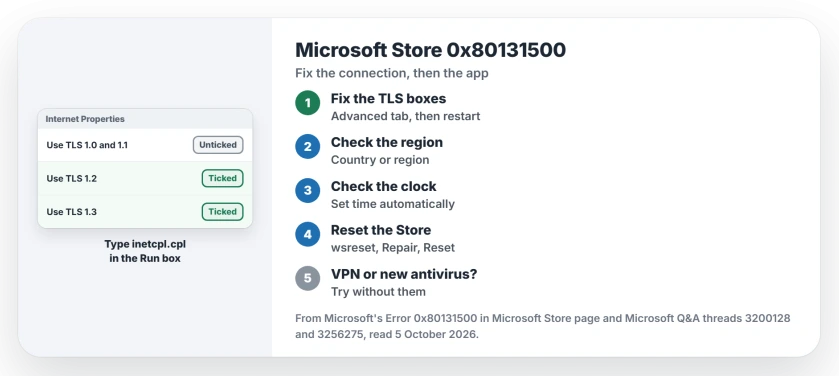
Status: checked 5 October 2026. Ticking TLS 1.2 in Internet Options fixed it for owners, a step Microsoft now lists, and so did correcting the region.
Fix the TLS boxes
Press Windows+R, type inetcpl.cpl and open the Advanced tab, where the TLS boxes are the last entries in the long list.
Microsoft's steps: "Ensure that Use TLS 1.0 and Use TLS 1.1 are unchecked", then "Ensure that Use TLS 1.2 and Use TLS 1.3 are checked".
Select Apply, then restart your PC so the Store picks up the change. The 3,800+ thread's accepted answer says the same, and it has 1,100+ helpful votes.
Owners report the same result. One had spent hours on it: "I checked the box for the TLS 1.2, and it WORKED". Another called it "The only one that worked out of at least seven others I've tried".
Older answers tell you to tick TLS 1.0 and 1.1 as well, but I would follow Microsoft's current page, which unticks them.
Check your region and time
Microsoft's page says: "Check your time and location settings". An owner in Guernsey found the cause there. "When I lied and changed it to United Kingdom, the Store no longer gives the error".
Another owner, stuck switching out of S Mode, "checked my region settings and they were wrong. I corrected them and was able to complete the switch".
Open Settings, Time and language, Language and region, and check that Country or region shows where you really are. A wrong clock breaks secure connections too, so check that the time is right.
Reset or repair the Store
Microsoft's first step is the reset command: "Enter wsreset.exe and then select OK" in the Run box. It did nothing for the 3,800+ asker: "I've tried wsreset.exe- no success".
A Microsoft moderator gave the next step in December 2025, from the Installed apps list under Settings, Apps, then Microsoft Store and its Advanced options: "Click Repair first. If still failing, click Reset (this clears app data)".
On Windows 11 26H2, look under System Components instead; a moderator sent one owner there.
A Store that opens and then closes is a different fault, with its own fix.
Try without a VPN or new security software
The owner fixed by the TLS box said the Store "just stopped working when I installed Norton".
An adviser suggested the same test in October 2025. In their words: "If you have a third-party VPN or Antivirus installed, please try to temporarily uninstall it then check if the issue persists".
I would switch the VPN off first, since that is quicker than removing anything.
Does a new Windows account fix it?
The 200+ asker found the Store worked in a fresh Windows account: "When I tried to create a new user, it worked properly". Their region list was empty as well.
Ours: that points at your own account. Fix the region and TLS boxes there first. A new account is the last resort.
What did not help
The reset command and Microsoft's app troubleshooting page did nothing for the 3,800+ asker, and neither did resetting their region, language and speech. A wrong region is a cause to check, not a cure every time.
Clearing the Windows Update download folders, for the same asker. The TLS answer came later, in April.
Is it safe to untick TLS 1.0 and 1.1?
Microsoft's page for this error tells you to untick them. Ours: current secure sites use TLS 1.2 or 1.3, so the old boxes rarely do anything useful.
Why does the Store work on another PC with the same account?
The fault sits on your PC, not your Microsoft account, because the settings in Internet Options and your region belong to Windows on that machine.
Does 0x80131500 mean my account is blocked?
Not on the evidence here. Microsoft's fixes are all about the PC's own settings. The 200+ asker's Store also worked in a new Windows account on that PC.
The Short Version
- Internet Options, Advanced: untick TLS 1.0 and 1.1.
- Tick TLS 1.2 and TLS 1.3, then restart.
- Check your country or region and the clock.
- Run wsreset.exe, then Repair or Reset the Store.
- Try with the VPN off and new security software paused.
- Works in a new account? Fix your own account's settings.
Where to Next
Press Windows+R now, type inetcpl.cpl and look at the TLS boxes on the Advanced tab. If they already match Microsoft's page, check your region next.
Was it the TLS boxes, the region or something else on your PC? Leave a comment; other readers stuck on this code will want to know.

Isaac Smith is the founder and editor of PC Glance, a website that covers computers, laptops, and technology. He is a tech enthusiast and a computer geek who loves to share his insights and help his readers make smart choices when buying tech gadgets or laptops. He is always curious and updated about the latest tech trends.