OneDrive's waiting for eastus1-mediap.svc.ms message can mean its folder ZIP service has stalled. Download an urgent file on its own first. If single files work but folders fail for several people, ask IT about the download service.
The exact message appeared during a confirmed service fault in 2018. A failed folder download today can also come from download limits or the selected view, so check those before changing settings on your computer.
In this guide
1. Download an individual file first
In the OneDrive website, browse into the affected folder. Select one ordinary document, then choose Download from the toolbar or its right-click menu. Watch your browser's downloads list for a completed file, then open that saved copy.
If that works, download two small documents together. They normally arrive as a ZIP archive, which packages the selection into one file. This checks whether OneDrive can package files together, rather than just download one file.
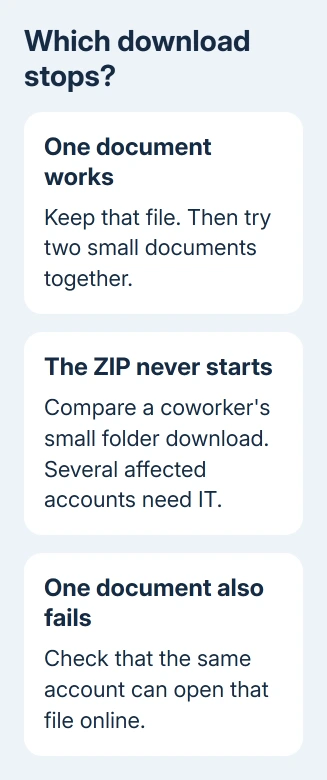
If one file downloads but the ZIP never starts, the problem is with downloading files together. It won't identify the failing server. Keep the document you downloaded and try a smaller selection before assuming your whole account is broken.
If even one small document fails, check whether it opens online and whether the same account can download another document. A file you can't open needs an access check from its owner, rather than repeated folder downloads.
I'd use individual downloads for an urgent document before spending time resetting the sync app. The browser download and the installed OneDrive app are separate routes, and the original fault occurred in the web route.
2. Select the folder before choosing Download
Go back to the folder that contains the folder you want. Select the circle beside the target folder and choose Download. Make sure you're selecting the folder itself, rather than expecting a toolbar command to act on an unselected item.
Selecting an item makes the download control available. When it disappears after a page refresh, go up one folder and return, or close the tab and navigate to that location again. Then repeat the selection.
Microsoft says downloads from Shared need a different route: open the file, then save a copy. Downloading directly from that view isn't supported.
When the folder came from another person, confirm which location and account the invitation opens. The OneDrive folder sharing guide explains the permission choices if the owner needs to correct your access.
For work or school downloads, use an up-to-date Edge or Chrome browser. Internet Explorer doesn't support downloading folders or multiple files there. If the toolbar now produces a ZIP, the problem was the selection or browser route.
3. Split an oversized download into smaller groups
Try a small selection from the affected folder. If it downloads, split the larger job into smaller groups. Name each downloaded group separately to track what's finished and avoid downloading it twice.
The current download guidance lists a 250 GB file size limit and a 10,000-file limit, including a 10,000-file folder limit. A folder with many nested folders can reach the file count even when its visible top level looks small.
Multiple compressed files have separate restrictions: the guidance lists 10 GB per ZIP file and 20 GB overall. It includes files such as ZIP archives and MP4 videos in that warning. Don't assume the larger limit applies to every selection.
Folder ZIP downloads don't export OneNote notebooks; the archive contains a text error for the notebook. If that error appears inside your ZIP, use a notebook-specific export route instead of repairing the browser.
Size checks matter when one large folder fails but smaller groups work. If two tiny documents also fail for several coworkers, file size is a poor explanation. Check for a service failure before splitting every folder manually.
4. Check whether coworkers have the same ZIP failure
Ask a coworker to download a small folder they can already access. Compare the failure time, whether individual files download, and whether the folder stops with the same service name. Matching failures give IT reason to check the service.
In the original eastus1 report, one owner tried Firefox, Chrome and Internet Explorer, cleared browser caches, and checked multiple users. Only single files downloaded.
Those browser changes didn't solve it. The support team's summary traced the fault to a stuck service instance and recorded a server restart. The owner also reported that downloads worked again after the interruption.
That explains the historical message; it isn't a current outage notice. An administrator can check Health > Service health using Microsoft 365's admin center. Report the failure if no incident matches.
Give IT the hostname, time and time zone, plus the single-file and ZIP results. Customers can't restart Microsoft's ZIP service through a setting. Changing the account password won't restart that service either.
5. Work from synced files during the interruption
If the files are already synced to your computer, browse your synced OneDrive location using File Explorer or Finder. Check that the needed files open locally before using them as a replacement for the failed web download.
An online-only item won't open offline until its download finishes. For a separate copy, copy the completed files into a folder outside OneDrive. Avoid moving originals out of the shared working folder.
If the installed app hasn't received recent changes, follow the OneDrive sync checks for that separate failure. Don't assume a folder in File Explorer contains the latest cloud version just because its name matches.
Ask your administrator to report unresolved folder ZIP failures to Microsoft 365 support. Include an example folder, file count, affected users and browser comparison. Share private file addresses only through your support channel.
The Short Version
Compare one document with a small ZIP, then check the selection and limits. If several users lose only grouped downloads, ask IT about the download service. Use individual files or verified local copies while the failure is reported.
Checked November 17, 2026.