
OnePlus screen issues that leave a persistent green line need a display assessment. OnePlus directs affected owners to an authorized service center for screen replacement.
Its India offer has eligibility limits, so confirm the terms for the phone before paying for a repair.
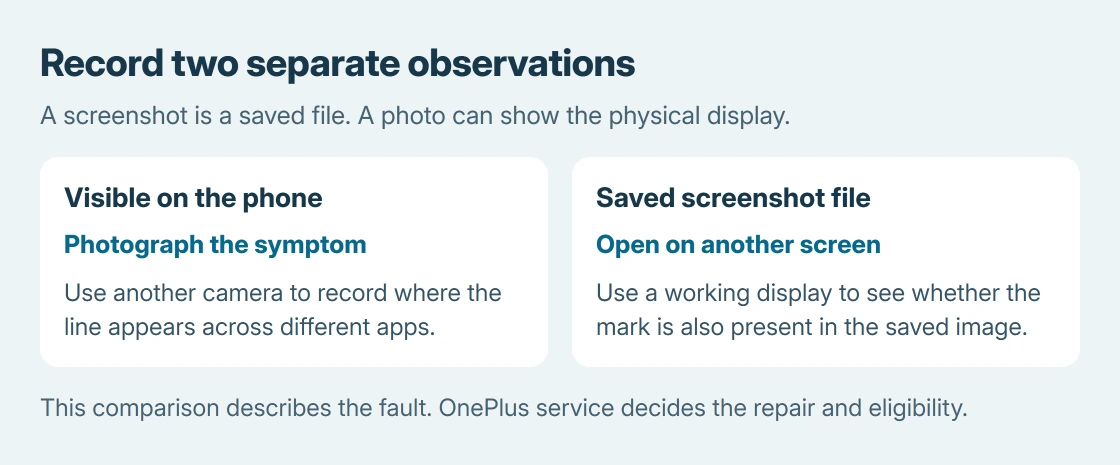
First record whether the line stays in the same place across apps. A mark contained in one photo or video calls for checking that content separately.
Compare the display with a saved screenshot
Open Settings or another plain page where the line is easy to see. Take a screenshot by pressing Power and Volume down together. Google says to use this combination in its Android screenshot instructions.
View the saved file on a different, working screen, such as a computer. Looking at it only on the affected phone cannot make the comparison: that display can put its own line over a clean file.
Status: OnePlus India's green-line service information and warranty limits checked October 26, 2026. Regional eligibility requires confirmation. No phone or display was tested.
This comparison is ours, intended to describe the symptom to service. A clean saved image with a line still visible on the phone supports checking the display path. It does not identify the failed component or guarantee warranty approval.
If the mark travels with the saved picture to another screen, include that file in the support request. If it exists only in one app, record the app and content involved rather than assuming every green mark needs a new panel.
Ask OnePlus about its green-line replacement offer
Display replacement is the remedy documented by the vendor for eligible green-line faults. OnePlus India directs users who bought through authorized sales channels to an authorized service center.
Explain the symptom and ask whether that particular model and purchase qualify. Outside India, use the OnePlus support service for the purchase region and request its applicable policy. The Indian page does not establish worldwide coverage.
Record the model, purchase region and when the line appeared. A second device's photo can show the visible defect that a screenshot fails to capture. Retain the receipt or purchase record for the assessment.
Read the limits attached to the display promise
The lifetime-display disclaimer on OnePlus India's 13s product page limits free green-line replacement to the parts supply period. It excludes damage caused by human or external factors.
The same disclaimer says the conditions at the service center on the day of service determine the specific terms.
A cracked or liquid-damaged phone therefore needs an eligibility decision; the green-line offer is not a promise to repair every screen problem.
Ask for the proposed repair, any charge and the data-handling requirements before agreeing. No universal completion time or cash alternative is promised here.
Protect the phone's data before handing it over
If the phone remains usable, complete an Android backup before service. Check photo backups separately, along with anything stored only inside an app.
Keep the original symptom record and support reference. A factory reset is a destructive operation, not a documented substitute for OnePlus's green-line display replacement.
If the center declines coverage or lacks the part, request the reason and available options in writing.
Contact OnePlus support with that assessment. A persistent physical display fault needs a repair decision rather than repeated settings changes.
The Short Version
Record the green line and compare a screenshot on another screen. Ask authorized OnePlus service about display replacement.
The India policy depends on purchase eligibility, damage assessment and parts availability. Back up accessible data before repair.

Isaac Smith is the founder and editor of PC Glance, a website that covers computers, laptops, and technology. He is a tech enthusiast and a computer geek who loves to share his insights and help his readers make smart choices when buying tech gadgets or laptops. He is always curious and updated about the latest tech trends.