Create Skype Meeting failed can appear even while Skype for Business is open. Match its work sign-in to your Outlook calendar's account, then try a fresh meeting. Reinstalling won't fix mismatched accounts or an unavailable meeting service.
Check with IT before repairing an old Skype setup after a move to Teams. Skype for Business Online retired in 2021. Use these desktop checks if your organization still provides Skype meetings through its own server.
In this guide
1. Match the signed-in account and calendar
Open Skype for Business, rather than the personal Skype app. Check the work sign-in address. In Outlook, open Calendar and select the calendar belonging to that same work account.
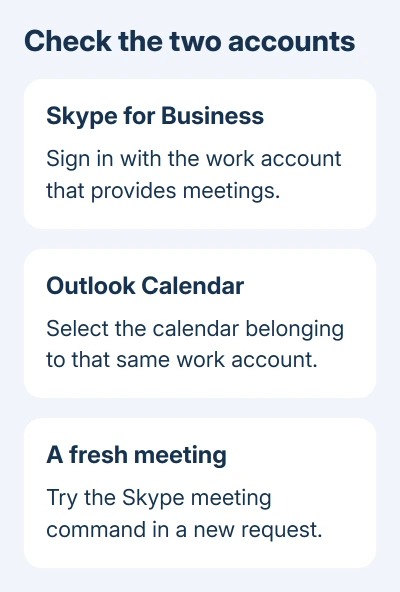
Create a new meeting there and try the Skype meeting command. Keep this separate from an old invitation, a shared calendar, or a calendar belonging to a second mailbox.
If the meeting details now appear in the invitation, review them before sending. You need the online meeting information in the body, not just a window that opens without displaying an error.
If the error remains, report whether creating a meeting also fails in your own calendar. A problem only while scheduling for another person needs their account and scheduling permissions checked separately.
The original asker could already use Skype for Business. Matching accounts and clearing saved sign-in information hadn't helped. Being able to chat doesn't mean Outlook can create a meeting.
2. Confirm that the organization still provides Skype meetings
Ask the workplace help desk whether your account should create Skype for Business meetings or Teams meetings. Provide your work address along with the Outlook command that triggers the error.
The Skype for Business Online retirement notice gives July 31, 2021 as the service's retirement date. That online service is separate from Skype meetings hosted on an organization's own server.
If IT has moved your account to Teams, ask them to get Teams meeting scheduling working for your account. Don't use a Windows rollback to recover access to a retired online service.
If colleagues with the same account setup can still create Skype meetings, give IT that comparison. It helps them check your desktop installation or account without assuming the entire organization has lost scheduling.
For an urgent appointment, create the ordinary Outlook calendar invitation and use only the meeting link or conferencing method your organization approves. Review the final invitation before sending it.
3. Enable the meeting add-in if its button is missing
A visible Skype button that returns an error is different from a button that's absent. Microsoft explains how to enable the missing control in its Outlook 2016 add-in steps.
- In classic Outlook, choose File > Options > Add-ins.
- Set Manage to COM Add-ins, then select Go.
- Select Skype Meeting Add-in for Microsoft Office 2016.
- Choose OK, then check a new meeting request.
If the entry isn't in the list, tell IT that it is missing entirely. That needs a different installation check from an add-in that's installed but unchecked.
An administrator message can appear when the add-in was installed for all users of the PC. You'll need an IT administrator to enable the add-in in that case. Try the checkbox first, before considering any registry work.
If the button returns but still reports Create Skype Meeting failed, move on. Turning the button on won't fix a separate sign-in or meeting-creation problem.
4. Restart the two desktop apps with the right sign-in
Save your Outlook drafts and close Outlook. Sign out of Skype for Business, then exit it completely through its menu. Reopen Skype for Business using the sign-in address supplied by your workplace.
Wait for sign-in to complete before opening Outlook again. Then select the matching calendar and create one fresh meeting request. This checks the connection between the two apps that the error message asks for.
If Skype itself now refuses sign-in, send IT that exact error. It needs attention before another Outlook reinstall. Note whether you're on the office network or connecting remotely when it occurs.
Avoid repeatedly deleting cache folders as a substitute for a working account. The asker tried the suggested cache-clearing steps, but they didn't fix the problem.
I'd stop repeating an Office repair once it has already failed. In this thread, both repairing Office and completely reinstalling it left the same meeting error in place.
5. Review a recent Windows change with IT
An owner later reported that restoring Windows to an earlier version made almost everything work again. They suspected an update, but didn't identify its number or the exact recovery option used.
That makes the timing of a Windows change useful to check. It doesn't provide a named update to uninstall, and it doesn't tell us that every account or add-in error has the same cause.
When the error started just after a system change and other desktop features broke too, ask IT to review it. Give them the first failure date, Windows update history, and whether the machine worked before that change.
System Restore can return Windows system files, settings, and installed programs to a saved state when a suitable restore point exists. Have IT review affected software and back up important work first.
On Windows 10 or 11, press Windows+R, enter rstrui.exe, and press Enter. Select Next, choose an appropriate earlier restore point, and use Scan for affected programs before deciding whether to continue.
Select Next > Finish only after reviewing that change with IT. Windows restarts during restoration. If the needed restore point isn't available, don't substitute a factory reset for this check.
Still unable to create a meeting?
Give the help desk your Outlook and Skype for Business versions, work sign-in and affected calendar. Describe the button: missing or giving an error. Include whether colleagues can create meetings through the same service.
Ask them to check the account's meeting service and Outlook integration. If the issue is instead an invitation missing from a shared calendar, the shared-calendar checks address that different fault.
The Short Version
Match the Skype for Business sign-in to the Outlook calendar. Confirm the meeting service and restore a missing add-in. Have IT review recent Windows changes when other desktop features broke at the same time.
Checked November 17, 2026.