Outlook that disconnects until reboot can be affected by Dell Optimizer or ExpressConnect, especially when Teams drops too but webmail works. Removing that software resolved this pattern for several Dell owners.
A status bar showing Working Offline needs a quicker fix, while a PC that also loses web access needs its network connection repaired. Check which problem you have so restarting the PC doesn't become your daily routine.
In this guide
1. Turn off Work Offline when that is the message
Read classic Outlook's status bar along its lower edge. Working Offline, Disconnected, and Trying to connect all stop normal mail delivery, but they don't describe the same condition.
Open Send/Receive and check Work Offline. If offline mode is selected, click it to return online, then choose Send/Receive All Folders. Watch for the status to return to a connected state and for recent messages to arrive.
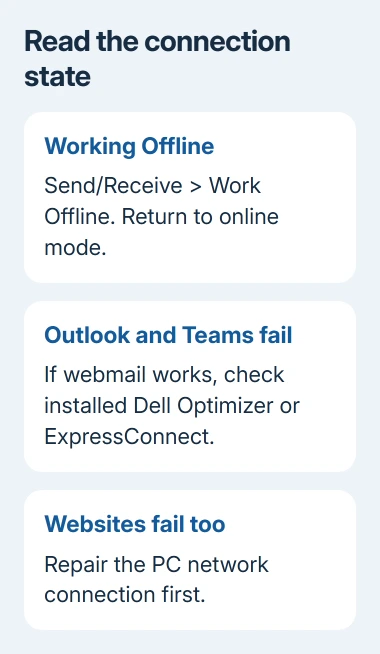
Microsoft's send and receive troubleshooting starts with this connection check. It won't remove an underlying fault that returns after a few hours.
If Work Offline wasn't selected, don't keep toggling it. Write down the exact status, check whether Teams is also disconnected, and continue with the comparison in the next section.
2. Compare desktop apps with the same account online
Before rebooting, open your organization's usual webmail address and check the affected mailbox. Try Teams in the browser too if the desktop Teams app has stopped connecting. Use the same work account for the comparison.
If current messages appear online while desktop apps remain disconnected, the mailbox is reachable through the browser. Check the desktop apps' connection, network tools, or sign-in session next. Your mail is still available online.
If ordinary websites also fail, repair the Windows Wi-Fi connection or wired connection first. An Office repair can't restore an internet connection that's down for every app.
When multiple coworkers lose webmail at once, have your administrator review service health in their Microsoft 365 admin center. If the service is down across the organization, rebuilding each laptop's Outlook profile isn't the next step.
Browser access is also a practical way to keep working while IT checks the PC. Check the desktop Outbox before sending the same message again online so you don't send duplicate replies after Outlook reconnects.
3. Remove Dell Optimizer or ExpressConnect if installed
On Windows 11, open Settings > Apps > Installed apps. On Windows 10, use Settings > Apps > Apps & features. Search the installed list for Dell Optimizer and ExpressConnect.
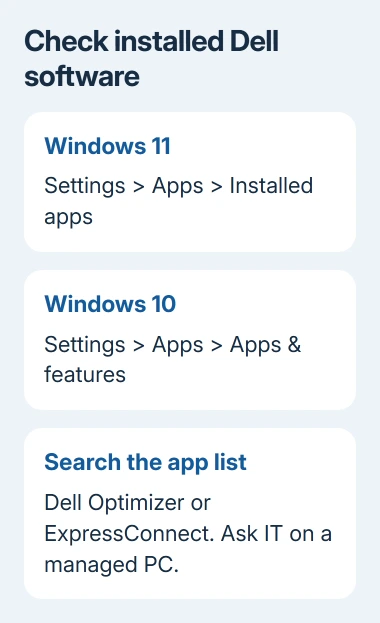
The source thread includes an owner update confirming that uninstalling Dell Optimizer/ExpressConnect resolved the disconnects on their Dell laptops. Another owner also reported success.
If this is your own unmanaged PC, save your work, select the installed Dell Optimizer entry, and choose Uninstall. Follow its removal prompts. Check for a separate ExpressConnect entry and note its full name if one remains.
For a company-managed laptop, ask IT to remove or change this software through its usual management system. They affect network optimization, so this is a more useful request than asking for another Outlook profile reset.
Restart Windows after the removal and use Outlook normally through the part of the day when it used to disconnect. Check both sending and receiving. A connection that survives only a few minutes isn't the result you're looking for.
If Dell software management installs the component again, tell IT exactly when the fault returned. They can then check why the software was installed again and whether that's when Outlook started disconnecting.
Removing the software didn't fix the problem for the person who wrote the accepted reply. Later replies also include non-Dell PCs and machines without Optimizer. Skip this step if the software isn't installed; don't install it as a cure.
4. Update Outlook and compare safe mode
In classic Outlook, open File > Office Account > Update Options > Update Now. If the organization controls updates, give IT the version and build shown on that page and ask whether the installed release is current for its update channel.
Close Outlook, press Windows + R, enter outlook.exe /safe, and press Enter. When a profile picker appears, select your normal mailbox profile. This startup mode skips the add-ins, which are extra tools integrated into classic Outlook.
Use the same mailbox and connection long enough to cover the usual failure period. If it disconnects every afternoon, five minutes in safe mode won't tell you whether it helps.
If safe mode stays connected, have IT review the add-ins rather than removing account data. If it disconnects too, note that result and continue. The command doesn't apply to new Outlook.
For an app that stops launching altogether, the Outlook opening fixes cover that separate failure. A crash when Outlook starts calls for different steps than a lost connection later in the day.
5. Give IT the recurring connection pattern
If the Dell check and Outlook update don't help, try the profile and Office repair steps linked from the send-and-receive support page. Keep your existing profile while IT checks it, especially if Outlook stores local archive files.
I'd bring IT the pattern before asking for a Windows reinstall. In the original case, rebuilding the mail profile, disabling cached Exchange mode, and reinstalling Windows and Office had already failed to stop the recurring disconnects.
Include the Outlook build, Windows version, device model, connection type, and time the fault occurred. Say whether webmail worked at that moment, whether Teams failed too, and whether a restart restored both desktop apps.
For Microsoft 365 work accounts, ask the administrator to open a support request through the admin center if their local checks don't explain it. Ask them to check the desktop connection and sign-in failures around the time you recorded.
Avoid clearing every saved credential or deleting mailbox files on your own. You could end up having to sign back in and recover data while the cause is still unclear. A precise failure time is more useful than another unexplained reset.
The Short Version
Return Outlook to online mode if needed. When webmail works but Outlook and Teams drop, check for Dell Optimizer/ExpressConnect. Remove it yourself or through IT as appropriate, then compare an updated app and a safe-mode session.
Checked November 16, 2026.
 If you have any business, I can build it online