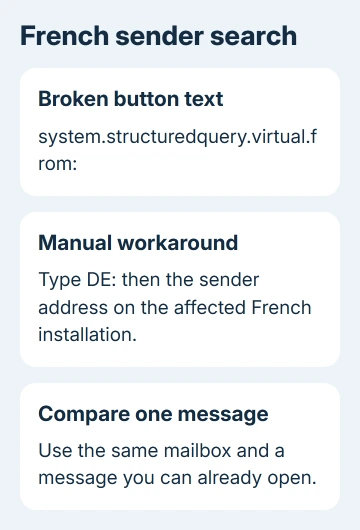
Typing DE: followed by the sender can work when French Outlook's From button inserts system.structuredquery.virtual.from: and returns nothing. Replace that generated text with a manual sender search before rebuilding the search index.
The original Outlook 2016 report describes this exact difference: the button failed, while manually entering De: returned results. Searches that fail even with a manually entered sender need the wider search checks instead.
In this guide
1. Enter the sender manually
Click Outlook's search box and clear the entire existing query. For the French Outlook version affected by this old fault, type DE: immediately followed by the sender's email address, without an extra space inside the address.
Press Enter and look for a message from that sender. Choose an address from an email you can already open, so a misspelled name doesn't confuse the result.
For a sender's display name containing spaces, the historical workaround used DE: followed by the name inside straight double quotation marks. Try the complete address first if several people have similar names.
Check whether typing the query finds messages while clicking De produces the long property name. If it does, the button's search text is the problem; Outlook can still find your mail.
One owner in the French Outlook discussion confirmed that manually typed De: worked. You don't need to repair every part of search to use that workaround.
If it returns the messages you need, keep using manual sender searches while you check updates. If it returns nothing, keep one known matching message open and check the search scope next.
2. Keep the language and search scope consistent
Start in the folder that contains your known message. Check the search scope control and include that folder or the appropriate mailbox. A correct sender query won't find a message outside the selected scope.
Use the message's real From address, not the name of someone mentioned in its text. For messages sent on behalf of another person or mailing list, inspect the displayed sender details before choosing the address.
The DE: workaround applies to the French Outlook setup in the report. Other languages, Outlook versions and search services don't all use that spelling.
Current Outlook search instructions show the from: operator with an email address. If your current app uses that format, keep it. Keep a working query as it is, even if the old workaround uses different text.
Compare the button's query with one you type in the same Outlook app. That keeps the check focused on the search text. Testing one query in classic Outlook and another in new Outlook changes more than the text you're trying to check.
A result list that contains emails but omits their sender names is another problem. Follow the missing sender names steps when messages are present and only the From column is wrong.
3. Update Office without installing an old workaround build
In classic Outlook, choose File > Office Account, then Update Options > Update Now. French controls read Fichier > Compte Office > Options de mise à jour > Mettre à jour maintenant.
Save your work in Office apps before accepting an update that needs them closed. Once Outlook reopens, click the sender filter again and inspect the query it inserts.
Check that the sender button now creates a working search and finds the mail you expect. Seeing a newer version number doesn't by itself tell you whether that button now works.
If the update control is unavailable, ask the administrator who manages Office to check its update channel and build. Keep using the working manual query while they handle the installation.
Support for Outlook 2016 ended October 14, 2025. For an installation still running it, ask about replacing it with supported Office rather than searching for a 2018 installer or removing years of updates.
4. Recognize the historical Windows language fault
The long property name in this report came from a Windows search-language issue affecting French Outlook 2016. It wasn't simply a forgotten colon or an email address that Outlook couldn't recognize.
The reply history separates Windows 10 versions. Updates were reported for versions 1607 and 1703 in January 2018. Owners on version 1709 still reported the fault later, so that early update advice didn't fix every affected installation.
A later May 2018 reply recommended current Windows and Office updates, but no owner replied to say they worked. That reply doesn't tell us whether the fault was fixed on every 1709 system.
If your PC still runs an old Windows release, give IT the Windows version from Win + R > winver, plus the Outlook version from Office Account. Ask them to review a supported upgrade path.
One reply suggested changing a search-language cache file for one old Windows version. That wasn't a general Outlook search repair. Don't delete search-language files just because a modern search returns no results.
I'd keep the manual sender query as the immediate workaround here. It directly addresses the broken generated term and avoids changing index settings that may already be working.
5. Follow the wider search route when manual entry fails too
Pick a distinctive subject word in the known message, using a scope that includes its folder. If even that message doesn't appear, more than the sender button is failing.
Use the general Outlook search guide for the next checks. Classic Outlook's Windows indexing and new Outlook's search behavior need different steps, so identify the app before rebuilding anything.
If subject searches work but sender searches fail, send IT the exact query and a sample matching message. Tell them whether you searched by address or display name and whether changing the scope changed the results.
Ask IT for an Outlook search support case if the failure persists on supported software. Include the button-generated and manually typed queries so support can compare them.
The Short Version
Use a manual DE: query when the French sender button inserts system.structuredquery.virtual.from:. Check the scope and sender address, then update the software. Broader search repairs come next if manual entry also fails.
Checked November 17, 2026.
 If you have any business, I can build it online