Outlook's unexpected error when sending to a contact group can come from the group entry itself. Expand it into individual addresses before sending. That let an Outlook 2016 owner send to their Outlook.com group again.
If the group doesn't appear in suggestions, check whether Outlook recognizes its saved name. If it recognizes the group but won't send, try expanding it. Neither check requires changing the saved members.
In this guide
1. Expand the group before pressing Send
In the Windows version of classic Outlook, compose a message and put your saved contact group in To. Find the small + beside its name. Click it and accept the expansion prompt if Outlook shows one.
The group name should become separate recipients. Check that the expected addresses appear, then send the message. Expansion changes this message's recipients, leaving the saved group available for later emails.
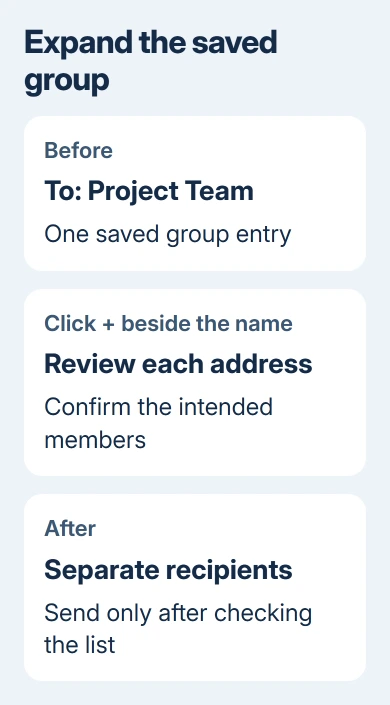
An owner on Microsoft's forum could send after expanding the group, and the accepted reply recommended it too. This gets the message sent without using the failing group entry, though it doesn't repair the group problem.
I'd try this before rebuilding the group. It takes one message to find out whether Outlook can send to its members when they aren't bundled into a single recipient.
If the email sends, keep using expansion for affected messages while following the update check in section 4. If expansion itself fails, use the address-book route in section 2.
Pay attention to recipient privacy when expanding a large list. Choose Outlook's Bcc field when the recipients shouldn't see each other's addresses, and review the resulting fields before sending.
2. Add the group through the address book
Remove the unsuccessful group entry from the draft. Select To, choose the address book containing your saved group, and double-click that group to add it. Confirm the selection, then try the + beside the newly added entry.
Try this when a group selected from suggestions won't expand. Microsoft's contact-group expansion workaround uses the To button and address book for that separate fault.
With that fault, Outlook says the command is invalid for the recipient or an object couldn't be found. A contact card can also show no members even though the group should contain them.
Don't treat that display alone as a reason to recreate every contact. First check whether selecting the actual saved group through the address book lets Outlook expand it correctly.
If the group isn't available in the address book at all, open People and locate it there. Check the account and folder holding it. A group stored under another account isn't necessarily the one selected when you press To.
3. Separate a missing suggestion from a failed send
If the group never appears while you're typing, check whether Outlook can recognize its name before trying to send. Type its full saved name in the recipient field and press Ctrl+K to resolve it against the address book.
If Outlook recognizes the name, check the selected recipient before continuing. Similar group and individual names can make the first match misleading. The missing contact-group suggestions guide covers that fault in detail.
If Outlook recognizes the group but sending produces the unexpected error, return to expansion. Repeatedly clearing suggestions won't change the fact that the selected saved group is failing as a recipient.
The original Outlook 2016 reports included groups created in Outlook and lists created on Outlook.com. Recreating those groups and lists didn't fix the asker's problem. Creating another mail profile left the error unchanged too.
Those results are useful when deciding how far to go. Don't spend an afternoon rebuilding membership just because a generic error offers no explanation. A successful expanded message gives you a workable sending method first.
4. Check the build without installing an old rollback
Open File > Office Account > About Outlook in classic Outlook and note its complete build number. Where Update Options is available, select Update Now, finish the update, and reopen Outlook.
The expansion fault followed Version 2203, Build 15028.20160. Its support page describes a fix entering the Beta channel in May 2022. That was a problem in an older release; don't install a 2022 build today.
An organization may hide that update control. Give IT your build and the error, including whether choosing the group through To works. Those details let IT check the recipient failure before deciding whether Office needs repair.
Outlook 2016 itself is an older, unsupported release. Checking its updates doesn't restore product support. Arrange an upgrade to a supported Outlook release separately from getting today's message sent.
After an available update, make a fresh draft and try the saved group once without expansion. If it still fails but expanded recipients send, keep the workaround and report that specific difference.
When individual recipients fail as well
Try a short message to one known working member, without the group attached. If that also fails, the problem extends beyond this contact group. Record any new error code and whether the message remains in Outbox.
For workplace mail, give the administrator both the single-recipient result and the group result. Include the time, sending account, Outlook build, and whether the message used a group or separate addresses.
For a personal account, use Outlook's Help support options and include the same details. Explain that the error happens when you send, since an unexpected error during startup needs a different repair.
Keep a copy of the intended membership before anyone changes the group. Support should address the failing recipient or connection while preserving a list that still contains the right people.
The Short Version
Expand the group with + and check its addresses before sending. If expansion fails, add it through To and the address book. Resolve a missing suggestion with Ctrl+K; check the mail connection if individual addresses fail too.
Checked November 16, 2026.