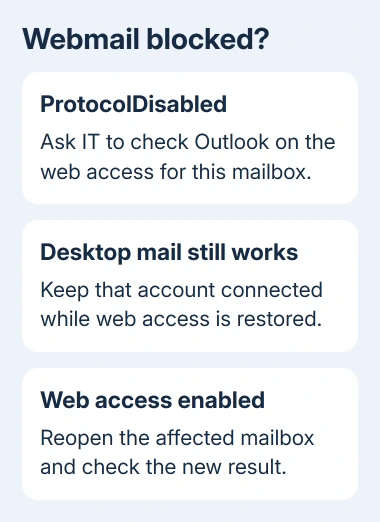
ProtocolDisabled means Outlook on the web access is switched off for the mailbox. Have IT check the mailbox's web-access setting first, especially when mail still works in classic Outlook or on your phone.
The account can still sign in to other Microsoft 365 apps while webmail is blocked. An Outlook reinstall can't enable web access for the mailbox. Keep the complete message so support can tell this restriction from another sign-in problem.
In this guide
1. Read the named account state first
Look for The mailbox being accessed doesn't have a valid account state ('ProtocolDisabled') on the failed webmail page. That state tells IT what to check; the server names and request numbers beside it don't explain the restriction.
Keep a private copy of the error, including its date and time. Send it to your organization's help desk with the affected email address. Don't post account details or request information in a public discussion.
This repair applies to a work or school mailbox in Exchange Online. A personal Hotmail or Outlook.com account doesn't have an organization's Exchange administrator who can change this setting.
Try opening that mailbox in classic Outlook or the phone mail app that's already connected. Working mail there fits a web-access restriction because the different connection methods can be enabled separately.
Keep using the working app while your administrator checks web access. Removing its account could interrupt the only mail access you currently have.
If the message instead describes an incorrect password, a locked account, or missing permissions, pass that exact wording to support. Support needs to follow those messages instead of changing the webmail switch.
2. Have the administrator enable Outlook on the web
An administrator with the necessary Exchange permissions should open the Exchange admin center, then select Recipients > Mailboxes. Select the affected user's mailbox, checking the full address before changing anything.
On the mailbox's General tab, find Email apps & mobile devices and choose Manage email apps settings. In the settings pane, set Outlook on the web to Enabled, then select Save.
Microsoft's mailbox app instructions describe this route. A successful save displays Email app settings updated successfully. Select Close after that confirmation.
The other entries control Outlook desktop, mobile access, IMAP, and POP. Leave those entries as they are unless the administrator has a separate reason to change them. Enabling every method isn't necessary for this fault.
If the administrator finds web access already enabled, record that result and continue to the verification section. Repeatedly flipping the same setting won't explain a different sign-in failure.
Without Exchange permissions, you can't make this change in your own Outlook settings. Send the help desk the mailbox address and the ProtocolDisabled text so the request reaches the person who manages mailbox access.
3. Use PowerShell when the admin center isn't suitable
An administrator already connected to Exchange Online PowerShell can change the same setting for one mailbox. Replace person@example.com with the affected mailbox address in each command.
Get-CASMailbox -Identity "person@example.com" | Format-List OWAEnabledAn OWAEnabled value of False means web access is disabled. If organizational policy allows that employee to use webmail, enable it with the following command:
Set-CASMailbox -Identity "person@example.com" -OWAEnabled $trueRun the first command again to check the stored value. It should now show True. These are Exchange administration commands, not a repair to run in an ordinary, unconnected Windows PowerShell window.
Your administrator can use the admin center or PowerShell, whichever they normally use for Exchange. After saving, use the read-only command to check the setting rather than repeat the change through another interface.
Target just the mailbox whose access needs restoring. A command aimed at every user would alter access for people who never reported this problem and could conflict with the organization's access policy.
For Exchange Server hosted by your company, ask its Exchange administrator to use that server's mailbox controls. The cloud admin-center screens described here aren't the same as an on-premises installation.
4. Reopen webmail and check the actual result
After the change saves, close the failed tab and reopen Outlook on the web. Use the affected account to sign in. The mailbox itself should open, rather than only the Microsoft 365 home page.
Check that the address and mailbox are the ones the administrator changed. An existing browser session can belong to a different work account. A private browser window is a useful way to make that account choice clear.
I'd check the saved mailbox setting before clearing browser data. A private window can help with account selection, but it can't turn a disabled mailbox feature on.
If the mailbox opens but you can't send, follow the Outlook sending checks. Web access is working again at that point; the remaining problem is sending mail.
For a page that still won't load with web access enabled, use the browser Outlook checks and give IT the new error. A blank page and ProtocolDisabled aren't interchangeable symptoms.
5. Escalate a restriction that returns
Ask IT whether webmail access was intentionally disabled. If a saved Enabled setting later becomes Disabled again, give them the time it changed so they can check which policy or administrator changed it.
If an enabled mailbox still reports ProtocolDisabled, ask IT to report the access failure through Microsoft 365 support. Include the checked OWAEnabled value, the affected address, the failure time, and whether desktop and phone mail work.
Keep any working mail app connected while support checks the restriction. Reinstalling Outlook on your PC won't change the mailbox restriction.
The Short Version
Match ProtocolDisabled, then ask the Exchange administrator to enable Outlook on the web for that mailbox. Verify the saved setting and reopen the affected account. Escalate a repeated restriction or a different error with its full details.
Checked November 17, 2026.
 If you have any business, I can build it online