

A Canon printer reset can clear only its network settings or return its settings to defaults, depending on the model. Choose the smallest reset that matches the problem. A Wi-Fi change doesn't always call for a full reset.
For a PIXMA TS3500-series printer, the full reset uses Setup > 17, then Black or Color. Touchscreen models such as the TS7700 series offer separate reset choices instead.
Choose what needs resetting before pressing buttons
Find the full model name printed on its label. Canon uses different menus and button sequences across PIXMA, MAXIFY and laser printers. A sequence for another model can select a different operation.
Decide whether you're changing a wireless connection, undoing print settings or preparing the printer for a new owner. Each calls for a different reset.
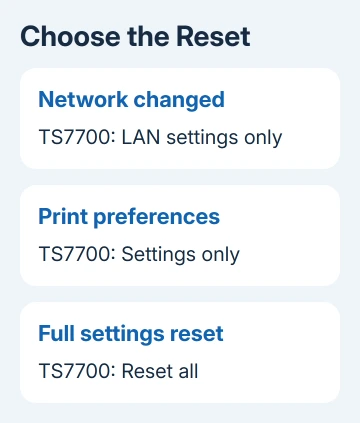
I'd use a network-only reset for a connection problem when the printer offers it. Clearing paper and print preferences won't help it connect to your new router.
Before clearing the wireless setup, note the router's name and Wi-Fi password. Your computer may stop reaching the printer over Wi-Fi until setup is complete again.
If a print job is paused or an error code is displayed, deal with that message first. A Canon printer that stops halfway can be waiting for processing or cooling rather than needing its settings erased.
Reset a PIXMA TS3500-series printer with its buttons
Check that your printer is listed in the TS3500-series manual, including its regional models. These steps use the small LCD and the Setup, Black and Color buttons.
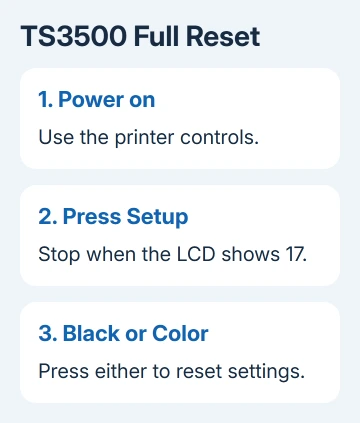
- Turn the printer on.
- Press Setup repeatedly until the LCD shows 17.
- Press either Black or Color to perform the reset.
Canon's initialization instructions say this resets the printer settings and returns its administrator password to its default.
17 is the reset option on the display, not the number of seconds to hold the power button. If your controls or display don't match, check your printer's manual for the right button combination.
The reset also clears the saved network settings. Once it finishes, set up your printer's connection again.
Initialization doesn't return the print head's current position or its encryption certificate request to defaults. A hardware error that keeps returning may still need repair.
Pick the right reset on a TS7700 touchscreen
On the TS7700 series, start at HOME, select Setup, then open Printer settings > Reset settings. Read the choices before confirming one.
- LAN settings only clears network settings.
- Settings only resets settings such as paper size and media type.
- Web service setup only resets web-service settings.
- E-mail address book entries only deletes saved email addresses.
- Reset all returns the printer's settings, including its administrator password, to defaults.
These names come from the TS7700 reset menu. Other touchscreen Canon printers may offer different choices, so match the model before using this route.
For a full reset when handing the printer to another person, select Reset all, tap OK, then select Yes at the confirmation. Wait for the operation to finish before beginning setup again.
Reset all has exceptions on this series. It keeps the display language, print head position, cumulative usage statistics and encryption certificate request. Don't expect the usage count to become zero.
Reconnect the printer and check a finished page
After a network or full reset, follow the Canon Wi-Fi setup steps for your model. Connect it to your router before looking for it on your computer.
In Windows 11, open Settings > Bluetooth & devices > Printers & scanners. Windows 10 puts that page under Settings > Devices. Select Add device if the configured printer needs adding.
The Windows printer installation instructions cover that stage. Adding a Windows entry alone doesn't restore the router details erased from the printer.
Print a short document using the correct Canon entry. A finished page confirms the connection works. Seeing the printer's name in Settings only means Windows has found it.
If reset isn't available or the same error returns, ask Canon support for your model's procedure or repair advice. Give them the exact error code.
A forgotten security administrator password on the TS7700 needs a Canon service center, not repeated Reset all attempts.
The Short Version
Match the reset to the model and purpose. TS3500 uses Setup until 17 appears, then Black or Color. TS7700 offers separate reset choices. Reconnect Wi-Fi after erasing network settings, then verify printing.
Checked November 7, 2026.

Isaac Smith is the founder and editor of PC Glance, a website that covers computers, laptops, and technology. He is a tech enthusiast and a computer geek who loves to share his insights and help his readers make smart choices when buying tech gadgets or laptops. He is always curious and updated about the latest tech trends.