
Your iPhone is meant to tap you on the shoulder when the doorbell goes, and it has said nothing for days. Relying on a feature to hear what you cannot, and getting silence, is genuinely worrying.
I have sorted this by what is happening on your screen, so find yours and skip the rest.
Before anything else, one line from Apple that belongs at the top rather than buried.
Apple: "Don't rely on your iPhone to recognize sounds in circumstances where you may be harmed or injured, in high-risk or emergency situations, or for navigation."
That is Apple calling it an assistance feature, not a safety device. Keep whatever you used before it.
You cannot find the setting at all
Start here. The path gained a level and most instructions never caught up.
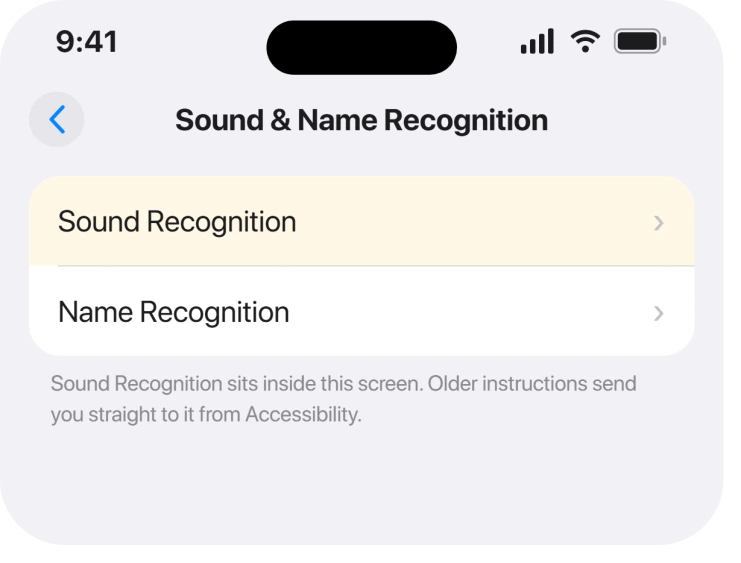
Apple gives it in full on the Sound Recognition page: "Tap Accessibility, tap Sound & Name Recognition, tap Sound Recognition, then turn on Sound Recognition."
Note the middle step. It is Sound & Name Recognition now, with Sound Recognition sitting inside it.
Instructions that send you straight from Accessibility to Sound Recognition are describing an older iOS, and you will scroll past the row they mean.
Apple also notes a shortcut worth setting up while you are there: "To quickly turn Sound Recognition on or off, add it to Control Center".
It is on and it detects nothing
Second, and the commonest reason is that it has nothing loaded yet.
Apple puts the requirement in a note most people scroll past: "After you turn on Sound Recognition, you may need to wait for iPhone to download the available sounds to your device."
So the switch goes green before the phone can actually listen for anything. On a slow connection that gap can be long enough to convince you the feature is broken.
Then there is a second step people miss entirely. Apple: "Tap Sounds, then turn on the sounds you want iPhone to recognize."
Turning on Sound Recognition does not turn on any individual sound. If you have never opened the Sounds list and switched things on, the feature is running and listening for nothing at all.
A custom sound will not finish training
Third, and there is no fix for it. It gets its own section because people lose days to it.
The symptom is precise. You add a custom doorbell or appliance, the On button stays greyed out, and the screen says your sound is being trained and you will be notified when it is ready.
That notification never comes.
On an Apple Community thread, the owner who reported it had waited over twelve hours, restarted the phone, and tried the whole process on three different iPhones, including one belonging to a friend. It never completed on any of them.
Somebody else replied months later confirming the same thing on a newer iOS release and a different model. The thread closed with no answer.
Apple documents how it is supposed to work: "Tap Custom Alarm or Custom Appliance or Doorbell, then enter a name", then "When your alarm, appliance, or doorbell is ready, place iPhone near the sound and minimize background noise", then "Tap Start Listening, then follow the onscreen instructions."
Apple never publishes anything about that training failing to complete, and nothing we found resolves it.
Ours, and marked as ours: if custom training is what you need, use one of Apple's built-in sounds as a stand-in where you can, and do not keep erasing and re-adding.
The owner above proved that three phones behave identically, so the problem is not on your device.
It works, then stops when you plug in headphones
Fourth, and narrower.
Sound Recognition listens through the microphone. Anything that takes over the audio path, a headset, a car, a call, changes what it can hear and when it can tell you.
That is not documented as a limitation, so treat it as a thing to test rather than a known rule. Turn the feature off and on with the Control Center control after your headphones disconnect and see whether alerts resume.
If the phone is going quiet more widely rather than only here, an iPhone that buzzes with no notification works through the whole alert chain.
The alerts arrive but you never notice them
Last, and it is a notification problem wearing a Sound Recognition costume.
The feature can be detecting perfectly while a Focus, a low volume or a notification setting keeps the alert from reaching you. Nothing in the Sound Recognition screen tells you that has happened.
Check Settings, Notifications for the phone's own alerts, and confirm no Focus is running when you expect the alerts most, which for a doorbell is usually the evening.
Notifications arriving late on iOS 26 covers the version where they turn up eventually.
What does not help
- Restarting the iPhone. Reported and tested by the owner on the community thread, across more than one device, with no effect on the training problem.
- Trying it on a different iPhone. The same owner tried three, including a friend's. It behaved identically on all of them.
- Waiting longer for training. Twelve hours was not enough, and no report shows any duration being enough.
- Turning Sound Recognition off and on. It does not restart a stuck training job, and it does not download the sounds any faster.
Status: iOS 26.6.1, checked 19 August 2026. The setup problems are documented and fixable. Custom sound training has been reported as never completing since iOS 16, with no confirmed fix.
Where is Sound Recognition in iPhone settings?
Settings, Accessibility, Sound & Name Recognition, then Sound Recognition. That middle level is what catches people, because older instructions go from Accessibility straight to Sound Recognition and no such row exists any more.
Why is Sound Recognition not detecting anything?
Usually because no individual sounds are switched on. Turning the feature on does not enable any sound by itself, so you have to open Sounds and turn on the ones you want. Apple also notes the phone may still be downloading the sounds.
Why does my custom sound stay greyed out while training?
Nobody knows. Owners report the training never finishing, with the message saying you will be notified when the sound is ready. One person waited more than twelve hours and tried three separate iPhones without it ever completing.
Can I rely on Sound Recognition for a smoke alarm?
Apple says no. Its own note tells you not to rely on iPhone to recognize sounds where you may be harmed or injured, in high-risk or emergency situations, or for navigation. Treat it as a helpful extra rather than a replacement.
The Short Version
- The path is Accessibility, Sound & Name Recognition, then Sound Recognition.
- Turning the feature on does not turn on any individual sound.
- The phone may still be downloading sounds after the switch goes green.
- Custom sound training can stall forever, and no fix exists.
- Three different iPhones behaved identically, so it is not your device.
- Apple states plainly that this is not for high-risk situations.
Where to Next
What I would want somebody to tell me here is that the two setup problems are genuinely fixable in a minute, and the custom training one is not fixable at all. Knowing which of those you have saves you an evening.
If your custom sound ever did finish training, tell me what was different. Every report going back to iOS 16 ends the same way, and none of them ends well.

Isaac Smith is the founder and editor of PC Glance, a website that covers computers, laptops, and technology. He is a tech enthusiast and a computer geek who loves to share his insights and help his readers make smart choices when buying tech gadgets or laptops. He is always curious and updated about the latest tech trends.