
You gave your PC a fixed IP address, yet ipconfig shows an Autoconfiguration IPv4 Address starting with 169.254. Nothing on the network answers.
My first suspect is another device sitting on your address, so I would hunt for it before touching any setting. Windows checks that an address is free before taking it, and when something else answers, it quietly falls back to 169.254.
On Microsoft Q&A, one question from a home network where every address was static shows 300+ people with it. On Super User, a 2017 question from someone hooking a PC up to machine automation gear has 278,420 views.
Why Windows gives up the address you set
Before it uses an address, Windows sends a few test messages asking whether anyone already has it.
Microsoft says on its Set-NetIPInterface page that the DadTransmits setting counts the messages sent "while the network driver performs duplicate address detection".
If a printer, a camera or a virtual machine replies, Windows marks your address as a duplicate. Then it falls back to 169.254.
Often you get no warning at all. In their words, the top Super User answer's author says newer Windows versions "may silently set an autoconfig IP", which is why the fault looks so random.
Ours: every adapter on this laptop sends 3 such messages, the value Get-NetIPInterface reports. That check is on by default.
Status: on 10 October 2026 I went through Microsoft's Set-NetIPInterface and network settings pages and the owner threads. A free address cleared it for owners.
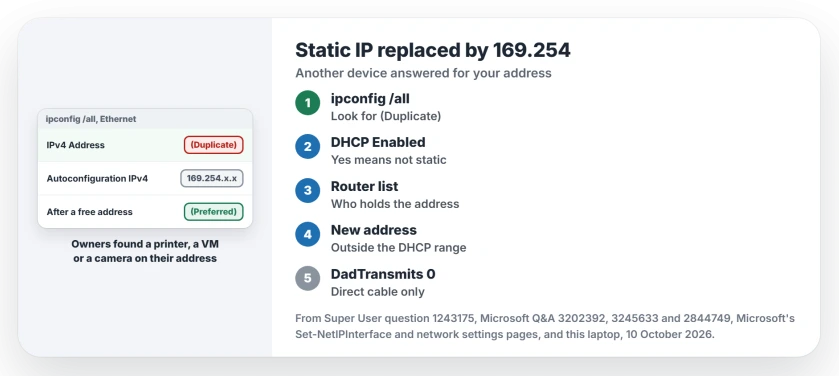
1. Read what ipconfig says about your address
Open Command Prompt and type ipconfig /all. Find your Ethernet or Wi-Fi adapter, then read three lines in its block.
(Duplicate) after your address is the conflict. The Autoconfiguration IPv4 Address line is the stand-in Windows took instead.
Ours: this laptop's ipconfig message file holds the labels (Preferred), (Tentative) and (Duplicate). Preferred is the address in use; Duplicate means another device won.
Now read DHCP Enabled. Yes there means your adapter is still set to get an address on its own, so your static entry never took. The 2018 Q&A answer asked exactly that: did you set it on the right card?
2. Find the device that holds your address
Open your router's page and read its list of connected devices. The router admin page explains how to get in. Look for your address next to another name.
Printers, cameras and NAS boxes often carry a fixed address of their own. One owner had set the laptop to 192.168.123.100, the same address as the printer it was cabled to, and the laptop "defaulted back to 169.254".
Virtual machines are the other usual suspect. One owner found a twin VM. Another ran a Hyper-V machine with eight adapters, and the one showing 169.254 had an address "already taken by another device".
Nothing on the list? Switch off your other devices one at a time, then disable and enable the PC's adapter. When the Duplicate tag clears, the last device you turned off is the one.
3. Choose a free address, then set it again
Pick an address no device uses, and keep it outside the range your router hands out automatically. The router's DHCP page shows it.
On Windows 11, Microsoft's route starts in Settings, Network & internet. For a cable, select Ethernet; for Wi-Fi, Manage known networks and your network. Next to IP assignment, select Edit, choose Manual and turn on IPv4.
Fill in the IP address, Subnet mask and Gateway boxes, and DNS too. A new address was enough. "Simply changing the static IP address fixed the autoconfigured 169 issue", the Hyper-V owner wrote.
Using a DHCP router after all? Then the 169.254 address points at a router that never replied. It is another fault entirely, and the valid IP configuration page works through it.
Should you switch duplicate detection off?
One answer and one comment turn the check off by setting DadTransmits to 0, in PowerShell or with netsh as administrator:
netsh interface ipv4 show interfaces
netsh interface ipv4 set interface 12 dadtransmits=0 store=persistent
Swap 12 for the number in the Idx column of your adapter. An owner whose PCs suddenly did this wrote that "your fix made it work" for the netsh route.
The accepted answer warns against it, though. The conflict does not go away; Windows just stops telling you about it. Both devices then answer for one address, and the network breaks in stranger ways later.
I would use it only on a cable straight to one machine, where you know nothing else shares the address.
Is the 169.254 address dangerous?
No. It works only on your local link and never reaches the internet. Windows uses it so the adapter has some address while it cannot use the one it wanted.
The line Autoconfiguration Enabled . . : Yes is normal on its own, too. Ours: it reads Yes on every adapter here, with no 169.254 address anywhere.
The Short Version
- 169.254 on a static setup points to another device on your address.
- ipconfig /all shows your address with (Duplicate) next to it.
- Find the printer, camera or VM that uses it, via the router's device list.
- Pick a free address outside the router's automatic range.
- DHCP Enabled: Yes means the static setting never applied.
Where to Next
Got your address back? Leave me a comment on which device was holding it. Printers and cameras turn up most in the threads, so I am curious when it is something else.

Isaac Smith is the founder and editor of PC Glance, a website that covers computers, laptops, and technology. He is a tech enthusiast and a computer geek who loves to share his insights and help his readers make smart choices when buying tech gadgets or laptops. He is always curious and updated about the latest tech trends.