

You change your BIOS storage setting from RAID or Intel RST to AHCI, usually so Linux can see the drive, and Windows stops on a blue screen. You do not need a fresh install for this.
I would let Safe Mode load the driver for you. Microsoft documents that route for the older ATA setting, and owners on Dell, Asus and Acer PCs say the same steps worked from RAID.
Super User counts 160,304 views on the December 2017 question. A 2021 copy on Microsoft Q&A drew 80+ Same question clicks from people stuck at the same point.
Why Windows stops after the switch
Windows reaches its own drive through a storage driver that has to load very early, before almost anything else. Microsoft's support article on the ATA to AHCI case names the cause.
In its words: "This is due to changes in Windows 8 PnP in which Boot Start Drivers are not installed by default".
So the AHCI driver is already on your disk. It just is not set to load at boot, when Windows needs it most. Change the mode, and Windows cannot find its own drive.
Ours: on this laptop, the storahci driver is set to start at boot, yet a StartOverride entry of 3 holds it back to on demand. The drive itself runs on the Standard NVM Express Controller instead, so nothing here needs AHCI today.
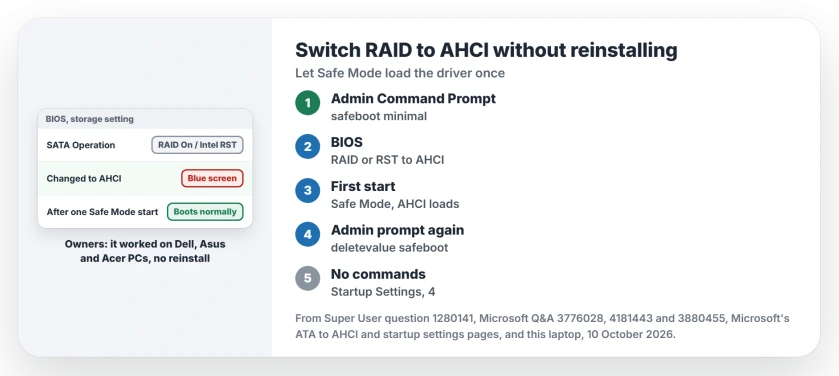
Status: Microsoft's AHCI steps and the owner threads checked 10 October 2026. One Safe Mode start loads the AHCI driver; owners confirm it on RAID and Intel RST laptops.
Before you open the BIOS
Know your account password, not just your PIN. Microsoft's article puts it first: "Be sure you know the Local Admin account and password and are able to boot successfully before proceeding".
The Super User answer is blunter. Without the password, it warns, "or else you would be stuck in safe mode forever".
Is your drive encrypted? Find your recovery key now. Microsoft's startup settings page says you will "need your BitLocker key to complete this task".
Where your BitLocker key actually is covers the places to look. The same advice came from an owner further down: "save your recovery key elsewhere (or write it on paper) before attempting to change to AHCI".
Does your BIOS name Intel Optane next to RST? One owner's did. They installed Intel's latest chipset drivers first, as one answer told them to, and Windows still would not start.
I would read your PC maker's notes on Optane before going further.
1. Set Safe Mode for the next start
Open Start, type cmd, and choose Run as administrator. Use Command Prompt here. The answer warns that in PowerShell "you would have to escape the curly braces".
Type this and press Enter:
bcdedit /set {current} safeboot minimalCurly braces matter. One Q&A asker typed square brackets and got "The element data type specified is not recognized" instead.
Ours: bcdedit's own help on this laptop lists the safeboot value as "Can be Minimal, Network or DsRepair". You want Minimal.
2. Change the mode in the BIOS
Restart and open your BIOS setup. Look for a setting called SATA Operation, Storage Mode or something close to that name. Change RAID On or Intel RST to AHCI.
Not sure which key opens it? Ours: on this laptop, shutdown /? describes a /fw switch that makes the next boot go to the "firmware user interface". From an admin Command Prompt, shutdown /r /fw /t 0 restarts you straight into it.
Save and exit. The answer describes what happens next: "Save changes and exit Setup and Windows will automatically boot to Safe Mode".
Let it get all the way to the desktop, even if Safe Mode looks plain and slow. That first Safe Mode start is when Windows picks up the AHCI driver.
3. Take the Safe Mode flag off
Still in Safe Mode, open Command Prompt as administrator again and run:
bcdedit /deletevalue {current} safebootRestart. In the words of the Super User answer, "Windows will automatically start with AHCI drivers enabled".
Owner after owner confirmed it under that answer. They named a Dell Precision, an Asus VivoBook 15, an Acer Veriton and several XPS models.
A Latitude 5420 owner added a sharper point: "This just worked for me on a Latitude 5420 with Win10 21H1, although there are various posts from Dell techies on Dell's fora saying it's impossible and you must reinstall".
No commands at all
You can skip both bcdedit lines. One owner changed the setting first and let Windows fail: "If windows fails to boot three times, it lets you boot into safe mode".
From the blue Choose an option screen, Microsoft's startup settings page gives your path. Choose Troubleshoot, Advanced options, Startup Settings, Restart. Then press 4 for Enable Safe Mode.
A reader liked that version better: "No risk of getting stuck in safe mode, no admin password required, no commands needed".
Another found it even quicker. Their PC "never actually fully booted into safe mode, just did some updates and then finally booted normally".
Things that did not help
Restoring a backup made under RAID while your BIOS reads AHCI. One Q&A asker tried exactly that. Their laptop then reported it did not recognize the drive.
They got out by turning RAID back on first. In their words, "restoring my BIOS settings to RAID and applying the Windows recovery image" brought the old setup back.
Hunting for AHCI drivers before you switch. The 2017 accepted answer suggested it. The replies under it disagree: "It is not necessary to reinstall storage drivers. Windows will do this itself if started in Safe Mode".
Reinstalling anyway. One XPS 9700 owner had already reinstalled through Dell's SupportAssist, which did not help, before finding these steps. Their verdict: "Looks like I reinstalled for nothing!"
Stuck in Safe Mode after every restart?
Then your flag is still set. Run the deletevalue line again. Or open Run with Windows key and R, type msconfig, then on the Boot tab clear the Safe boot box.
That box is the one Microsoft names in its article on PCs that keep starting in Safe Mode: "This issue happens when SAFEBOOT option is checked in the System Configuration Utility".
If Windows refuses to start after the switch, put your BIOS back to RAID first. The INACCESSIBLE_BOOT_DEVICE page explains why the old mode brings it back.
Is AHCI faster than RAID on one drive?
Often you gain nothing. The accepted answer found no difference "between the two modes on Dell XPS machines".
Linux is your usual reason to switch. The answer that worked notes "Switching to AHCI is essential if you want to install any Linux as RAID mode is to my knowledge not supported".
The Short Version
- Know your password, and your BitLocker key if the drive is encrypted.
- Run bcdedit /set {current} safeboot minimal in Command Prompt as admin.
- Change RAID or Intel RST to AHCI in the BIOS, then let Safe Mode start.
- Run bcdedit /deletevalue {current} safeboot and restart.
- No commands: let it fail three times, then Startup Settings and 4.
Where to Next
Which name did the old mode have in your BIOS: RAID On, Intel RST or VMD? Put it in a comment next to your laptop model. I would also like to know whether your first Safe Mode start reached the desktop.

Isaac Smith is the founder and editor of PC Glance, a website that covers computers, laptops, and technology. He is a tech enthusiast and a computer geek who loves to share his insights and help his readers make smart choices when buying tech gadgets or laptops. He is always curious and updated about the latest tech trends.