Unblocking someone on iMessage lets new messages from that contact reach you again. It doesn't send them a message announcing the change, and it isn't a way to retrieve texts they sent while blocked. Ask them to resend anything you missed.
The change also affects other built-in calling and messaging apps. Before removing the block, check the exact number or email involved, especially if the same person uses both for iMessage.
In this guide
What changes when the block comes off
The block list controls messages and calls from a number or email. Remove that entry, and new messages and calls can get through. It doesn't start a conversation, place a call, or automatically send the other person a reply.
Apple's blocking instructions explain that blocked messages aren't delivered. Unblocking lets new messages through; it doesn't open an inbox of texts saved during the block.
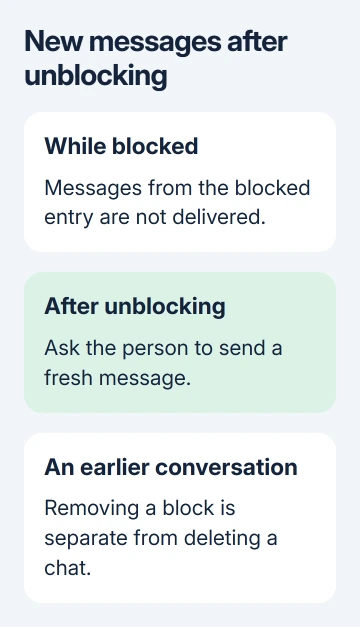
A message that was already in your conversation before the block is a different matter. Blocking isn't the same action as deleting a conversation. If you also deleted the chat, removing the block doesn't undo that separate action.
Ask the other person to send a fresh message after you remove the entry. Then check whether the new text reaches Messages. An old bubble on their phone can't answer that question.
Unblock the right entry on your iPhone
The menu moved in iOS 26. Use the route for the software on your phone, rather than searching for an older Messages setting that has changed location.
- On iOS 26, open Settings > Privacy & Security > Blocked Contacts.
- Tap Edit. If the entry is in the Unknown contacts list, open that list and tap Edit there.
- Tap the remove control beside the contact or number, then tap Unblock.
- Check that the intended entry has left the blocked list. If another number or email for that person remains listed, review that entry separately.
On iOS 18, open Settings > Apps > Messages > Blocked Contacts. Reveal Unblock by swiping the entry left, then select it. For iOS 17 or earlier, start at Settings > Messages; there is no intervening Apps menu.
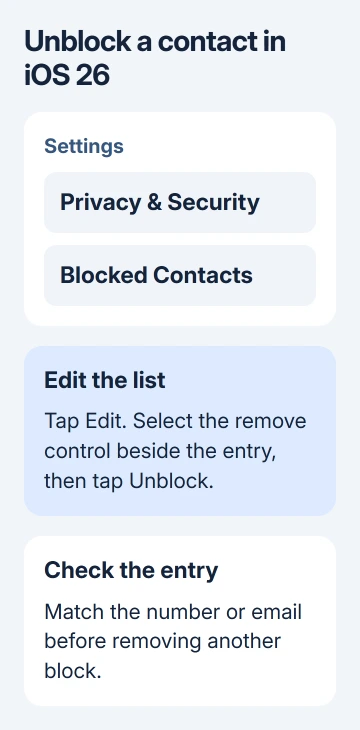
Use the full number or email to choose an entry when names are missing or duplicated. I'd check that detail before changing a second setting; an iMessage conversation can use an email address rather than the phone number you expect.
There isn't a separate confirmation text to send. Once the entry is removed, leave the list and check a new message if you want to confirm communication is working.
Can they tell that you unblocked them?
Removing a block doesn't insert an announcement into your conversation. They may work out that something changed if you reply to a new message or their call reaches you, but they don't get an unblocking notice.
Don't promise that the change will be impossible to notice. They can notice that messages or calls get through again, even when the phone hasn't told them why.
From the sender's side, iMessage delivery indicators don't provide a dependable way to identify a block. A missing reply, green bubble, or absent read receipt shouldn't be treated as a record of your settings.
Read receipts have their own controls. Removing a contact from the block list isn't a request to mark their earlier messages as read, and you don't need to turn receipts on to receive a new message.
Does it unblock calls and FaceTime too?
Blocking through the built-in apps isn't an iMessage-only switch. The iPhone guide explains that a contact blocked in Messages is also blocked in Phone, FaceTime, Mail, Calendar, and other apps on current software.
That matters if you want to receive texts but still prevent calls from the same entry. Removing the shared block lets calls through again too; it isn't a text-only exception.
For the computer side, review the MacBook blocking controls using the central list on current macOS or app settings on older releases.
Voicemail behaves differently: a caller on the block list can leave a recording, although its notification won't reach you. A voicemail from them doesn't mean your earlier block failed.
A separate app such as WhatsApp has its own controls. Changing the iPhone block list doesn't change a block set inside that app. Open the app involved if the problem is limited to its conversations.
Check sharing separately before reconnecting
On iOS 26, blocking a contact immediately stops Find My people location sharing. Blocking an emergency contact also removes that person's emergency-contact role. Those changes affect more than whether their next text arrives.
Don't assume unblocking has restored your earlier sharing choices. Check Find My > People and your emergency contacts separately if you want to restore either relationship.
Family Sharing needs particular care. A blocked person in your family group may still see the location of your devices through Find My devices. Blocking their messages doesn't cover everything you share through your account.
The personal safety controls cover these differences. To review your other sharing settings, open Settings > Privacy & Security > Safety Check on a supported iPhone.
A new message still doesn't arrive
First confirm the sender used the exact number or email you removed. Ask for one new message, rather than repeated attempts to recover an old blocked text. Check your Messages filters as well as the main conversation list.
Check the conversation itself before changing the block again. A new text that arrived silently points to that chat's alerts or an active Focus, rather than a delivery failure.
For contacts whose blocked numbers still get through, compare their other contact details. The reverse also matters: removing one entry can leave another entry blocked.
If a fresh message still fails, ask Apple Support for Messages help. Say whether one contact or several are affected, and give the iOS version, sending address, and any Not Delivered error.
The Short Version
Unblocking allows new contact again without sending a conversation announcement. Ask for missed texts to be resent, remove the correct number or email, and review calls, Find My sharing, and emergency contacts separately.
Checked November 10, 2026.
 If you have any business, I can build it online