
Microsoft's Windows 11 emergency update KB5134133, released October 26, 2026, targets devices missing current certificate trust-list updates. Get it through the Microsoft Update Catalog if the PC needs it.
Microsoft classifies it as a non-security out-of-band release. There is no ordinary Windows Update offer. Check whether the affected situation matches the PC before installing it manually.
Check whether the certificate-update condition applies
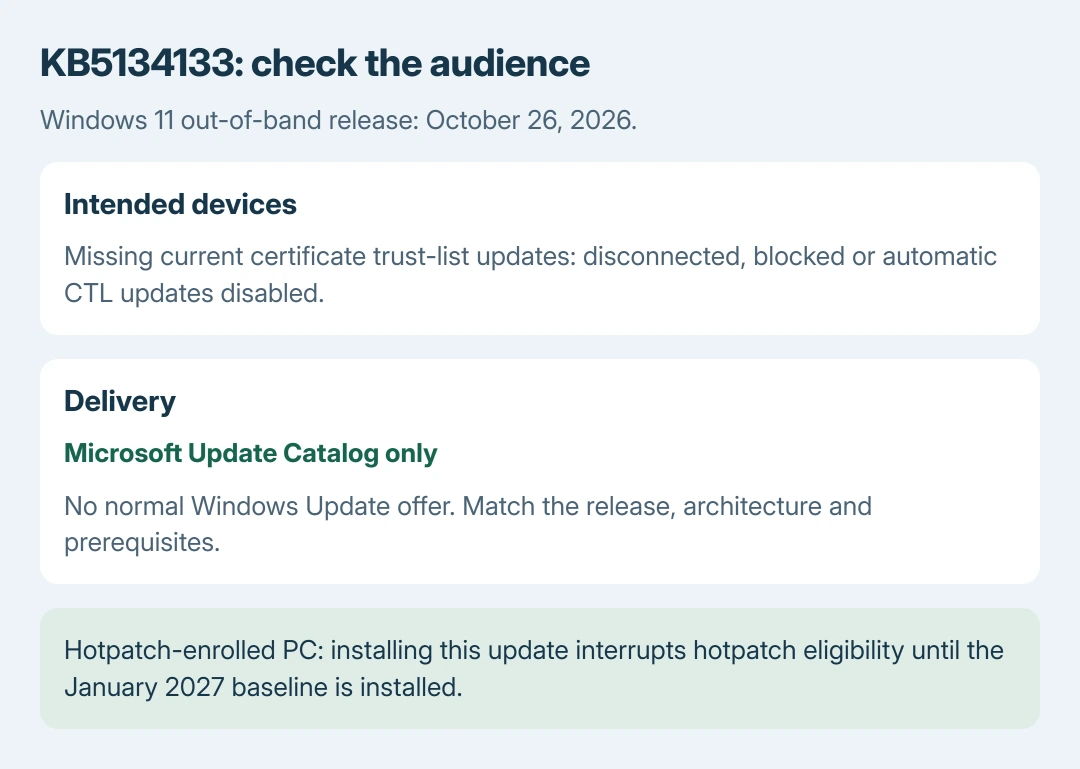
Microsoft says KB5134133 is intended for disconnected devices, machines unable to reach its certificate-update service, and installations where automatic certificate trust-list updates are disabled.
Those lists tell Windows which certificate authorities to trust or distrust. The package carries an updated trust payload for systems that are not getting it through the normal certificate-update channel.
Status: KB5134133 and its October 27 release-note change checked October 28, 2026. Catalog-only delivery and the hotpatch consequence are documented. No update was installed.
Microsoft's eMudhra incident response explains the compromised certificate-authority keys behind the trust changes.
It tells customers to allow automatic certificate trust updates and Edge component updates through. Administrators need a separate plan for disconnected devices. A headline alone cannot show that a connected PC lacks those protections.
On a managed computer, ask IT whether certificate updates are blocked or intentionally disabled. Our recommendation is to make that check before selecting a package; that audience check is ours, not a test performed on this PC.
Understand why Check for updates does not offer it
Microsoft documents two out-of-band delivery categories in its Windows update release cycle. Some critical releases are automatic; noncritical releases can be obtained only from the Catalog.
KB5134133's own installation table lists Catalog availability and no Windows Update offer. Repeatedly checking Settings therefore does not establish that Windows Update is broken.
Out-of-band describes timing outside the normal monthly schedule. It can address a vulnerability or a quality issue, and these updates are cumulative. It is separate from a feature upgrade or an optional monthly preview.
The Installation Assistant guide explains the feature-upgrade tool. That assistant does not select this emergency package for an existing Windows release.
Match the Windows version and read the prerequisites
Press Windows+R, enter winver and read the installed version and OS build. Check Settings > System > About > System type for x64 or Arm64. Microsoft's Windows identification instructions describe these checks.
The KB covers 24H2, 25H2 and 26H2. It lists resulting builds 26100.9725, 26200.9725 and 26300.9725, respectively. Match the version before considering a download; a similar-looking KB title is insufficient.
For 24H2 and 25H2, Microsoft requires an update from June 10, 2025 or later, and it also specifies servicing-stack requirements. Its Catalog instructions include required checkpoint packages before the target update when applicable.
Use the KB's x64 or Arm64 installation section, including its file order. The Catalog download procedure explains the general interface, but this release's prerequisites determine the files needed.
Save open work and keep a backup before installing. Follow the KB's installation sequence and restart prompts rather than selecting one file simply because its name contains the right KB number.
Verify the installation and retain any error
After restarting, open Settings > Windows Update > Update history and run winver again. Compare the recorded update and resulting build with the intended release. A pending restart can leave the earlier build visible.
For an installation failure, keep the complete error, Windows version, architecture and installed prerequisite details. Give Microsoft Support or the managing administrator those details to compare with the KB requirements.
Review hotpatch and known issues before deployment
The October 27 note says a hotpatch-enrolled device installing this package will not receive hotpatch updates again until it installs the January 2027 baseline update. Administrators need that consequence in the deployment decision.
The checked KB lists a grayed-out Smart App Control activation option and Remote Desktop failures for certain non-admin users as known issues. The certificate update does not establish that those separate faults are resolved.
The Short Version
KB5134133 addresses missing certificate trust updates and is Catalog-only. Confirm the audience, Windows version and package prerequisites first. Managed and hotpatch-enrolled PCs need their administrator's deployment decision.

Isaac Smith is the founder and editor of PC Glance, a website that covers computers, laptops, and technology. He is a tech enthusiast and a computer geek who loves to share his insights and help his readers make smart choices when buying tech gadgets or laptops. He is always curious and updated about the latest tech trends.