Missing Word 2013 document themes can be added as custom .thmx files. Save the required theme from a trusted working Office installation, then load it through Design > Themes > Browse for Themes.
This changes the document's design. The Office Theme setting that changes Word's window colors, and the Windows desktop theme, won't add a missing document theme to the gallery.
In this guide
1. Check the document theme gallery you actually need
Open Word 2013 and select Design > Themes. Look for the theme your assignment or document requires, rather than counting thumbnails. Having fewer choices doesn't tell you which particular theme is missing.
In a classroom, note the theme's name on a working machine. Look for it on the affected student's PC while signed in as that student. Custom themes are saved per user, so different accounts can show different choices.
A document theme combines colors, fonts and effects. A Word template can also contain page layout, sample content and other document settings. Supplying a theme won't recreate an entire worksheet, letterhead or classroom template.
The Word formatting symptom guide is more useful when commands flicker or the whole interface misbehaves. A missing named theme is a file-availability problem to check before resetting Word.
A missing Word Document Information Panel is a removed feature; its property fields use a different route from theme files.
If the named theme is already listed, apply it to a duplicate document and review the result. The remaining issue may be how the document uses colors or fonts, rather than the absence of the theme itself.
2. Save the required theme from a working Word document
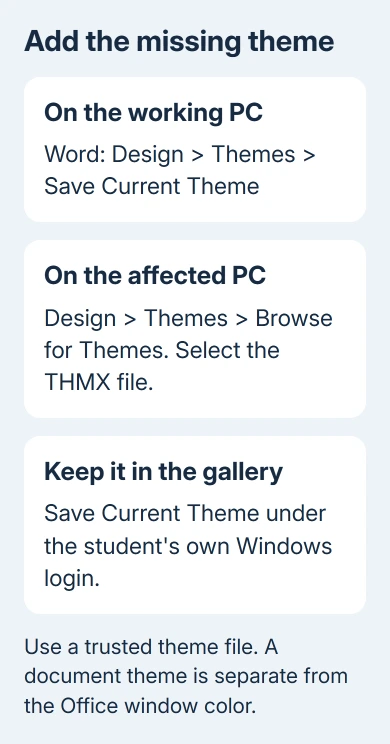
On the working computer, open a document that uses the theme you need. In Word, choose Design > Themes > Save Current Theme. Name the theme clearly and choose an easy-to-find save folder.
The result is a .thmx file, Office's theme format. Microsoft's custom theme instructions explain that saved themes can be reused across Office programs.
Transfer the file through an approved school folder or another trusted method. The theme file holds design settings, so you can share it without sharing the document's private content.
On the affected computer, open a copy of your Word document. Choose Design > Themes > Browse for Themes, select the THMX file and open it. The document should adopt the theme's color, font and effect choices.
Check a heading and an object that actually use theme settings. If those change as expected, Word can load the theme even though its original built-in thumbnail was missing. Save your document copy once you've checked how it looks.
I'd use a known working school file before looking for old theme download sites. It gives the class the intended design without depending on a retired gallery or an unknown package of Office files.
3. Put the theme in the student's custom gallery
Applying a theme once and adding it to the reusable gallery are separate tasks. After loading it, choose Design > Themes > Save Current Theme on the affected computer. Save with the proposed theme-file type and a clear name.
Office normally saves the file in the user's Document Themes folder and adds it to the custom themes listed under Themes. Open the gallery again and look for the custom entry rather than expecting a built-in entry in its old position.
The historical thread also points to this per-user Windows location:
%APPDATA%\Microsoft\Templates\Document ThemesIn File Explorer, enter that location to check the signed-in user's theme folder. APPDATA takes you to that user's folder without needing another student's username in the path. Leave unrelated template files where they are.
Ask school IT to add the THMX file to each student's profile. Saving it under the teacher's login won't give it to every student. If profiles reset on sign-out, the administrator may need to arrange for the file to stay available.
Have one affected student sign out, then log in again. If the custom entry vanishes, tell IT when and under which profile. Reinstalling Word won't necessarily preserve a file that profile management removes.
4. Use an existing Office theme instead of an old web workflow
One owner downloaded a PowerPoint file from the online Themes gallery, browsed to it from Word and applied the required design. They got the design working across Office programs that way.
Its 2014 website buttons aren't a reliable current download procedure. Use a theme file supplied by the school or saved from an existing trusted Office document, rather than trying to reproduce every click on that old website.
A PowerPoint presentation isn't a THMX theme. Don't rename PPTX to THMX. Request an exported Office theme file, or save the theme from a Word document that already uses it.
If no working computer has the requested design, ask the teacher or document author for the theme file or an approved alternative. A screenshot of the gallery can't give Word the font, color and effect settings stored in the theme file.
Tell the teacher your Office version if the assignment requires an exact older theme. A similar thumbnail can hide different colors and fonts. Matching its appearance alone can produce the wrong design.
5. Separate missing themes from text that won't change
Themes affect content using theme fonts and colors. Text with a fixed font or color can retain its formatting. Try a fresh paragraph or heading style in a document copy before assuming the theme didn't load.
For a heading, apply the intended entry under Home > Styles to the selected text. Compare its theme-based formatting. Changing each word by hand can hide differences in the styles you've used.
The Word proofing-language guide covers language settings that can also come from styles or templates. Changing the theme won't fix the spelling language or replace those separate document settings.
Use Design > Set as Default only if you want the design for future new documents. It isn't required to apply a theme to the current file, and it won't add that theme to other users' profiles.
If a known good THMX file won't load at all, give your help desk the filename, Word version and exact error message. Ask them to test the same file under another user profile before repairing the Office installation.
The Short Version
Export a THMX file from a working Office document, load it through Word's Design > Themes menu, and save it to the student's custom gallery. Have IT distribute classroom themes per user. Skip the old online-gallery workflow.
Checked November 16, 2026.