A3 can disappear from the paper-size list in Word when your printer's driver doesn't offer it. Choose the intended printer, then check the list again. Custom dimensions help with layout, but won't make the printer accept larger paper.
A3 and 11 x 17 inches aren't the same format. A3 measures 297 x 420 mm; 11 x 17 is called Tabloid. Check which one the recipient or print shop needs before changing the document.
In this guide
1. Choose the intended printer before changing the page
Check the printer name shown in Word's print window. A printer name left over from another job can explain why the paper-size menu offers only Letter and A4.
For Word on Windows, press Ctrl+P, select the intended device under Printer, then return to the document. Open Layout > Size and check whether A3 or Tabloid is available.
For Word on Mac, open File > Print and select the intended printer. Check the paper choices in the print dialog and the document's Layout > Size menu. The printer selected for this document matters, even when another app prints correctly.
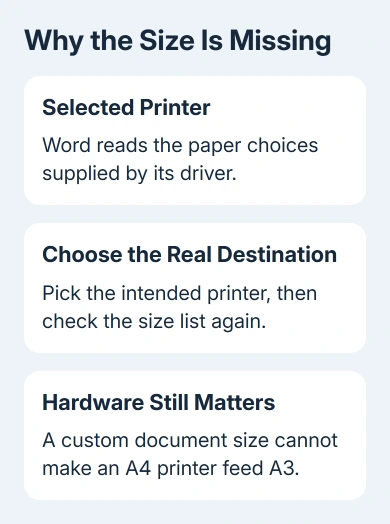
Microsoft's printer-settings explanation says Word gets page sizes and other paper settings from the driver. Switching printers can therefore change what the document offers.
If the required size appears after choosing the correct printer, select it and inspect the document's layout. More room on the page can change text wrapping, page count and the position of tables.
The Windows printing guide covers selecting a destination and inspecting the preview. Choosing the right printer is the first check; a missing size in that printer's driver needs a different fix.
2. Check whether the printer actually supports that size
Compare the exact printer model with its supported paper list. A printer limited to A4 or Letter can't feed a full A3 sheet just because Word accepts custom dimensions.
If this document will be printed elsewhere, ask the print shop for its required page dimensions and margins. Selecting your small home printer while designing a large sheet can give you a misleading set of choices.
On a managed computer, IT should compare the installed printer entry with the actual model. Two similarly named entries can use different drivers or printing systems and offer different features.
Compare the same physical printer from another computer. If that computer offers the size and yours doesn't, give IT both printer-entry names and the missing option. They can then check the configuration rather than the paper itself.
Printing successfully from a phone or tablet doesn't mean your laptop has the same paper options. Each device can reach the printer through a different printing system, even when the final sheet looks identical.
I'd check this before reinstalling Word. The app can't list a capability its selected driver isn't supplying, and an Office reinstall doesn't change which paper the printer can handle.
If an A3-capable printer still omits the size, give IT or manufacturer support its model and installed driver details. Have them review paper settings and driver support. Avoid installing an unrelated printer solely to make a menu longer.
3. On Mac, check Page Setup and custom sizes
In Word for Mac, open File > Page Setup when that command is available. Depending on the version, Format > Document > Page Setup provides another route to the macOS page settings.
Check Format For if the dialog shows it. Older versions offer Any Printer, which can reveal additional formats for layout. That doesn't confirm the real printer supports every listed size.
For a missing format, open the Paper Size menu and look for Manage Custom Sizes. The macOS print dialog can also offer this under File > Print > Paper Size. Some app and printer combinations don't offer the control.
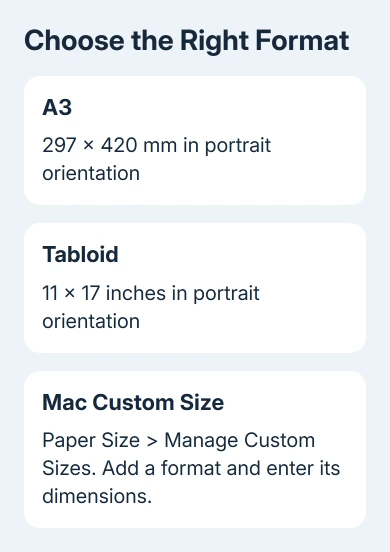
Choose Manage Custom Sizes, select the add control, and name the new format clearly. Enter its width and height in the units shown. Use 297 x 420 mm for portrait A3, or 11 x 17 inches for portrait Tabloid.
Apple's custom paper-size instructions describe creating the format and choosing it from the Paper Size menu. If that menu is absent, check the app's own Page Setup controls instead.
Keep the printer's nonprintable margins in mind. Entering zero margins doesn't give a printer borderless capability. Use the margins required by the intended device or by the print shop handling the file.
4. On Windows, check the document's custom dimensions
For the Windows desktop edition, choose Layout > Size > More Paper Sizes. In Page Setup, use the Paper tab to inspect the paper size, width and height.
Enter the custom dimensions if the driver allows them. Set Apply to carefully before accepting the new dimensions. Choose the whole document for a change to every page, or the current section if only that part needs a different size.
An existing section break can leave another part of the file at its previous size. Inspect both the opening page and a page late in the file, especially in a report assembled from several documents.
If Word rejects the dimensions or the printer still won't offer them, return to the device's supported sizes and driver settings. Typing a larger width again won't make the printer accept a larger sheet.
For unusual loose sheets, the notebook-paper checks explain why physical size, weight and edges must all meet the printer's limits. The sheet needs to fit the printer's limits as well as your document's page size.
When the document looks right but output is smaller
Check the print dialog for a scaling or fit-to-paper option. A document formatted for A3 can be reduced onto A4 if the output settings request it. Compare the document size with the paper selected for the actual job.
If you're sending a file to a print shop, ask for its accepted file format and verify the exported page dimensions before delivery. Give the shop the intended physical size, so the shop doesn't have to guess from the filename.
If the size remains missing on a capable printer, send support the printer model, operating system, Word version and selected printer-entry name. Ask them to check the available paper sizes reported by that entry.
The Short Version
Set the destination printer and verify its paper formats before changing the page dimensions. Mac Page Setup can supply a custom layout format. A3 and Tabloid differ, and custom dimensions don't change printer limits.
Checked November 17, 2026.