Windows' mapped web folders can reject large files with 0x800700DF because of the WebClient size allowance. Download the same file through the service's website first to avoid that WebDAV transfer route.
Small files working while large ones fail suggests a size limit. USB single-file limits and server upload rules need different fixes. Check both ends of the transfer before editing the registry.
In this guide
1. Identify the connection that produces the error
Read the full message and note the failing file's size. The relevant wording is The file size exceeds the limit allowed and cannot be saved, with code 0x800700DF. Record whether you were opening, downloading or uploading the file.
In File Explorer, click the mapped drive or network location and read its address. A web address or a path containing DavWWWRoot points toward WebDAV, the method Windows uses to access some web storage as folders.
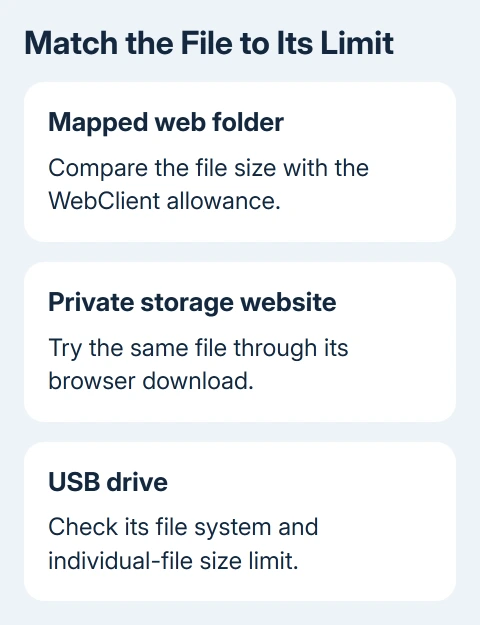
A drive letter doesn't tell you the connection type. Both a normal network share and a web folder can have one. Ask the administrator or storage provider how the location was mapped if the address doesn't make that clear.
Try a small file from the same folder. If that transfers but the larger file fails consistently, a size limit fits the pattern. If both fail, check the connection, account and server availability before changing a file-size setting.
If the error is instead a path-length message, follow the long-path file-copy steps. Shortening a filename won't raise a WebDAV transfer allowance, and raising that allowance won't shorten a path.
2. Download through the service's own website
Sign in to your storage website and locate the affected file. Select Download and choose a local destination outside the mapped drive. That checks whether you can download it without the Windows mapped-folder connection.
Open the finished download and check its byte count against the source. A working browser download gives you the file immediately and shows the failure is tied to the mapped connection. It doesn't require changing a system setting.
I'd use the browser for a one-time download. For regular work, ask whether the provider's supported sync app handles large files. An older mapped-folder setup may no longer be the preferred client.
If the browser refuses the file too, keep its message. Server limits, account restrictions or damaged uploads can affect several clients. A Windows setting can't override the storage service's own limit.
For company storage, ask IT to try the same file with the same access. Include its size, transfer direction and the small-file result. Those details help more than the drive's remaining capacity alone.
3. Read the current WebClient size setting
Use these steps once you've confirmed the folder uses Windows WebDAV. Microsoft's WebDAV reference says the FileSizeLimitInBytes value sets the WebClient transfer ceiling.
The documented default is 50,000,000 bytes, roughly 47.7 MiB. That's why a file described as about 50 MB can run into this limit. The number counts bytes per file, not unused space on the disk.
On the affected Windows PC, press Windows+R, type regedit, and press Enter. Approve the administrator prompt. In Registry Editor, open this key:
HKEY_LOCAL_MACHINE\SYSTEM\CurrentControlSet\Services\WebClient\ParametersSelect Parameters, then find FileSizeLimitInBytes in the right pane. Before changing it, right-click the Parameters key and choose Export to save its current settings. Keep the old value in your support notes too.
Double-click FileSizeLimitInBytes and select Decimal to read it. Switching from Hexadecimal only changes the display, not the stored number. With Decimal selected, you can compare the setting directly with the file's size in bytes.
If the value is already larger than the failing file, the default size limit doesn't explain the failure. Cancel the dialog and check the server and transfer route. Don't keep raising a value that already allows that size.
4. Raise the allowance only as far as the job needs
If the file exceeds the limit, enter an approved decimal value larger than the file's size in bytes. For example, 200000000 allows 200 million bytes. This is an example, not a setting every computer needs.
Keep Decimal selected, apply with OK, and exit Registry Editor. Save your work before rebooting. Then test the original file through the same mapped folder to compare the result.
The value is a 32-bit DWORD even on 64-bit Windows. Its largest unsigned value is 4294967295 bytes, just under 4 GiB. Choosing a 64-bit registry type doesn't turn WebClient into an unlimited large-file transfer tool.
Use the provider's browser or supported client when the file exceeds what this setting can represent. For a business PC, have IT approve the allowance and apply it through the organization's normal management process.
If the transfer works, open the copied file to check that it arrived intact. If it fails, record the new allowance and failing file size. If the higher limit hasn't changed the result, check for another restriction before raising it again.
5. Separate USB limits from web-transfer limits
A large file going to a USB stick can fail because of its file system instead. In File Explorer, right-click the USB drive, select Properties, and read File system on the General tab.
FAT32 has a maximum individual file size just under 4 GiB. Spare capacity doesn't remove that ceiling. Use a destination with a file system that supports the file, such as a suitable existing exFAT or NTFS drive, and retry the copy there.
Don't format a drive that contains wanted files to test this. Formatting erases its contents. The USB memory-stick guide covers using and safely removing the drive while you choose a suitable destination.
A transfer that stops after running for a long time can hit a timeout instead of a size ceiling. Tell the provider how long it ran and whether the browser finished. Large-file failures don't all share one cause.
For an unresolved failure, give IT the location, connection type, file size, allowance and browser result. Ask them to review WebClient and server transfer rules. Those results help them decide whether to check Windows or the server next.
The Short Version
Try a browser download first. For confirmed WebDAV size failures, compare the file with FileSizeLimitInBytes and raise an inadequate limit with IT's approval. USB and server limits require a different transfer route.
Checked November 17, 2026.
 If you have any business, I can build it online